Password conflict detection and resolution
Sometimes, a managed account may inadvertently store more than one candidate password. This could be due to the agent returning an unexpected result after a password reset, two replication nodes simultaneously randomizing the same managed account's password, or when the Privileged Access Manager Service (idarch) halts during a password reset. As a result, it is uncertain whether the password was successfully randomized on the managed system, so it is considered a working password in the interim.
Bravura Security always recommends deploying Bravura Privilege servers in a replicated environment for redundancy. Given the multi-master design of Bravura Privilege replication, it’s becoming increasingly common to deploy these redundant nodes behind a load balancer as well. When end user connections are distributed across multiple Bravura Privilege nodes, there is a risk that an end user’s randomization of an account on one node will coincide with a scheduled randomization of that same account on another node. Bravura Privilege includes technology for automatically detecting coincident randomizations and resolving the conflicts that arise from them.
The most common cause of conflicts is a scheduled randomization on one node coinciding with a manual check-in on another; to reduce this, randomizations are forwarded to the account's managing node where possible (see Allow password randomization only on managing node).
The following sections describe the methods used for detecting and resolving conflicts and give examples of how to troubleshoot issues. In all examples used, unless otherwise specified, there are assumed to be only two nodes using classic (non-shared schema) replication.
Randomization and replication
Bravura Privilege replication is implemented at the stored procedure level. When a stored procedure is run on any Bravura Privilege node, the name of the procedure and all of its arguments are serialized into a replication message which is placed in an outgoing queue file. An outgoing queue file is maintained for each replica and the database service on each node is responsible for periodically sending messages in its outgoing queue files to the database services running on its replicas. Simultaneously, each database service receives replication messages from its replicas and places them in its incoming queue file.
The database service processes each message in its incoming queue file one by one by unpacking the name and arguments of the stored procedure and executing them against its backend database. In this manner, every node executes the same set of stored procedures, and should maintain synchronization. Note that, because the incoming queue is processed one message at a time, it takes an unpredictable amount of time for two nodes to be synchronized with respect to any particular message. If the queue is empty, the message will be processed nearly instantaneously. If there’s a significant queue backlog because of long-running stored procedures, the message must wait and the nodes will remain desynchronized until it is processed.
Randomization is implemented on top of replication. A provisional password is generated within the Privileged Access Manager Service (idarch) , encrypted, and inserted into the database using a stored procedure (thus creating replication messages for replicas). Once stored in the database, a connector is launched to set the password on the target system. The status of the provisional password in the database is then updated via a second stored procedure run, depending on the return code from the connector. The mechanics of this process are discussed more in Schema - tables used for randomization .
Allow password randomization only on managing node
If the managing node is not available, Bravura Security Fabric performs the randomization locally to ensure access is revoked as promptly as possible.This is sensitive to network connectivity problems and server maintenance events that can create the potential for conflicting password generation.
If you are encountering password conflicts, set Manage the system > Maintenance > System variables > IDARCHIVE RANDOMIZE LOCAL FALLBACK to false to perform randomizations only on the managing node. Note that certain pages in Bravura Security Fabric allow for bulk randomizations that can include accounts that are managed by multiple nodes. For these cases, a warning message is displayed on the Randomize password button's confirmation dialog box stating that randomizations will be performed by the local node.
Conflict detection
Randomizations with uncertain outcomes
Replication works extremely well in most cases without any additional complexity. When it comes to password randomization, however, merely maintaining synchronization is not good enough. Not only must all nodes record the same password for an account but it must be the correct password for the account on its target system as well. The delayed nature of replication means that if two nodes perform a randomization simultaneously, the value recorded for the password on each node is unpredictable because incoming replication messages from a replica will overwrite the current stored value. Depending on the account, if the wrong password is set in a node’s database, the impact can range from completely inconsequential to a catastrophic outage. Bravura Privilege is now capable of detecting cases where the passwords stored in its database may be incorrect or out of synchronization with its replicas and has a conflict resolution module to correct them.
Consider a replicated environment with only two nodes: A and B. When A randomizes an account’s password, it immediately writes to its database the password it intends to set and replicates that same value to B. B follows exactly the same process when it performs a randomization. If B begins a randomization near the same time as A’s randomization, the password that is stored in the database depends on how its constituent operations interact with A’s randomization. In the following three scenarios, involving two nodes randomizing the same account, different replication timing leads to different, sometimes incorrect, results.
Case 1: Serialized randomization
A writes provisional password #1 into its database
A launches its connector
A’s connector completes successfully
A records the completion of randomization #1
B receives provisional password #1 from A
B receives the completion of randomization #1 from A
B writes provisional password #2 into its database
B launches its connector
B’s connector completes successfully
B records the completion of randomization #2
A receives provisional password #2 from B
A receives the completion of randomization #2 from B
First A records password #1, then B records password #1, then B records password #2, then A records password #2. Ignoring any replication delay, both nodes correctly agree (that is, they have stored the same password in their databases) at all times as to the current password. Ideally, all randomizations follow this flow: each node is allowed to complete and fully replicate each randomization before any other node begins a new one.
Case 2: Perfectly parallel randomization
Suppose now that node B initiates its randomization earlier:
A writes provisional password #1 into its database
B writes provisional password #2 into its database
A launches its connector
B launches its connector
A’s connector completes successfully
B’s connector completes successfully
A records the completion of randomization #1
B records the completion of randomization #2
A receives provisional password #2 from B
A receives the completion of randomization #2 from B
B receives provisional password #1 from A
B receives the completion of randomization #1 from A
In this case, password #2 is the last password that was stored at A while password #1 is the last password that was stored at B. The nodes disagree and the instance is desynchronized. Because these are two completely independent nodes, each corresponding pair of steps may occur at exactly the same time on each node. By the time A learns that B is in the process of randomizing, its randomization is already complete, and vice versa.
Case 3: Interleaved parallel randomization
A writes provisional password #1 into its database
B writes provisional password #2 into its database
A launches its connector
B launches its connector
A’s connector completes successfully
B’s connector completes successfully
B records the completion of randomization #2
A receives provisional password #2 from B
A receives the completion of randomization #2 from B
A records the completion of randomization #1
B receives provisional password #1 from A
B receives the completion of randomization #1 from A
In this variant, A and B are at first in disagreement about the provisional password. Then, because A is a little slower than B, both nodes first store B’s password #2 and are in agreement, and then A’s password #1. But A’s connector completed before B’s connector. Although both nodes agree on password #1, the current password on the target system is password #2.
Case 4: Incomplete randomization
This is another case that is handled by Bravura Security Fabric 's password conflict detection technology, though it is unrelated to replication. If a node launches a connector to perform a randomization and the connector stops responding or times out, there is no way to know whether the connector was actually able to set the password on the target. It may be that the connector stopped responding immediately after startup and wasn't even able to connect to the target, or it may be that the target accepted the password randomization and network latency caused its acknowledgment to the connector to be dropped, leading to a timeout.
Ancestry trees
An ancestry tree is used to detect and correct simultaneous randomizations. In an ancestry tree, each randomization is linked to the last successful randomization that came before it (this randomization is called its parent), according to the node that issued it. This linkage creates a tree of randomizations. The root of the tree is the earliest randomization, and the tip is the latest randomization.
In the ideal case of a single node with no conflicts, each randomization has at most one child and at most one parent, and the tree is entirely vertical, as in Figure 1. With multiple nodes, each node maintains its own copy of the randomization tree, as in Figure 2, “Copy”. When a node receives a replication message informing it of a randomization, it incorporates that randomization into its tree, as in Figure 3, “Incorporation”. A replication message that creates a new randomization includes information about its parent and the node that initiated the randomization.
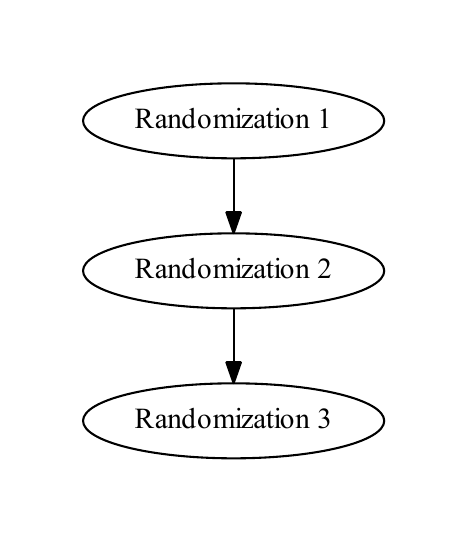
A simple randomization tree with no conflicts. Randomization 1 is the root and Randomization 3 is the tip
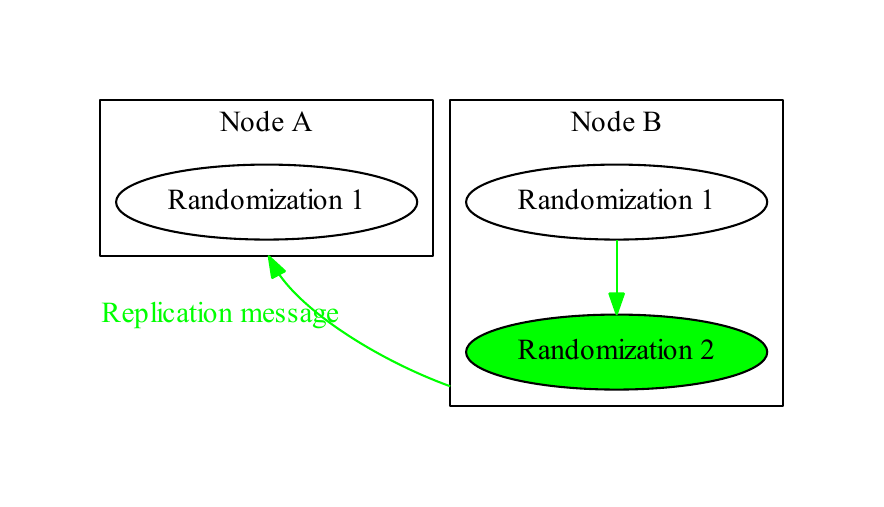
Node B performs a randomization and Node A has not yet processed its replication message. The replication message for Randomization 2 records that it was performed by Node B (in green), and that its parent is Randomization 1
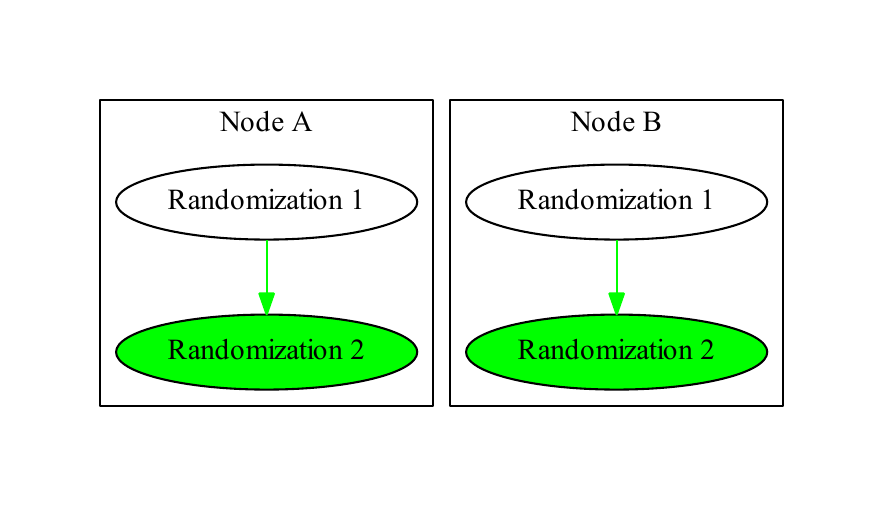
Node A incorporates Node B’s randomization into its tree
Simultaneous randomizations are defined as two randomizations with the same parent. Such randomizations trigger a conflict called a tree conflict. In Figure 4, “Simultaneous randomization”, both nodes have performed different randomizations with the same parent. When their replication messages to each other are processed, they create a complex tree, shown in Figure 5, “Conflict detection”. Each node checks its randomization tree with each addition and searches for such conflicts.
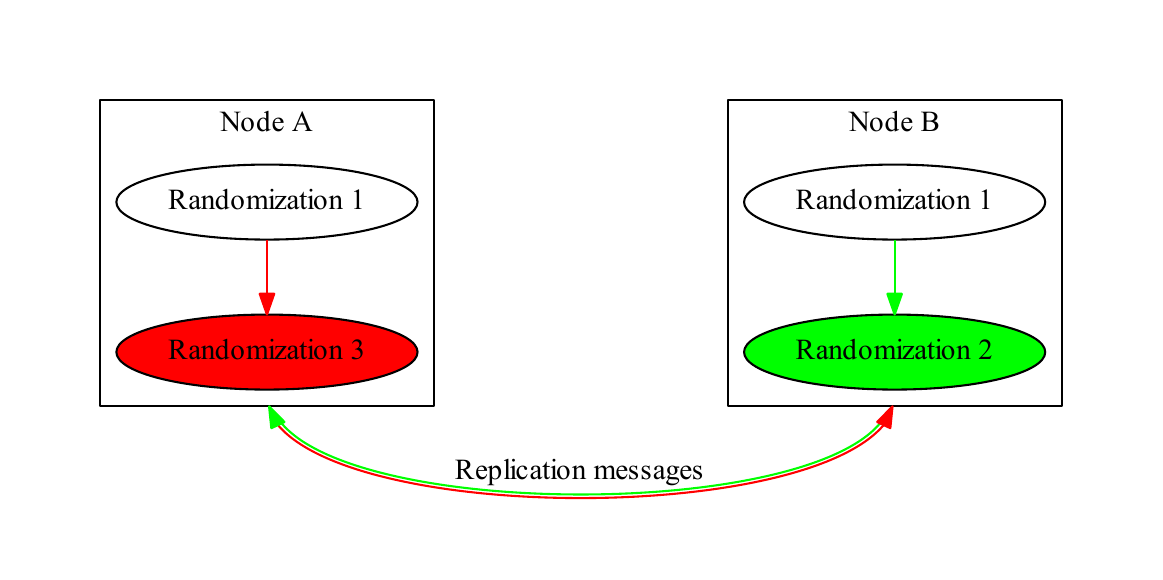
Nodes A (in red) and B (in green) randomize the same account simultaneously and replicate to each other
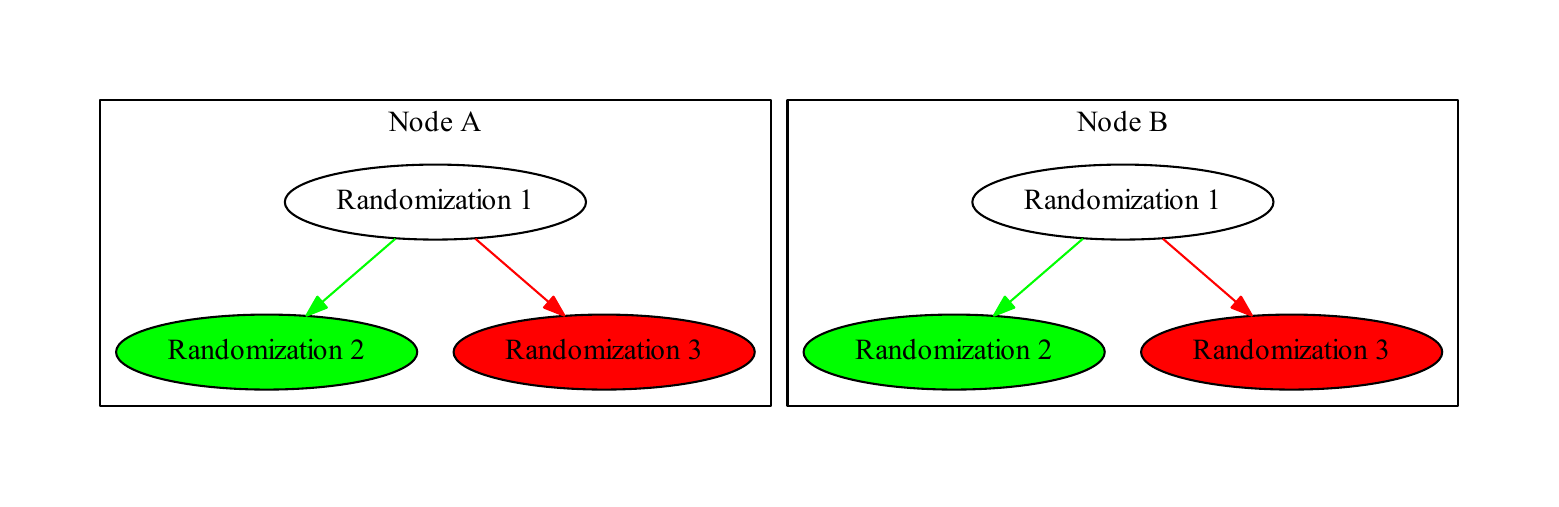
Nodes A (in red) and B (in green) randomize the same account simultaneously and replicate to each other
Schema - tables used for randomization
There are four primary tables used for randomization:
wstnpwdhis: This table contains all passwords that are known to have been successfully set on an account. Each password is identified by its sigkey, a globally unique string, and a reference to the account the password belongs to.
wstnpwdcur: This table has one row for each account. It tracks account-level metadata like the first time the account’s password was randomized, and has a reference to the sigkey of the current password for each account (located in wstnpwdhis).
wstnpwd_working: This table contains each account’s randomization tree.
wstnpwd_working_his: This table holds all passwords that are known to have been unsuccessfully set on an account. When a randomization fails, passwords are moved to this table. If a password with a status of U (see below) is rejected during password conflict resolution , it is also moved to this table.
All passwords that have ever been generated are always retained in one of these tables. They are only discarded using the rmidarchivehis program or a similar administrator-controlled process.
All passwords have a status, regardless of table location (though some tables imply some subsets of these statuses). The important statuses for conflict resolution are:
- P
Pending. The password has been generated and a connector launch is imminent or in progress, but definitely not complete. Passwords in this status will be periodically timed out by a poll loop in the idarch service. Timed out pending passwords have their status set to U.
- C
Confirmed. The connector attempted to set this password and was met with a successful acknowledgment from the target system. All passwords in wstnpwdhis implicitly have this status.
- U
Uncertain. The connector was launched but stopped responding or timed out. The password may or may not have been successfully set on the target. The presence of a password with this status always causes accounts to be marked conflicted, even if the randomization tree is otherwise conflict-free. These types of conflicts are called incomplete randomization conflicts.
- F
Failed. The connector attempted to set this password and was rejected by the target system.
Each node’s randomization tree is rooted at the sigkey specified in wstnpwdcur, which marks the current password for the account. This is the password that will be disclosed when checked out.
Randomization proceeds through a four-stage process:
A random password is generated and placed in wstnpwd_working with its parent set to the current password and its status set to P. The generated password is provided to the connector, which attempts to set it on the target system.
The password’s status is changed depending on the outcome of the connector execution. If the connector timed out or stopped responding, its status is updated to U. If the connector reports that it successfully changed the password, its status is updated to C. If the connector reports that it failed to change the password, its status is updated to F.
The resulting randomization tree is examined for conflicts. If there are conflicts, the account is marked conflicted. If not, the tree is walked from root to tip. Every confirmed password along the path is moved to wstnpwdhis, and the sigkey of the password at the tip is stored in wstnpwdcur, becoming the new root. Failed passwords encountered are moved to wstnpwd_working_his.
Conflict resolution is initiated for accounts in conflict. See Conflict resolution for more details of this process.
Implementation of the fourth stage differs depending on the node. On the node where randomization was initiated, the idarch service is signalled to begin resolution immediately. On other nodes it is not possible to signal any services because the tree validation takes place within a stored procedure in the context of the database service processing the incoming replication queue. Instead, the idarch service periodically polls the database to find accounts that have been marked conflicted by incoming replication messages. Note that conflicts are detected immediately when replicated, and the account marked appropriately; database polling is only required to initiate conflict resolution.
Account status values in wstnpwdcur
The per-password statuses above describe individual passwords in the randomization tree. Separately, the status field of the wstnpwdcur table records the account-level state of the current password. This field is returned by the ManagedAccountPasswordStatusGet API call and uses the following values:
- U
Randomization may not have completed.
- P
A password randomization is in progress.
- I
No password recorded yet.
- C
Password is confirmed correct.
- Q
A password change has been queued.
Check-out status codes
The status field of the pamchkout and wstnpwdchkout tables records the state of a check-in or check-out transaction. Both tables also include an expireby field. The status codes are case-sensitive:
- N
Checking out, need to implement.
- O
Checked out.
- H
Checking in, need to implement.
- I
Checked in.
- P
Pending.
- C
Closed.
- X
Being expired.
- E
Expired.
- V
Revoking.
- R
Revoked.
- F
Check-out failed and was rolled back.
- L
Check-out failed and rollback failed.
- Y
Check-out failed and is pending retry.
- f
Check-in failed and was rolled back.
- l
Check-in failed and rollback failed.
- y
Check-in failed and is pending retry.
Note
The failure codes are case-sensitive: uppercase F, L, and Y indicate check-out failures, and lowercase f, l, and y indicate check-in failures.
Conflict resolution
Viewing conflicts
The pwdconflicts program is scheduled to run nightly and saves the list of conflicts it finds in the product database. You can view the results of the last pwdconflicts run at Manage the system > Privileged access > Conflicting passwords . On this page, you can click Discover conflicts to run pwdconflicts and refresh the results at any time.
The password conflicts page shows a list of accounts in conflict on the system, their managed system policy, and the reason why the account failed automatic resolution . If automatic resolution has not yet completed, the accounts will be shown but resolution actions will be disabled until automatic resolution finishes.
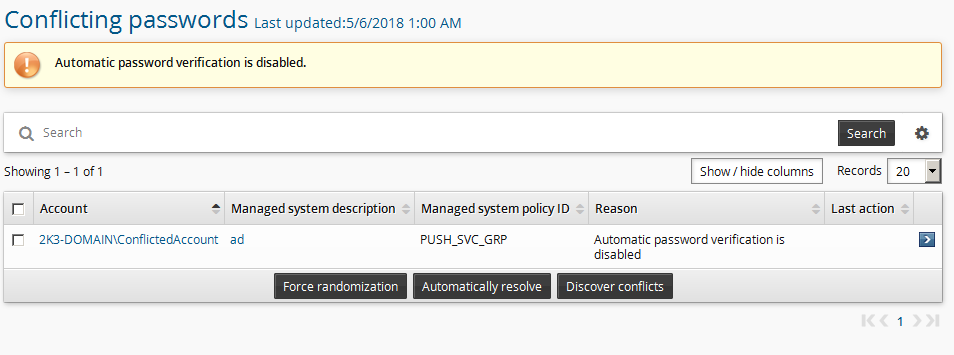
Automatic resolution
When the Privileged Access Manager Service (idarch) detects an account in conflict, it connects to each node and retrieves that node’s copy of the account’s randomization tree. It searches for any missing entries or inconsistencies such as differing statuses that might indicate the conflict will be resolved by allowing replication to complete. If any are found, it will wait for replication to flush, up to a configurable maximum set by the system variable VERIFICATION_WAIT_FOR_NODE_TIMEOUT. If the timeout is reached without the nodes reaching consistency, manual resolution is required.
Conflict resolution will only be performed by the idarch service running on the managing node for an account.
The tree of randomizations is searched for passwords whose statuses are either confirmed or uncertain, and which have no confirmed children (these are called candidate passwords). For example, if a single node attempts a randomization and the agent stops responding, the password it attempted (whose status is U) is a candidate as well as the root password (whose status is C) because its child is not confirmed. Candidate passwords are passed to the appropriate connector which attempts to authenticate against the target system with each one using the adminverify operation. The connector is not invoked for accounts that have been used as target administrator credentials, and will only be invoked for pull-mode systems if the ALLOW_AGENT_VERIFICATION_OF_LWS system variable is enabled.
The adminverify operation does not lock out accounts.
The account’s randomization tree is only modified if exactly one candidate password successfully authenticates. Some systems allow old passwords to continue to work for a short period after a change; this case is treated as though all passwords were rejected. When exactly one candidate password authenticates successfully, the passwords tested by the connector are removed from the tree according to the following rules:
If the password authenticated successfully, it is moved to wstnpwdhis and becomes the new root password.
If the password did not authenticate successfully and its status was
C, it is moved to wstnpwdhis with no impact on the current root password.If the password did not authenticate successfully and its status was
U, it is moved to wstnpwd_working_his. While it’s possible that this password was in fact set on the target system and simply overwritten, because Bravura Privilege cannot confirm whether it was ever valid, it is not moved to wstnpwdhis.
Use options available in the Manage the system > Privileged access > Options > Managed system policies menu to:
Control the size of batches of conflicted accounts on which the
idarchservice operates. The maximum size is controlled by the PASSWORD VERIFICATION BATCH LIMIT system variable. Default is 50.Disable automatic resolution entirely by disabling the PASSWORD CONFLICT ATTEMPT VERIFICATION system variable.
Manual resolution
If automatic resolution cannot resolve the password for any reason, an administrator must manually correct the issue.
Basic manual resolution
From the Conflicting passwords page , you can attempt generalized conflict resolution by selecting the accounts you want to resolve and clicking either Force randomization or Automatically resolve.
Alternatively you can display a current list of conflicts and resolve them with the pwdconflicts program from the command line. See pwdconflicts usage details .
If you are resolving more than a handful of conflicts at a time, you should use the pwdconflicts program.
Automatically resolve
Clicking Automatically resolve will simply re-issue a request to the Privileged Access Manager Service (idarch) to attempt automatic resolution again. This is appropriate for cases such as a Microsoft Active Directory server configured to allow old passwords to work for a short time after a randomization.
This must be done on the same node as the Privileged Access Manager Service (idarch) that is managing the managed system policy that includes the account.
Force randomization
In most cases, Force randomization is the simplest solution to password conflicts requiring manual resolution. Forcing randomization does not make any attempt to determine the correct password, and thus is not suitable for use with accounts where unscheduled randomizations are unacceptable such as target administrators or other sensitive accounts. Instead, the password conflict is cleared as follows:
Every password whose status is U is presumed to have failed and is moved to wstnpwd_working_his.
Every password whose status is C is moved to wstnpwdhis. The one with the latest timestamp is presumed to be the most recent and selected as the current root.
A password’s timestamp is the time when the password was randomly generated by Bravura Privilege and does not reliably indicate when it was set on a target system. There is no guarantee that this password was the correct one to choose.
A password randomization is immediately initiated.
Both forced randomization and automatic resolution bypass replication and modify remote nodes directly.
Generally, if you do not care about the outcome of password resolution, you should choose forced randomization.
Forced randomization will not occur if password randomization is disabled on the managed system policy to which the managed account is bound. See Disabling password randomization for more information.
Blanking
There is one more generalized resolution strategy that is intended to be used as a last resort, but it is not available from the web interface. The -blank option of the pwdconflicts program allows you to erase all ancestry linkages in an account’s randomization tree and start from scratch. This resolution strategy follows the same basic steps as forced randomization with the following exceptions:
No root node is set. The account reverts to the No password recorded yet status.
While all known passwords will be retained, the account will not be usable as a target administrator until it is randomized or overridden again. Check-outs will not disclose a password unless the checking-out user has access to historical passwords.
No randomization is issued.
Normal replication is used to inform other nodes of the change.
Blanking the password is designed to be a failsafe and should work reliably (to the extent that replication is working properly) for all cases. It can be successfully used even if some replicas are permanently or semipermanently offline, unlike forced randomization and automatic resolution retries which require a direct connection to all nodes. To reduce the risk of error, blanking may not be applied to more than one account at a time, and can only be invoked through pwdconflicts .
Because it is a failsafe, blanking performs no validation whatsoever. You should not use password blanking on an account that is being operated on by automatic resolution or by another user using the web interface unless it is unavoidable in an emergency.
Advanced manual resolution
You can click on accounts from the conflicting passwords page to see more details about the conflict. There is an example of this page in Incomplete randomization conflicts . Every password in wstnpwd_working on each node is displayed here with various metadata like its status, sigkey, the node that created it, and the node that created its parent. If you have sufficient access, a disclosure plugin is rendered with the actual value of the password.
You must have the "Pre-approved check-out of managed accounts" permission on the account’s managed system policy to view passwords on this screen. Being a superuser is neither sufficient nor necessary.
Incomplete randomization conflicts
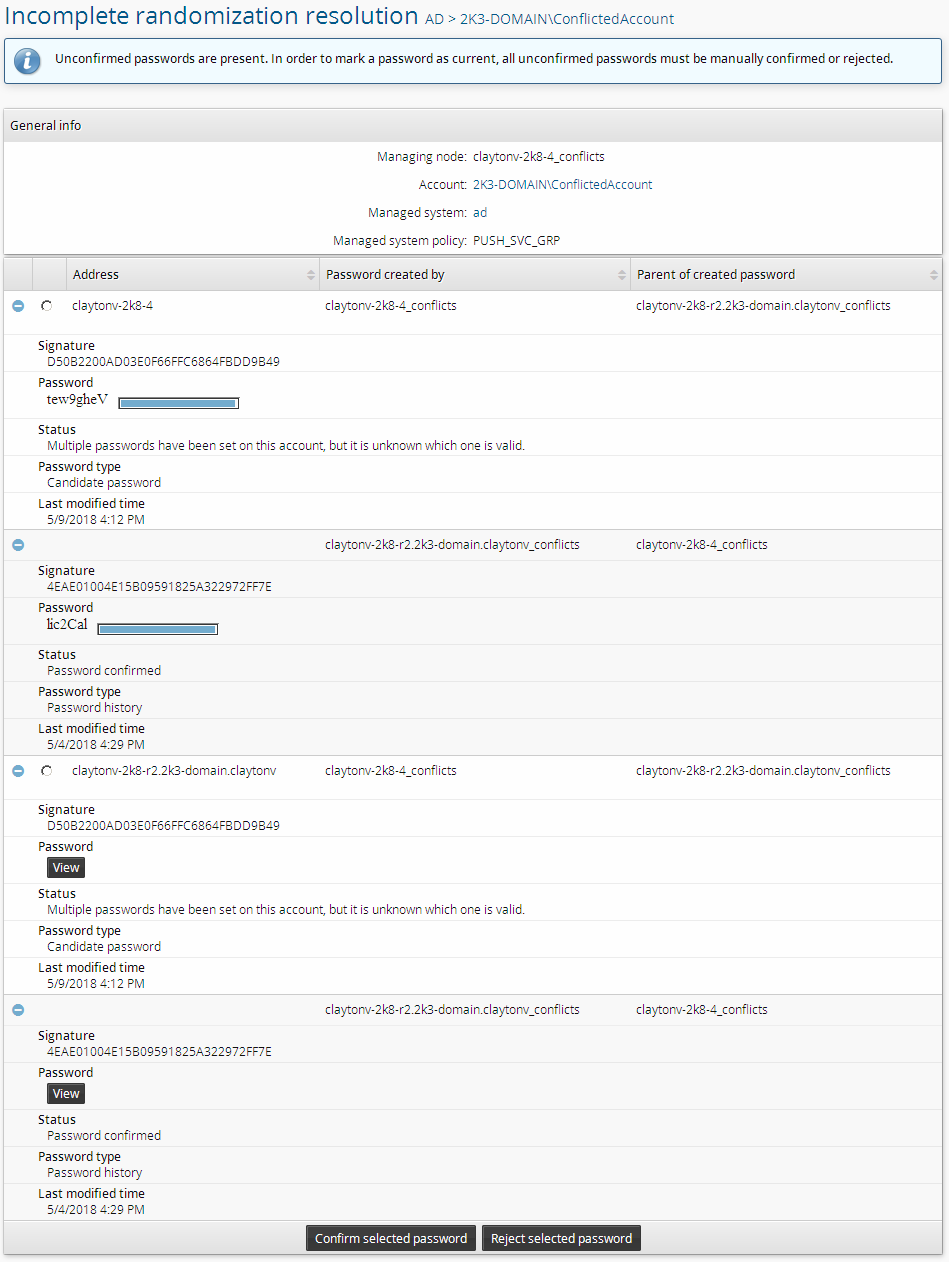
Details of the randomization tree for a specific account for a conflict caused by an incomplete randomization.
The screenshot above shows a scenario in which the connector attempted to randomize a password but stopped responding. Bravura Privilege marked the password it was supposed to set as uncertain and generated a conflict. Both nodes agree completely about this randomization tree, but neither knows whether the password passed to the connector was successfully put in place.
On this page, the displayed status string Multiple passwords have been set on this account, but it is unknown which is valid means the password has status U. In the context of an overall account, that string can indicate either a tree conflict or an incomplete randomization conflict. In the context of a single password, as in this case, that string always marks an incomplete randomization.
To resolve an incomplete randomization conflict, you must decide for each uncertain password whether it was successfully set on the target system. You may need to engage the owners of this target system to check its logs in order to decide which randomizations were successfully applied. You may also wish to manually test passwords to determine which is correct if you have access to them. Since lockouts are a concern, it would be a good idea to start with the password with the latest timestamp for this approach. Also, you should keep in mind that some systems such as Active Directory may allow old passwords to work for a short time after randomization.
When you have decided whether a password was successfully set, select the radio button for that password and click either Confirm selected password or Reject selected password to set its status to C or F, respectively. Clicking either button will cause the tree to be rechecked for conflicts. Repeat the process for each uncertain sigkey.
Although the page will display radio buttons for all uncertain passwords (one per node), you only need to perform this operation once for each distinct sigkey. Bravura Privilege will automatically correct all matching passwords on all nodes.
Tree conflicts
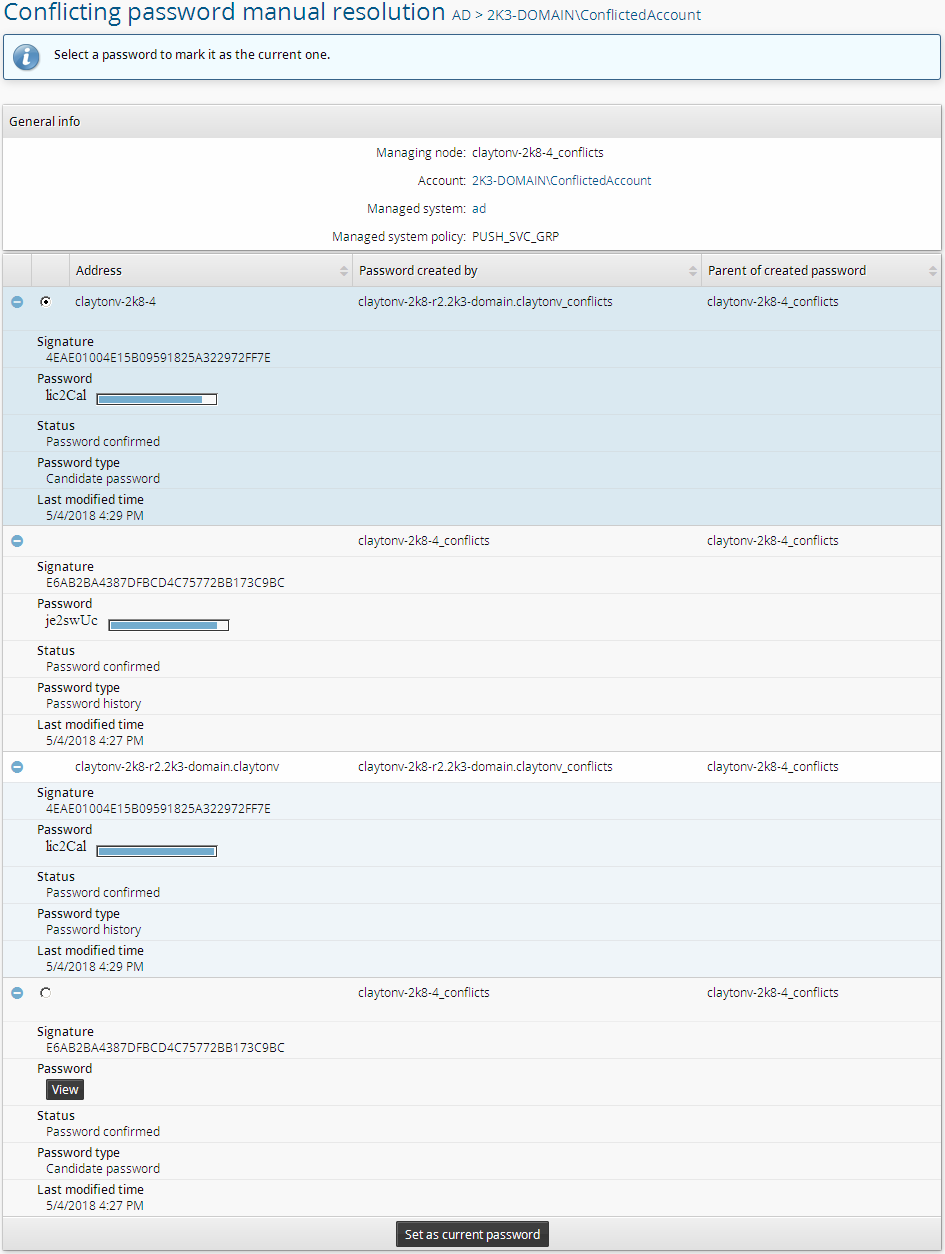
Details of the randomization tree for a specific account for a tree conflict.
If there are both tree and incomplete randomization conflicts, you must resolve the incomplete randomization conflicts before you can resolve the tree conflicts.
The screenshot above shows a very common scenario where two nodes randomized the same account at the same time. Each node has the same set of passwords, but disagrees about which is current. One node, claytonv-2k8-4_conflicts created E6AB2BA4387DFBCD4C75772BB173C9BC at 5/4/2018 4:27 PM and then attempted to set it. The other node, claytonv-2k8-r2.2k3-domain.claytonv_conflicts created 4EAE01004E15B09591825A322972FF7E at 5/4/2018 4:29 PM and attempted to set it. Both nodes successfully set their passwords. There was a slight replication backlog between 4:27 PM and 4:29 PM which caused these two randomizations to occur with the same parent.
When there are tree conflicts, as in this case, manual resolution entails choosing a single candidate password and making it the new root on all nodes by clicking Set as current password. Once again, you may need to engage the owners of this target system to check its logs, or manually test passwords, in order to decide which password is correct. For example, if the target system shows the latest password change as having come from claytonv-2k8-4 , then E6AB2BA4387DFBCD4C75772BB173C9BC should be set as the current password.
Verifying resolution
After you resolve a conflict, confirm that it cleared on every node. On the Conflicting passwords page, refresh the entry for the account and check that the Signature value is updated and consistent across all of the nodes' rows. To be certain, view the page while logged in to the web interface of each node.
Audit logging
Whenever an action is taken to resolve a conflict, whether automatic or manual, the action is recorded in the wstnpwdverification table. Currently there are no reports to retrieve data from this table but it can be viewed manually via standard database tools.
Each row in wstnpwdverification corresponds to the modification of a single password. The table contains the following columns:
svcid: The unique identifier of the node on which the action was taken.accountname: The name of the account the password belongs to at the time of the action.accountguid: The unique identifier of the account the password belongs to.type: The status of the password at the time that the action was taken.requestername: The name of the person or process that initiated the action, at the time the acttion was taken.requesterguid: The unique identifier of the person or process that initiated the action.retcode: A code indicating what the validity of the password was determined to be. If automatic resolution was performed, this column contains the actual agent code returned by the agent when it attempted to verify the password. If resolution was manual, it contains either ACSuccess or ACVerifyFailed, depending on whether the password was chosen as the current one.agentmessage: If automatic resolution was performed, the message returned by the agent when it attempted to verify the password. If manual resolution was performed, an arbitrary but representative value such as "Forced confirmation."sigkey: The sigkey of the password affected.verificationid: A timestamp-embedded unique identifier for a group of actions taken. For manual resolution, all actions receive a separate verificationid. For automatic resolution, all actions taken in a particular batch (spanning multiple accounts) receive the same verificationid.actionreason: The process that caused action to be taken. One of:A: Automatic verification.F: Forced randomization.B: Password blanking.M: Manual tree conflict resolution.
Checking the status of managed privileged credentials
This topic explains how to determine the validity and current status of the privileged credentials that Bravura Privilege manages, and how to diagnose accounts that show an abnormal status.
Unlike Bravura Pass profile password expiry, which is a simple aggregate of a few known values, privileged credential validity in Bravura Privilege is dynamic and depends on configuration, operation, user decisions, and network and target conditions. For how and when Bravura Privilege randomizes credentials, see the Password randomization concept definition and the Password randomization section.
Check credential status
You can check the status of a managed credential in three ways, from the most accessible to the most detailed.
Use reports
The Manage reports > Reports > Privileged access: Operations page provides the following reports:
Privileged password expiration: managed accounts whose passwords are due to be changed.
Managed system accounts status: managed system accounts and their status.
Managed account status: status of managed systems and accounts, including last connection time, last password change, and last check-out.
Use the API
To collect managed account status programmatically, first call ManagedAccountStatusGet to check whether the account is already managed. If it is, call ManagedAccountPasswordStatusGet. For details, see the REST API and SOAP API documentation.
Inspect the backend database
For the most detailed view, inspect the randomization tables in the backend database of the application node that manages the relevant managed system policy (MSP). These tables, their status values - including the wstnpwdcur account status values and the check-out status codes - and how the randomization tree is walked are documented in Schema - tables used for randomization.
The product schema is version specific. Obtain the schema for your product version from Support.
Diagnose an abnormal status
An abnormal status usually has a configuration cause, an operational cause, or both.
Configuration factors are governed by the managed system policy and its password policy, checkout durations and extensions, and randomization options. See Managed system policies and Scheduling push-mode password resets.
Common operational causes include:
Auto-discovery failures or malfunctions can invalidate accounts, which makes their managed status irrelevant.
Import rule misconfiguration can fail to manage an account, or can unexpectedly unbind a managed account and change its managed status.
Randomizations are not immediate. The
idarchservice reads the accounts to reset only on its poll interval, which defaults to every 60 minutes from its startup time.A randomization schedule on the MSP can defer changes to allowed time windows. See Scheduling push-mode password resets.
Database replication delays or other infrastructure issues can postpone updates to the randomization tables.
The
idarchservice is down, or its processing threads are blocked, on the node that manages the MSP.Connector, network, or target failures can delay or prevent the
[Connect],[serverinfo],[reset], or[verify]operations.Out-of-band resets, performed outside Bravura Privilege, invalidate the last known password.
Double-targeting from poor discovery data lets the same instance, or two different instances, reset an account at different times, so neither has the correct password.
Many of these conditions surface as password conflicts, where Bravura Privilege cannot determine which of the password values it holds for an account is currently valid. For detection and resolution, see Password conflict detection and resolution.
Double-targeting and duplicate accounts
When the same account appears more than once from a target system, or appears with only a difference in letter case, the listing and reset operations may be running against different physical systems that share a single target system ID. Each system holds a different password, so neither node can settle on a valid value. Common causes include:
DHCP addressing. The target gets its address from a DHCP server and the name change does not propagate to Bravura Privilege, or to its proxy, in time. The agent then lists from the wrong server.
Targeting by IP address. An IP address can map to different physical servers over time. Targeting systems by IP address is not recommended.
Targeting failover records. A server record that resolves through round-robin DNS or a load balancer can lead to different physical systems over time.
To confirm double-targeting, check for more than one account with the same name on the affected host in the backend database. The schema is version specific, so obtain it from Support; on 12.x products the relevant table is targetobj.
To remediate, exclude such systems from management to avoid double-targeting, or adopt a targeting method that resolves consistently to the same physical system for each target system ID.
Unbound managed accounts
If an account cannot be checked out and its password cannot be randomized, and the idmsuite.log records a line like the following, the account is not bound to a managing node:
not the managing node for account [guid-dash-hexadecimals] waiting for managing node
This happens when the account and the system it comes from are not both managed under the same managed system policy (MSP). It can occur when nodes are removed from replication, or when the account onboarding process did not finish correctly. Confirm that both the account and its source system are managed under the same MSP.
Resolve an abnormal status
Identify the root cause. Verify the Managed system policies configuration, then check the operational causes listed above.
Address one root cause per Support ticket.
Test the resolution in a lower environment that represents Production.
Deploy the tested resolution to the Production environment.
Note
Automatic resolution and forced randomization must be able to reach the target system from the node that manages the policy. If some targets are reachable only from certain network segments, deploy Bravura Privilege proxies in those segments so the operations run from where the targets are reachable.
Request help from Support
If the reports, API, and database do not answer your question, open a Support ticket with a clear description, including use-case detail, of:
The specific reporting you require.
Why you need it, including the requirements that led you to look for that information.
Bravura Security Engineering might be able to provide a complete answer, but it can take time and requires a detailed response to both points above.