Bravura Privilege architecture
The figure below illustrates how users and API clients interact with Bravura Privilege to authenticate, establish sessions, request access, launch login sessions and retrieve credentials where permitted.
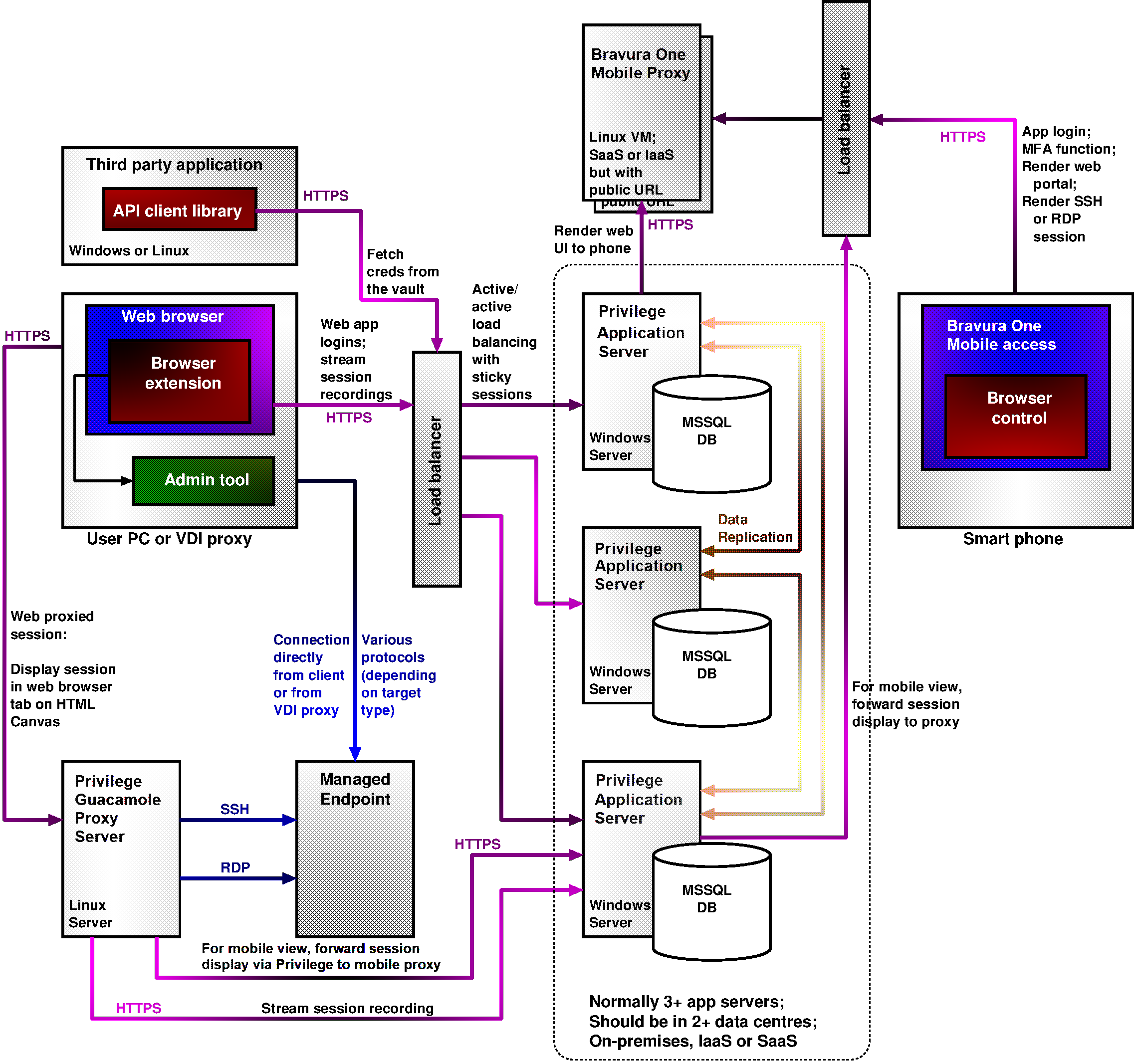
There are normally at least three Bravura Privilege servers, preferably deployed in at least two different physical locations. Since each server can operate independently, a server crash or natural disaster at one location will not disrupt service. Bravura Privilege servers may be on-premises, deployed on a private cloud tenant (IaaS) or delivered as a service (SaaS).
Security officers, auditors, IT staff, application owners (authorizers) and others who need to interact with Bravura Privilege do so using a web UI. This access is typically mediated by a load balancer that sends sessions to one of three or more Bravura Privilege servers.
Each Bravura Privilege server is connected to its own database which contains encrypted credentials for privileged accounts on target systems, along with policy data, audit logs and a variety of configuration data. The database runs Microsoft SQL Server.
Users can connect to sessions in several ways:
Directly via a browser extension that launches the relevant tool on their PC.
Indirectly by first signing into a VDI system and then launching first a login into Bravura Privilege and then a session that originates on the VDI proxy.
Indirectly by first signing into Bravura Privilege and then launching an SSH or RDP session from a Guacamole proxy system to the managed endpoint, and rendering the display of that session in a second browser tab on the user’s device.
Indirectly as above, but rendering the session display on the user’s smart phone, using the Bravura One app and connecting via a cloud-hosted mobile proxy.
Since Bravura Privilege systems do not normally expose a public URL, access from a smart phone is via a smart phone app and a mobile-specific proxy which does have a public URL. This way, registered apps on authorized user phones can interact with Bravura Privilege but random connections from the Internet are not possible.
The Bravura Privilege network architecture links application servers to managed endpoints where it enumerates accounts, services and groups and where it modifies passwords, group memberships and SSH trust relationships.
Push mode, Local Workstation Service mode, and proxy connectors
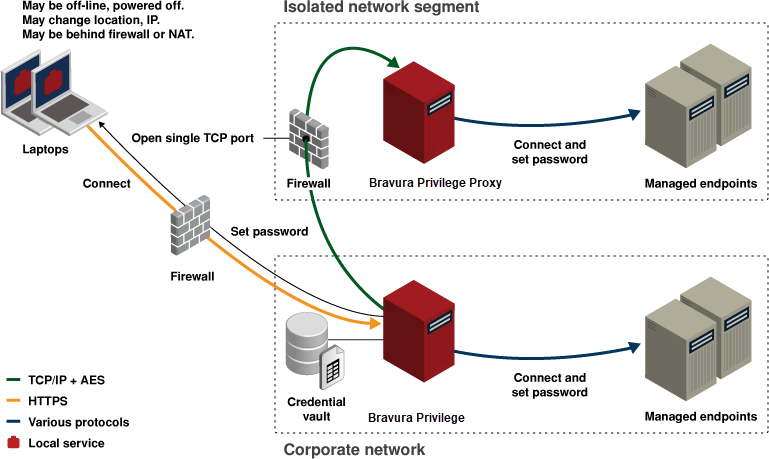
Bravura Privilege supports multiple integration patterns to reach managed systems in diverse network topologies.
Each Bravura Privilege server is responsible for pushing passwords to a set of target systems. This allows multiple servers to share the load of randomizing passwords across thousands or millions of targets.
Connectors push passwords to over 140 types of systems. A connector typically runs on a Bravura Privilege server and connects to the target without installing software on the target.
If firewalls block direct connections, deploy connector proxy servers near target systems. The main server connects to the proxy over a single TCP port; the proxy runs platform-specific connectors to reach each target system.
For intermittently available endpoints (laptops), a Local Workstation Service (LWS) can be installed. LWS calls home to report users/groups and implement requested changes locally (password changes, group assignments, SSH trust management).