OrgChart
About OrgChart management
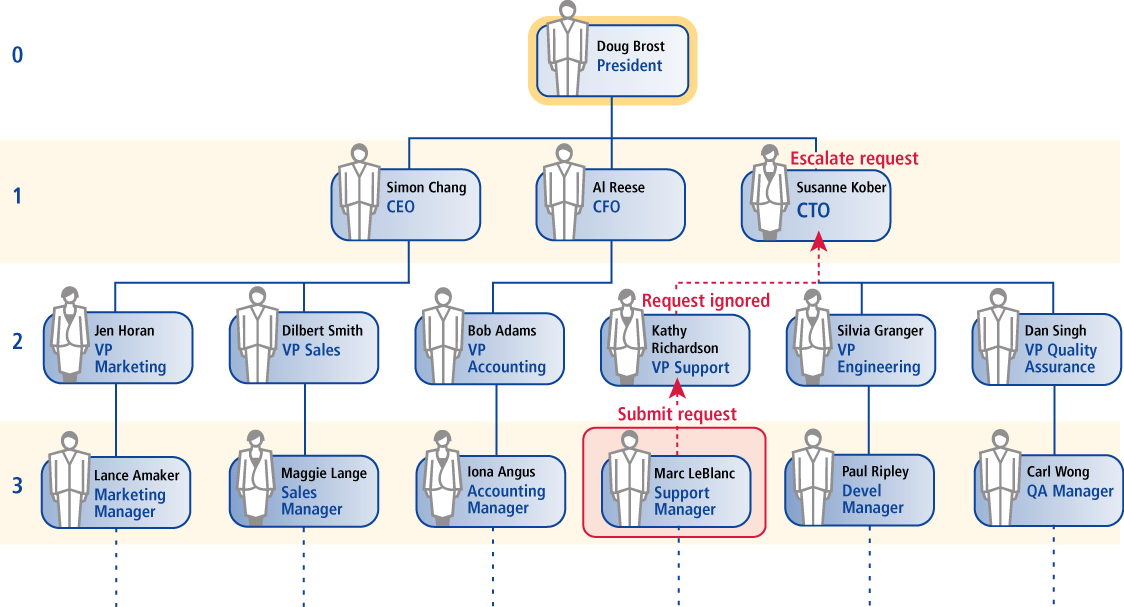
In general, OrgChart data represents how authority and responsibility is distributed within an organization. OrgChart data supports such processes as:
Request Authorization Workflow
Managers can be asked to approve changes in access privileges for their subordinates.
Automated Escalation
When managers or application owners fail to respond to a request to authorize access changes, their managers may be asked to respond in their place.
Access Certification
Managers may be periodically required to review a list of their direct subordinates and their respective access rights. This process can identify and remove stale accounts and privileges that do not represent current business needs. Periodic audits are essential for compliance with privacy and corporate governance legislation.
Problems with organization chart maintenance processes
Unfortunately, traditional methods of gathering and maintaining OrgChart data are often inadequate for the needs of an identity management system. Traditional methods include:
HR applications:
Human resource applications normally have a place to store OrgChart information, including the identity of each employee’s manager. Unfortunately:
Whole classes of users, such as contractors and vendors, are usually not entered into the HR application.
Data in the HR application may be stale – having been entered at the date an employee was hired and never updated.
Data in the HR application may be incomplete – available for some employees, but not others.
In other words, having a place to house this data is no guarantee of having good quality data, with complete coverage over the user population.
Manual maintenance:
It is certainly possible to hire a team of consultants to work with HR and interview managers, in order to construct OrgChart data centrally. This approach has problems:
It can be costly, requiring a lengthy consulting engagement.
OrgChart data collected at the start of the project may be obsolete by the end of the project.
There is no way to keep the data complete and accurate after the project is over. Instead, the OrgChart data collected represents a “window in time”.
Existing OrgChart software:
Commercial programs are available to construct and maintain OrgChart data, but they are used primarily to construct a graphical chart , with pictures, names, and reporting lines.
Existing programs do not address the need to build data about the primary managers for thousands of users, and to maintain this data over time.
Maintaining OrgChart data with Bravura Security Fabric
Bravura Security Fabric includes a system for constructing and maintaining comprehensive OrgChart data, for employees, contractors, and vendors, across an enterprise-scale organization. It is designed to support identity management system deployment and operation.
The Bravura Security Fabric representation of an OrgChart, referred to as the OrgChart , identifies the primary manager or supervisor for every person in an organization. While many people have “dotted line” relationships with multiple managers, in most organizations every person has a primary manager, with authority to review access rights, to terminate the employee or contractor, and to review performance and pay.
When you first install Bravura Security Fabric , the OrgChart contains no data and must be built from scratch. The Bravura Security Fabric administrator is responsible for initializing either a manual construction process, where OrgChart information is entered using the Bravura Security Fabric interface; or an automatic construction process, where preliminary OrgChart data is imported from an existing HR system.
The work of building and updating the OrgChart is distributed among managers. By distributing the work of maintaining OrgChart data to every manager in an organization, this information can be collected and maintained more quickly, more reliably, and less expensively than using a centralized process.
OrgChart maintenance works as follows:
Manual OrgChart construction
The Bravura Security Fabric administrator configures target systems, email settings, and other options for OrgChart maintenance.
Bravura Security Fabric gathers an inventory of users from target systems during auto discovery .
A Bravura Security Fabric administrator (a product administrator) logs in to the Manage the OrgChart (IDG) module and identifies the top-level manager in the organization, also known as the “root node”.
The Bravura Security Fabric administrator identifies the top-level manager’s subordinates until enough levels of the OrgChart have been created to begin the construction process.
Product administrators continue to identify subordinates, or managers log into the Browse the OrgChart (IDO) module to identify their own subordinates, and to indicate which of their subordinates are managers.
Bravura Security Fabric invites managers identified in Step 5 to log in to Bravura Security Fabric and identify their own subordinates.
The process continues until all managers’ lists are complete.
Automatic OrgChart construction
The Bravura Security Fabric administrator configures target systems, account attribute mappings, email settings, and other options for OrgChart maintenance.
During auto discovery , Bravura Security Fabric gathers an inventory of users from target systems. Bravura Security Fabric examines users’ attribute values to build the initial OrgChart from pre-existing data.
The Bravura Security Fabric administrator logs into the Manage the OrgChart (IDG) module, then verifies and corrects some or all of the imported data.
Managers could also log into the Browse the OrgChart (IDO) module to identify their own subordinates, and to indicate which of their subordinates are managers.