Access Certification
Access certification overview
In many cases, government regulations and security policies require organizations to report on the access privileges that users have to systems and data, and also to promptly remove privileges that are no longer appropriate. This process is known as access certification .
The following sections demonstrate the Bravura Security Fabric solution to the challenges of access certification and show you how to set up and start the certification process.
Challenges with access certification
Users often have unique and changing business responsibilities, so their access rights may be difficult to represent by simple role or user class membership. Also, over time users tend to accumulate login accounts and access privileges as they move through an organization. These processes make it challenging for an organization to model the appropriate access requirements.
Access termination is also a challenging process. It is not always clear when a user’s access to systems should be removed. Consider a user who moved from one department to another, but acts as a backup resource for his old responsibility for some limited period of time after the move. At what time is it safe and appropriate to remove the user’s old access rights? Which of the old rights are required to perform the user’s new job?
Access certification features
Bravura Security Fabric addresses the problem of identifying and removing excess access rights by coordinating and securing distributed review and cleanup of users and privileges.
Bravura Security Fabric periodically requires selected reviewers to use the self-service interface to view user entitlements, flag unneeded access rights for removal, and confirm remaining rights. The reviewers are required to sign off with an electronic signature to assure that the remaining entitlements are appropriate. The workflow engine routes change requests identified during the certification process (for example to delete accounts or group memberships) to suitable authorizers and completes change requests upon approval.
Bravura Security Fabric can also allow certain users to perform ad hoc quick reviews on individual users.
The Bravura Security Fabric configuration interface allows for a high degree of flexibility in how the review process is set up. A wizard-like series of configuration pages allows you to define:
Resources on which users are to be certified
Resources, for the purposes of certification, include:
Target systems
Managed groups
Segregation of duties rules
Roles
Users to be certified
You can include all users associated with a resource, select individual users, or a user class.
Profile and request attributes to be displayed
User information defined by profile and request attributes can be viewed by reviewers to help them determine what action to take.
Remediation requests to be submitted
You can specify remediation requests to determine what happens when a review revokes an entitlement, transfers a user, or resolves an SoD violation.
Certification method
You can choose to have users reviewed by a single reviewer, or split the work among multiple reviewers according to:
Segments defined by user class
Classes can be determined by attributes, groups, or PSLang expression.
Resource managers
Reviewers are assigned to each selected application or group to review users privileges. This is practical where the resources have few members.
Organization chart
This method begins with a simple premise: managers can recognize inappropriate rights assigned to their subordinates.
Unlike other methods, the Bravura Security Fabric administrator does not need to determine all reviewers, but only the manager whose branch of the organizational tree is to be reviewed. Each manager below the level of the selected manager reviews their direct subordinates.
This method is tightly integrated with OrgChart data to identify managers and their subordinates.
Once a certification campaign has been configured, it can be started immediately, and/or saved for later use. A certification campaign configuration can be saved and exported into a data component, to made part of a reference implementation.
Certification campaigns can be scheduled to start automatically and at regular intervals, like a scheduled job.
Planning what to review and by whom it should be reviewed
The determination for what needs to be certified, by whom, and how often will be based on an organization's requirements. For auditing or regulatory compliance purposes, it would generally be entitlements or access that if misused can cause harm to an organization if it is compromised.
Being compromised may be as simple as someone accidentally accessing information they should not have anymore to some malicious. Ensuring users have what they need to and nothing more ensures an organization is in compliance.
The more sensitive information/access is, it maybe more often certification campaigns be performed. Also ensuring the "right" people are certifying the right entitlements can be important as it can be the case the certifier may "rubberstamp" entitlements they are not the owner of or understand why the user should have or not have.
What to certify
Within certification campaigns, what to certify provides the basis to compliance. Entitlements that can be certified can include:
Profiles (who the person is)
Accounts (the accounts the person has)
Groups (what groups an account has)
Roles (what roles a user has)
Profile attributes (what attribute is set to for given users)
Segregation of Duties (what SoD rules a person may fall under)
Review not required
During a certification campaign, some entitlements may be marked as: "Review not required"
Filtered accounts - found by Bravura Security Fabric but filtered by an ID filter - may be presented to reviewers but do not need to be reviewed.
Who to certify
Who is being certified is very important in how a certification campaign created. If the population of users being certified is small, it is very common to assign the certifier a person. However, if the population of users being certified is large, it would make better sense this population is segmented into smaller certification campaigns. A single campaign should be a reasonable size to ensure the certifier is actually certifying what is in the campaign and not "rubberstamping" items.
An alternative method is to have smaller certification campaigns serially. For example: all users whose last name begin with "A to E" is certified first; when that campaign is complete, the next campaign would be: all users whose last being begin with "F to J", and so on. The goal is to keep the certification campaigns a reasonable size to avoid "rubberstamping".
What information to present to the certifier
Depending on what is certified, the administrator can decide what attributes for each user to present to the certifier. The information should be relevant for the certifier to review who this user is and whether or not they require the entitlement(s) being certified or not. It is recommended you try to present just enough information to the certifier and not overload them with too much information. If certifiers have too much information, they may get confused or be overloaded with too much information and end up "rubberstamping" the campaign.
If there is not sufficient information presented to the certifier, the certifier would have to look up details of the user being certified. This can be tedious and cause the certifier to be lazy. Presenting certifiers the sufficient amount of details will lead to the best results.
Remediation
It is very common that remediation in certification to be simply the revocation of the entitlement being certified. For example if user do not require an entitlement, the entitlement is removed from the user. However, the administrator can design what a revocation means. For example, if a user does not need an entitlement, a predefined request (PDR) can be generated to not only remove the entitlement, the PDR can also do something like add another entitlement to the user, update an attribute, and so on.
Understand what revoking the entitlement means during a certification may mean a design of a PDR to meet your objectives.
Reviewers
Who the reviewers are for the certification campaign will differ depending on what is being certified. Sometimes the entitlement or application owner; the manager; HR, or just someone needs to do the certification. If a campaign is segmented to multiple parts, who certifies each part may be required (a segmented campaign can be split into multiple campaigns and certified by a single person).
Peer groups
Within a certification campaign, an administrator can ensure the users to be certified meet a criteria for the certifier to certify. This can streamline the certification where users that meet a defined peer group threshold are visually marked (green) and reviewers can easily make a decision to certify them.
Reviewers can more closely scrutinize users that fail to meet the peer group threshold (yellow or red) before deciding whether to certify or revoke the entitlements.
Defining good peer groups can make the certification process easier for the certifiers.
Additional Information
Once certification campaigns are created and achieve the compliance an organization requires, those campaigns can be scheduled to run as often as required. This can tie closely to the certification validity interval (CERT VALIDITY INTERVAL): "Certification of a user or entitlement is considered to be current if performed within this number of days." Though this number can differ between the entitlements that are certified, it can streamline larger campaigns where users may have been certified previously, the reviwer does not have to re-certify them.
Users within the CERT VALIDITY INTERVAL are automatically certified and can be skipped during a certification campaign. They are included and visually seen by the certifier as they can decided otherwise.
Certification process
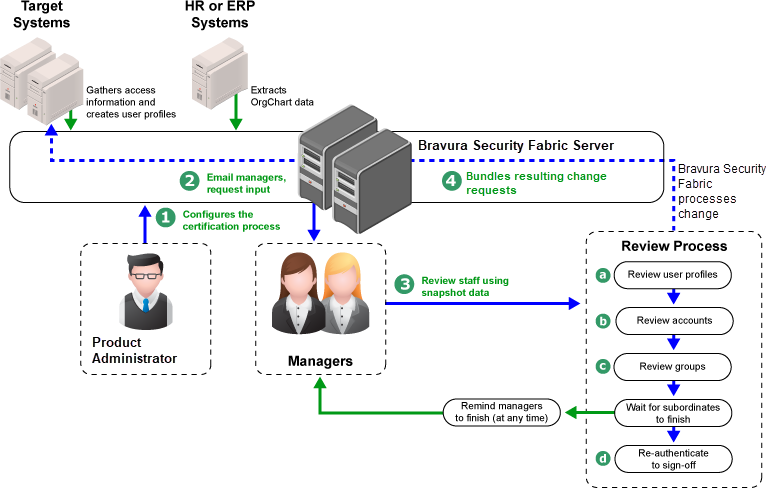
The certification process can vary depending on the method chosen, but generally proceeds as follows:
Bravura Security Fabric product administrator configures and starts the certification process using the Manage certification process (CERT) module.
Bravura Security Fabric notifies reviewers that they need to review user privileges.
If the OrgChart method is used, Bravura Security Fabric sends email to the lowest-level managers first. After a configurable delay, to give these managers a chance to finish their work, Bravura Security Fabric sends email to the next level of managers. This continues in a bottom up sequence until all managers have been invited.
Reviewers log into Bravura Security Fabric and click a link to start their review process.
Reviewers can choose to review accounts or groups by user or by resource.
Depending on the type and scope of the review, the reviewer can identify and flag for removal:
Subordinates who no longer work for the organization
OrgChart managers can also transfer users who no longer report to them to other managers.
Accounts which are no longer needed
Inappropriate group memberships
Segregation of Duties rule violations
Inappropriate roles
The reviewer is asked to sign, with a validated network or directory password, a statement to the effect that the certification is complete.
Bravura Security Fabric bundles the changes identified in Step 4 into access change requests to be processed by the product’s workflow engine, where they can optionally be subjected to an authorization process before they are fulfilled.
When the OrgChart method is used, Bravura Security Fabric collects certifications up through the organization’s hierarchy. Manager A’s certification is not considered to be complete, and cannot be signed off, until all of the managers (B, C, …) that report to A, directly or indirectly, have completed their own certifications.
In the case of a quick or ad hoc certification, the process is simpler:
An end user (userX) logs into Bravura Security Fabric and clicks View and update profile , then selects another user (userY).
Bravura Security Fabric applies a two-participant user class to evaluate whether userX is permitted to certify userY.
If permitted, then the Initiate a review of all entitlements option is available for userX to initiate a certification of user Y. If not permitted, the option is not available.
The access certification feature works with the following web modules and services.
Program | Purpose |
|---|---|
Manage certification process (CERT) module | Allows product administrators to configure and start access certification campaigns. |
View and update profile (IDR) module | Allows reviewers to review current access and request changes. Self-service users can also request a review of a single user. |
Requests application | Enables users to view the status of their requests. Allows authorizers to review and either approve or deny requests. |
Workflow Manager Service | Receives requests for authorization workflow. In most cases, user provisioning requests made through self-service require approval before they can be completed. |
For screenshots and step-by-step details of certification procedures, see Certification Campaigns in End User Documentation.