Mainframe Connector Installation
Pre-installation Process
Mainframe Connector is the z/OS component of the Bravura Pass password management system. It is also used to interface with Bravura Identity systems. The steps involved in creating the Mainframe Connector datasets are as follows:
Download the Mainframe Connector distribution file from the Bravura Security WWW site or extract it from an Email. This file is in zip format.
Unzip the distribution file.
Upload files to z/OS.
Run z/OS tools to create Mainframe Connector distribution files.
These steps are illustrated in in the diagram below.
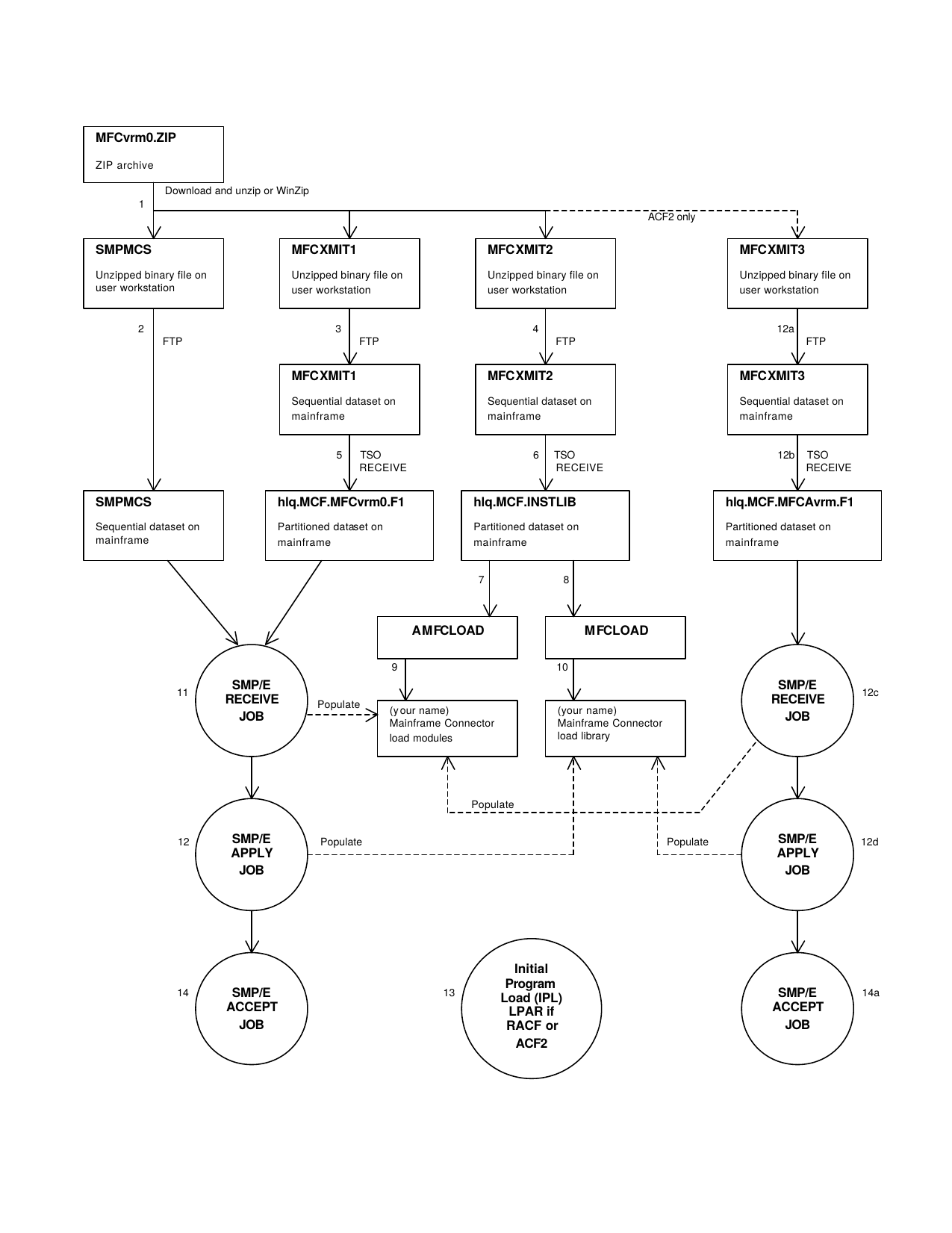
Unpacking archive
Unzip the initial Mainframe Connector distribution file. The unzip function will create four new files. These four files contain the following information:
The
SMPMCSinformation to be used for the Mainframe Connector SMP/E install.The
MFC7030.F1relfile to be used for the Mainframe Connector SMP/E base function install.The
INSTLIBinformation to be used for environment creation, sample procedure and parameter data, sample installation exits, and API usage example programs.The
MFCA703.F1relfile to be used for the Mainframe Connector SMP/E ACF2 dependent function install.
Moving files to z/OS
The files created in the unzip step can now be moved to z/OS. The most likely approach is to use FTP to move the files to an z/OS image. From the system that currently contains the Mainframe Connector unzip files, perform the following:
FTP login to the z/OS image, for example:
ftp zossys
Reply with z/OS userid and password information as prompted.
Set the file transfer mode to binary by issuing the bin command, for example:
bin
Place the Mainframe Connector files on to the z/OS image, for example
put smpmcs 'hlq.SMPMCS'

put mfcxmit1 'hlq.MFC7030.F1.XMIT'

put mfcxmit2 'hlq.INSTLIB.XMIT'

put mfcxmit3 'hlq.MFCA703.F1.XMIT'
exit FTP, for example
quit
The z/OS files should be preallocated. They should be FB datasets with an LRECL of 80 and BLKSIZE 3120. Space should be allocated as (TRK,(5,8),RLSE) for each dataset.
Note
"put mfcxmit3 ’hlq.MFCA703.F1.XMIT’" (see above) and any other MFCA702-involved operations should be performed only if the target system is or will be running ACF2. They do not apply to RACF or TopSecret.
Creating partitioned data sets
The hlq.SMPMCS dataset requires no further processing to be usable. The hlq.MFC7030.F1.XMIT , hlq.INSTLIB.XMIT , and hlq.MFCA703.F1.XMIT datasets require one additional step before the information they contain can be used. These datasets have been created using TSO TRANSMIT. They must now be processed through TSO RECEIVE to create PDS datasets on the z/OS image.
An example of the RECEIVE command follows:
RECEIVE INDATASET('hlq.MFC7030.F1.XMIT')This command will prompt you for the target dataset name. Enter the following response:
DATASET('hlq.MFC.MFC7030.F1')This will cause the contents of the dataset contained in hlq.MFC7030.F1.XMIT to be moved into hlq.MFC.MFC7030.F1 . hlq.MFC.MFC7030.F1 is a partitioned dataset and the RECEIVE command populates this partitioned dataset with the appropriate dataset members.
Repeat the above process for the hlq.INSTLIB.XMIT dataset and, if necessary, for the hlq.MFCA703.F2.XMIT dataset.
hlq.MFC.MFC7030.F1 will require 5 cylinders of DASD space and should be allocated with the following dataset characteristics:
DSORG=PO
LRECL=0
BLKSIZE=6144
DIRBLKS=20
RECFM=U
hlq.MFC.INSTLIB will require 15 tracks of DASD space and should be allocated with the following dataset characteristics:
DSORG=PO
LRECL=80
BLKSIZE=8000
DIRBLKS=5
RECFM=FB
hlq.MFC.MFCA703.F1 (if necessary) will require 5 tracks of DASD space and should be allocated with the following dataset characteristics:
DSORG=PO
LRECL=0
BLKSIZE=6144
DIRBLKS=3
RECFM=U
Installing Mainframe Connector Using SMP/E
This section describes the Mainframe Connector installation process using SMP/E to manage the install.
Creating distribution library and target load library
SMP/E processing loads the distribution and target libraries. The distribution library is used to maintain Mainframe Connector . It contains the distributed load modules for your Mainframe Connector system and can be used for backup. The target library contains all the executable modules needed to run Mainframe Connector .
A sample job for defining your SMP/E environment is provided in member SMPDEF of the .INSTLIB dataset. Modify and execute this job and expect a return code of zero. In modifying, note that it is STRONGLY recommended that separate SMP/E datasets be defined for Mainframe Connector . If you choose not to define separate SMP/E datasets, then the following restrictions will apply to the subsequent installation process:
Mainframe Connector cannot be installed into the SMP/E zone in which the MOD or LMOD EDC400F9 is installed.
If your installation is running ACF2, then Mainframe Connector cannot be installed into the SMP/E zone in which ACF2 is installed.
SMP/E receive processing
You are now ready to do the RECEIVE. A sample job is provided in member SMPREC of the .INSTLIB dataset. You should expect a return code of zero. Any other return code should be investigated.
SMP/E apply processing
Having received the installation data into your global zone, you can now apply the Mainframe Connector base product into your target library. A sample job is provided in member SMPAPP of the install dataset. You should expect a return code of four. The following SMP/E warning messages are expected from the APPLY process:
GIM43401W    MODULE modname IN SYSMOD MFC7030 WAS NOT INSTALLED
             IN ANY TARGET LIBRARY.
Where modname indicates a module name that has not been specifically used in the SMP/E install process, but may be a module used by a stand-alone linkedit job or a module that could be used for diagnostic purposes.
Best practice
It is always wise to run an APPLY/CHECK first to uncover potential errors without actually updating any libraries. SMP/E produces reports that can be used to investigate potential problems.
Apply Mainframe Connector maintenance
If an SMPPTFIN file was sent with the Mainframe Connector installation package it should be SMP/E RECEIVEd and APPLYd at this time. The SMPPTFIN file will contain the accumulated maintenance for Mainframe Connector that has not been included in the base installation. Members PTFREC and PTFAPP in the install dataset provide sample jobs for receiving and applying the Mainframe Connector maintenance.
Installing the Mainframe Connector ACF2 Function
The following sections apply when running Mainframe Connector on a system that uses ACF2 for its security product.
SMP/E update
A sample job for updating the SMP/E environment in preparation for ACF2 SMP/E installation is provided in member ACF2DEF of the install dataset. Modify and execute this job and expect a return code of zero.
SMP/E receive
A sample job to SMP/E RECEIVE the Mainframe Connector ACF2 function dependent sysmod is provided in member ACF2REC of the install dataset. Make the necessary changes to the sample job. You should expect a return code of zero from this job. Any other return code should be investigated.
SMP/E apply
When the ACF2REC job has completed, you can now apply the Mainframe Connector ACF2 sysmod into your target library. A sample job to SMP/E APPLY this sysmod is provided in member ACF2APP of the install dataset. You should expect a return code of four.
Best practice
It is always wise to run an APPLY/CHECK first to uncover potential errors without actually updating any libraries. SMP/E produces reports that can be used to investigate potential problems.
Installing the password change exit
RACF - Installing the RACF password exit ICHPWX01
Upon completion of the SMP/E apply for the base FUNCTION, the RACF password change exit ICHPWX01 can be installed. Member UMDPWX1 in the Mainframe Connector installation library has been provided as a sample to perform this task.
Note
You will only need to install the RACF ICHPWX01 exit if you will be using your z/OS system as a Bravura Pass transparent synchronization trigger system.
The USERMOD should be installed in the same SMP/E environment that contains the RACF base FUNCTION. The sample job in UMDPWX1 will install the USERMOD into the z/OS SMP/E environment and place an updated version of ICHPWX01 into SYS1.LPALIB . The object code for ICHPWX01 is contained in member ICHPWX01 in the Mainframe Connector installation library. It should be moved to a site specific library that is used to maintain USERMOD object code.
If you choose not to install ICHPWX01 into SYS1.LPALIB , it must be installed into a library that is contained in the LPALSTxx concatenation.
You should expect a return code of zero from the UMDPWX1 job. Any other return code should be investigated.
If the ICHPWX01 exit is already being used for other functions, see Password Change Notification Exit Conflict for options for creating a multi-function ICHPWX01 exit.
Restarting the z/OS Image
To enable the Mainframe Connector functionality in the RACF password exit ICHPWX01 , a system IPL (Initial Program Load) must be performed. Make sure that the IPL occurs with a CLPA option. This will cause the system Link Pack Area to be re-initialized and will load a new copy of ICHPWX01 for use by RACF.
RACF - Installing the RACF pass phrase exit ICHPWX11
Upon completion of the SMP/E apply for the base FUNCTION, the RACF pass phrase change exit ICHPWX11 can be installed. Member UMDPH11 in the Mainframe Connector installation library has been provided as a sample to perform this task.
Note
You will only need to install the RACF ICHPWX11 exit if you will be using your z/OS system as a Bravura Pass transparent synchronization trigger system for RACF pass phrase changes.
The USERMOD should be installed in the same SMP/E environment that contains the RACF base FUNCTION. The sample job in UMDPH11 will install the USERMOD into the z/OS SMP/E environment and place an updated version of ICHPWX11 into SYS1.LPALIB . The object code for ICHPWX11 is contained in member ICHPWX11 in the Mainframe Connector installation library. It should be moved to a site specific library that is used to maintain USERMOD object code.
If you choose not to install ICHPWX11 into SYS1.LPALIB , it must be installed into a library that is contained in the LPALSTxx concatenation.
You should expect a return code of zero from the UMDPH11 job. Any other return code should be investigated.
If the ICHPWX11 exit is already being used for other functions, see Password Change Notification Exit Conflict for options for creating a multi-function ICHPWX11 exit.
Restarting the z/OS Image
To enable the Mainframe Connector functionality in the RACF pass phrase exit ICHPWX11 , a system IPL (Initial Program Load) must be performed. Make sure that the IPL occurs with a CLPA option. This will cause the system Link Pack Area to be re-initialized and will load a new copy of ICHPWX11 for use by RACF.
ACF2 - Installing the ACF2 password exit NEWPXIT
Upon completion of the SMP/E apply for the base FUNCTION, the ACF2 password change exit NEWPXIT can be installed. Member UMDNPX1 in the Mainframe Connector installation library has been provided as a sample to perform this task.
Note
You will only need to install the ACF2 NEWPXIT exit if you will be using your z/OS system as a Bravura Pass transparent synchronization trigger system.
The USERMOD should be installed in the same SMP/E environment that contains the ACF2 base FUNCTION. The sample job in UMDNPX1 will install the USERMOD into the z/OS SMP/E environment and place an updated version of NEWPXIT into SYS1.LPALIB . The object code for NEWPXIT is contained in member NEWPXIT in the Mainframe Connector installation library. It should be moved to a site specific library that is used to maintain USERMOD object code.
If you choose not to install NEWPXIT into SYS1.LPALIB , it must be installed into a library that is contained in the LPALSTxx concatenation.
You should expect a return code of zero from the UMDNPX1 job. Any other return code should be investigated.
If the NEWPXIT exit is already being used for other functions, see Password Change Notification Exit Conflict for options for creating a multi-function NEWPXIT exit.
Restarting the z/OS Image
To enable the Mainframe Connector functionality in the ACF2 password exit NEWPXIT , a system IPL (Initial Program Load) must be performed. Make sure that the IPL occurs with a CLPA option. This will cause the system Link Pack Area to be re-initialized and will load a new copy of NEWPXIT for use by ACF2. The ACF2 EXIT GSO record should also be updated to reflect that NEWPXIT is to be active. Contact the ACF2 administrator to have this entry updated in the ACF2 environment.
TopSecret - Installing the TopSecret password exit TSSINSTX
Upon completion of the SMP/E apply for the base FUNCTION, the TopSecret password change exit TSSINSTX can be installed. Member UMDTSX1 in the Mainframe Connector installation library has been provided as a sample to perform this task.
Note
You will only need to install the TopSecret TSSINSTX exit if you will be using your z/OS system as a Bravura Pass transparent synchronization trigger system.
The USERMOD should be installed in the same SMP/E environment that contains the TopSecret base FUNCTION. The sample job in UMDTSX1 will install the USERMOD into the z/OS SMP/E environment and place an updated version of TSSINSTX into SYS1.LINKLIB . The object code for TSSINSTX is contained in members TSSEXITN and TSSPWXIT in the Mainframe Connector installation library. They should be moved to a site specific library that is used to maintain USERMOD object code.
If you choose not to install TSSINSTX into SYS1.LINKLIB , it must be installed into a library that is contained in the LNKLSTxx concatenation.
You should expect a return code of zero from the UMDTSX1 job. Any other return code should be investigated.
If the TSSINSTX exit is already being used for other functions, contact Bravura Security technical support to discuss available options.
If TSSINSTX has been dynamically installed into a linklist dataset of an active z/OS system, a refresh of LLA will be necessary to activate the new module. This can be accomplished with the following z/OS operator command:
F LLA,REFRESH
Enabling TSSINSTX
To enable the Mainframe Connector functionality in the TopSecret password exit TSSINSTX , the exit must be enabled to TopSecret. This can occur dynamically with a z/OS operator command. The following command can be used to enable the TopSecret installation exit:
F TSS,EXIT(ON)
The above command will cause TSSINSTX to be enabled within TopSecret. TSSINSTX must reside somewhere within the current active z/OS linklist for the above modify command to be successful.
SMP/E accept processing
Once it is determined that the status of Mainframe Connector is stable, an SMP/E ACCEPT should be performed for the Mainframe Connector base function.
The ACCEPT job installs Mainframe Connector into the distribution library which is used for backup. This process is similar to APPLY processing. The major difference is that it is irreversible so be sure that you are satisfied with the installation of Mainframe Connector before performing this step.
A sample job is provided in member SMPACC of the install dataset. You should expect a return code of zero. Any other return code should be investigated.
Accepting the Mainframe Connector ACF2 Function
This section pertains only to those customers who will be running Mainframe Connector on a system that uses ACF2 for its security product.
Mainframe Connector ACF2 Function ACCEPT
As with the Mainframe Connector base function, after it has been determined that the status of Mainframe Connector is stable, an SMP/E ACCEPT should be performed for the Mainframe Connector ACF2 dependent function.
A sample job is provided in member ACF2ACC of the install dataset. You should expect a return code of zero. Any other return code should be investigated.
Configuring Mainframe Connector for TCPaccess TCP/IP Environments
If Mainframe Connector will be running on a z/OS system that will be using TCPaccess for TCP/IP communication, additional install steps must be carried out. The default load modules created by the installation process are compatible with the IBM TCP/IP stack. The following sections will describe the steps necessary for creating a TCPaccess compatible Mainframe Connector .
If Mainframe Connector will be running with an IBM TCP/IP stack this section will not apply to your installation. Skip ahead to Other Requirements if Mainframe Connector will be running with an IBM TCP/IP stack.
Mainframe Connector TCPaccess load module dataset
A second load module dataset for Mainframe Connector should be created. The first step of the sample job of member LNKSNS in the INSTLIB install dataset creates this additional load module dataset.
Two approaches can be taken with the load module dataset that will be used for TCPaccess environments. You can decide to create this dataset to be used as a self contained Mainframe Connector load module dataset. If that is the choice, the load modules that have been created in the primary Mainframe Connector load library should be copied into this newly created load library.
If you decide to use the new dataset to contain just the module changes required for TCPaccess, you can use the TCPaccess specific load library and the original load module dataset together in a STEPLIB concatenation in your Mainframe Connector started task procedure.
Creating the Mainframe Connector TCPaccess specific load modules
Four modules need to be re-created specifically for Mainframe Connector to function in a TCPaccess environment. The four modules - PSNCDRVR, PSNCT254, PSNCLDRV, and PSNCTTOC - are created by running the LNKSNS job from the INSTLIB dataset. You will need to supply the name of your TCPaccess .LOAD dataset in the SYSLIB DD statement of this job.
The LNKSNS job will create versions of PSNCDRVR, PSNCT254, PSNCLDRV, and PSNCTTOC that will be able to function with a TCPaccess stack.
Mainframe Connector Started Task Procedure for TCPaccess
In order for Mainframe Connector to properly operate in a TCPaccess environment, the .LINK TCPaccess dataset MUST be included in the STEPLIB concatenation in your Mainframe Connector started task procedure. Member PROCSNS from the INSTLIB dataset provides a sample Mainframe Connector procedure for TCPaccess environments. Also, see SYS1.PROCLIB to review the differing requirements for the Mainframe Connector started task procedure when TCPaccess will be used.
Other Requirements
Authorizing the load module dataset
Regardless of which implementation technique is used, the newly created load module dataset will require z/OS APF dataset authorization. See Defining an Authorized Library for the specifics of making a dataset authorized.
Mainframe Connector started task procedure
SYS1.PROCLIB provides an example of a Mainframe Connector started task procedure that can be used.
Installation Exits
Installation exit points allow sites using Mainframe Connector to introduce alternate and/or additional processes into specific functions within Mainframe Connector operation. Seven exit points are currently provided with Mainframe Connector . They are:
PSNCUX01 - is invoked from the Mainframe Connector password reset module and is used primarily to indicate what should happen with a userid’s REVOKE/CANCEL/SUSPEND status when the corresponding password value is reset. See Exit PSNCUX01 specifics.
PSNCUX02 - is invoked from the Mainframe Connector userid list module and is used primarily to filter the userid list returned to the Bravura Security Fabric server. See Exit PSNCUX02 specifics.
PSNCUX03 - is invoked from the Mainframe Connector userid enable module and is used primarily to indicate whether or not a userid should be enabled (resumed) as requested by the Bravura Security Fabric server. See Exit PSNCUX03 specifics.
PSNCUX04 - is invoked from the Mainframe Connector password phrase reset module and is used primarily to indicate what should happen with a userid’s REVOKE/CANCEL/SUSPEND status when the corresponding password phrase value is reset. See Exit PSNCUX04 specifics.
ISNCUX01 - is invoked from the Mainframe Connector userid create module after a new userid has been successfully created. It allows for site specific operations related to the creation of a new userid. See Exit ISNCUX01 specifics.
ISNCUX02 - is invoked from the Mainframe Connector userid delete module after an existing userid has been successfully deleted. It allows for site specific operations related to the deletion of an existing userid. See Exit ISNCUX02 specifics.
ISNCUX03 - is invoked from the Mainframe Connector group user add/delete module after the specified userid has been successfully added to or deleted from the target group. It allows for site specific operations related to successfully adding/deleting a userid to/from a group. See Exit ISNCUX03 specifics.
ISNCUX04 - is invoked from the Mainframe Connector userid attribute update module after the standard security product attributes have been processed. The exit allows for site specific attribute processing. See Exit ISNCUX04 specifics.
Mainframe Connector provides default exits in all cases. The default exit processing is discussed in the exit specific sections.
Influencing REVOKE/CANCEL/SUSPEND Status and Rejecting Inbound Password Resets - Exit PSNCUX01
The password for a userid can be transparently reset without changing the current active status of the userid. By default, Mainframe Connector ships installation exit PSNCUX01 that leaves the current REVOKE/CANCEL/SUSPEND status of a userid unchanged.
If this default action is not appropriate, the site can provide a customized PSNCUX01 exit. PSNCUX01 is invoked twice for incoming transparent synchronization requests. The pre call occurs just prior to the password reset function in Mainframe Connector . The post call occurs following the password reset function invocation.
PSNCUX01 can also be used to reject an incoming password reset or resetexpire request. This can be useful for sites that want to be able to use their z/OS system as the final arbiter of a proposed new password value.
A sample PSNCUX01 exit is provided in member UX01SAMP of the Mainframe Connector installation library.
Following are the characteristics of the PSNCUX01 user exit:
Its name must be PSNCUX01 and it must reside in either the STEPLIB used for the Mainframe Connector started task or the system linklist
It should run AMODE(31) RMODE(24)
The exit is entered problem state key 8 and should return in this same state otherwise results are unpredictable
The exit must be reentrant
On entry to the exit, R1 points to the following parameter list:
UX01STAT DS    XL1    EXIT INVOCATION STATE (PRE OR POST)
 UX01PRE  EQU   X'80'  PRE INVOCATION
 UX01POST EQU   X'40'  POST INVOCATION
 UX01RSRV DS    XL3    RESERVED
 UX01RSRC DS    F      RESET RETURN CODE (USED FOR POST CALL)
 UX01UID  DS    CL8    USERID FOR WHICH PASSWORD IS BEING RESET
 UX01USER DS    F      A WORD FOR THE USER
 UX01NPWD DS    CL8    REQUESTED NEW PASSWORD VALUE
 UX01MSGB DS    F      ADDRESS OF 128-BYTE RETURN MESSAGE BUFFER THAT
 *                     CAN BE USED TO APPEND TO THE DEFAULT MESSAGE
 *                     THAT IS RETURNED TO THE PWD MANAGER SERVER WHEN
 *                     A M/F CONNECTOR RESET EVENT IS REJECTED BY
 *                     THE M/F CONNECTOR PSNCUX01 EXIT.  THE FORMAT OF
 *                     THIS MESSAGE AREA IS AS FOLLOWS:
 *                     +0 - TWO BYTE LENGTH OF MESSAGE BEING
 *                          RETURNED (MAX OF 126)
 *                     +2 - 126-BYTE MESSAGE BUFFER
Member PUX01PRM in the INSTLIB dataset contains the DSECT mapping macro for the above parameter list.
for the pre exit call, R15 on return contains a return code that will be interpreted as follows:
 R15=0    the current REVOKE/CANCEL/SUSPEND status for
          the userid will not be changed but the
          password will be reset to the new value.
 R15=4    the current REVOKE/CANCEL/SUSPEND status for
          the userid will be reset and the password
          will be reset to the new value.
 R15=8    the reset or resetexpire request should be
          terminated.  The password value will not be
          reset to the requested new value.
for the post exit call, UX01RSRC contains a return code value from the password revoke/reset request. If UX01RSRC=0 , the requested password reset and revoke update have been successful. Any other value in UX01RSRC indicates that the requested operation did not complete successfully.
UX01USER is a word of storage that can be used by the exit routine to maintain state information across the pre and post exit call.
UX01NPWD is the requested new password value for the reset or resetexpire request.
TopSecret ASUSPEND
If Mainframe Connector will be running in a TopSecret environment and you do not want a password reset event to reset the ASUSPEND attribute, see TopSecret and REMOVE ASUSPEND to alter this default function.
ACF2 CANCEL
If Mainframe Connector will be running in an ACF2 environment and you do not want a password reset event to reset the CANCEL flag, see ACF2 and Removing the CANCEL Flag to alter this default function.
Influencing Userids returned to Userlist processing - Exit PSNCUX02
One of the inbound requests supported by Mainframe Connector is a request from a Bravura Security Fabric server to provide a list of userids and corresponding user names as defined in the z/OS security product database. By default, Mainframe Connector ships installation exit PSNCUX02 that will return all userids defined in the security product database.
If this default action is not appropriate, the site can provide a customized PSNCUX02 exit. A return code of 4 from PSNCUX02 indicates that the current userid should not be returned to the Bravura Security Fabric server for the current user list request. Optionally, the userid can be modified by the exit to indicate the ’next’ userid that should be returned by the user list function.
A sample PSNCUX02 exit is provided in member UX02SAMP of the Mainframe Connector installation library.
Following are the characteristics of the PSNCUX02 user exit:
Its name must be PSNCUX02 and it must reside in either the STEPLIB used for the Mainframe Connector started task or the system linklist
It should run AMODE(31) RMODE(24)
The exit is entered problem state key 8 and should return in this same state otherwise results are unpredictable
The exit must be reentrant
On entry to the exit, R1 points to the following parameter list:
 UX02UID  DS    F    ADDR OF THE USERID FLD (8 BYTES)
 UX02UNAM DS    F    ADDR OF THE USER NAME FLD (20 BYTES)
Member PUX02PRM in the INSTLIB dataset contains the DSECT mapping macro for the above parameter list.
On return, R15 should contain one of the following return codes
 R15=0    the current userid and user name should be returned

          to the Password Manager server for this user list request.
 R15=4    the current userid should be bypassed.  PSNCUX02
          may have provided an alternative 'next' userid in
          the area pointed to by UX02UID.
Influencing RESUME Requests - Exit PSNCUX03
A Bravura Security Fabric server can request Mainframe Connector to resume/enable a userid. By default, Mainframe Connector ships installation exit PSNCUX03 that will permit the resume/enable operation to continue as requested.
If this default action is not appropriate, the site can provide a customized PSNCUX03 exit. A return code of 4 from PSNCUX03 indicates that the specified userid should not be resumed/enabled and that its current system access status should remain unchanged.
A sample PSNCUX03 exit is provided in member UX03SAMP of the Mainframe Connector installation library.
Following are the characteristics of the PSNCUX03 user exit:
Its name must be PSNCUX03 and it must reside in either the STEPLIB used for the Mainframe Connector started task or the system linklist
It should run AMODE(31) RMODE(24)
The exit is entered problem state key 8 and should return in this same state otherwise results are unpredictable
The exit must be reentrant
On entry to the exit, R1 points to the following parameter list:
UX03UID  DS    CL8       USERID FOR ENABLE/RESUME REQUEST
UX03MSGB DS    F         ADDRESS OF 128-BYTE RETURN MESSAGE BUFFER THAT
*                        CAN BE USED TO APPEND TO THE DEFAULT MESSAGE
*                        THAT IS RETURNED TO THE PWD (OR ID) MANAGER
*                        SERVER WHEN AN ENABLE/RESUME EVENT IS REJECTED
*                        BY THE M/F CONNECTOR PSNCUX03 EXIT.  THE
*                        FORMAT OF THIS MESSAGE AREA IS AS FOLLOWS:
*                        +0 - TWO BYTE LENGTH OF MESSAGE BEING
*                             RETURNED (MAX OF 126)
*                        +2 - 126-BYTE MESSAGE BUFFER
Member PUX03PRM in the INSTLIB dataset contains the DSECT mapping macro for the above parameter list.
on return, R15 should contain one of the following return codes
 R15=0    the specified userid should be resumed/enabled by the
          Mainframe Connector resume module.
 R15=4    the system access status for the specified userid
          should remain unchanged.
Influencing REVOKE/CANCEL/SUSPEND Status and Rejecting Inbound Password Phrase Resets - Exit PSNCUX04
The password phrase for a userid can be reset without changing the current active status of the userid. By default, Mainframe Connector ships installation exit PSNCUX04 that leaves the current REVOKE/CANCEL/SUSPEND status of a userid unchanged.
If this default action is not appropriate, the site can provide a customized PSNCUX04 exit. PSNCUX04 is invoked twice for incoming transparent synchronization requests. The pre call occurs just prior to the password phrase reset function in Mainframe Connector . The post call occurs following the password phrase reset function invocation.
PSNCUX04 can also be used to reject an incoming password phrase reset or resetexpire request. This can be useful for sites that want to be able to use their z/OS system as the final arbiter of a proposed new password phrase value.
A sample PSNCUX04 exit is provided in member UX04SAMP of the Mainframe Connector installation library.
Following are the characteristics of the PSNCUX04 user exit:
Its name must be PSNCUX04 and it must reside in either the STEPLIB used for the Mainframe Connector started task or the system linklist
It should run AMODE(31) RMODE(24)
The exit is entered problem state key 8 and should return in this same state otherwise results are unpredictable
The exit must be reentrant
On entry to the exit, R1 points to the following parameter list:
 UX04STAT DS    XL1    EXIT INVOCATION STATE (PRE OR POST)
 UX04PRE  EQU   X'80'  PRE INVOCATION
 UX04POST EQU   X'40'  POST INVOCATION
 UX04RSRV DS    XL3    RESERVED
 UX04RSRC DS    F      RESET RETURN CODE (USED FOR POST CALL)
 UX04UID  DS    CL8    USERID FOR WHICH PWD PHRASE IS BEING RESET
 UX04USER DS    F      A WORD FOR THE USER
 UX04NPHR DS    CL100  REQUESTED NEW PASSWORD PHRASE VALUE
 UX04MSGB DS    F      ADDRESS OF 128-BYTE RETURN MESSAGE BUFFER THAT
 *                     CAN BE USED TO APPEND TO THE DEFAULT MESSAGE
 *                     THAT IS RETURNED TO THE PWD MANAGER SERVER WHEN
 *                     A M/F CONNECTOR RESET EVENT IS REJECTED BY
 *                     THE M/F CONNECTOR PSNCUX04 EXIT.  THE FORMAT OF
 *                     THIS MESSAGE AREA IS AS FOLLOWS:
 *                     +0 - TWO BYTE LENGTH OF MESSAGE BEING
 *                          RETURNED (MAX OF 126)
 *                     +2 - 126-BYTE MESSAGE BUFFER
Member PUX04PRM in the INSTLIB dataset contains the DSECT mapping macro for the above parameter list.
For the pre exit call, R15 on return contains a return code that will be interpreted as follows:
 R15=0    the current REVOKE/CANCEL/SUSPEND status for
          the userid will not be changed but the
          password phrase will be reset to the new value.
 R15=4    the current REVOKE/CANCEL/SUSPEND status for
          the userid will be reset and the password phrase
          will be reset to the new value.
 R15=8    the reset or resetexpire request should be
          terminated.  The password phrase value will not be
          reset to the requested new value.
For the post exit call, UX04RSRC contains a return code value from the password phrase revoke/reset request. If UX04RSRC=0 , the requested password phrase reset and revoke update have been successful. Any other value in UX04RSRC indicates that the requested operation did not complete successfully.
UX04USER is a word of storage that can be used by the exit routine to maintain state information across the pre and post exit call.
UX04NPHR is the requested new password phrase value for the reset or resetexpire request.
TopSecret ASUSPEND
If Mainframe Connector will be running in a TopSecret environment and you do not want a password phrase reset event to reset the ASUSPEND attribute, see TopSecret and REMOVE ASUSPEND to alter this default function.
ACF2 CANCEL
If Mainframe Connector will be running in an ACF2 environment and you do not want a password phrase reset event to reset the CANCEL flag, see ACF2 and Removing the CANCEL Flag to alter this default function.
Userid Create Installation Exit - Exit ISNCUX01
An Bravura Identity server can request Mainframe Connector create a new userid. By default, Mainframe Connector ships installation exit ISNCUX01 that performs no additional processing with respect to a userid create operation.
If this default function is insufficient, the site can provide a customized ISNCUX01 exit. This exit can be used to provide any additional operations that a site may require that extend beyond the specific creation of the userid. An example of this might be the creation of a master catalog userid alias.
A sample ISNCUX01 exit is provided in member UX1ISAMP of the Mainframe Connector installation library.
Following are the characteristics of the ISNCUX01 user exit:
Its name must be ISNCUX01 and it must reside in either the STEPLIB used for the Mainframe Connector started task or the system linklist
It should run AMODE(31) RMODE(24)
The exit is entered problem state key 8 and should return in this same state otherwise results are unpredictable
The exit must be reentrant
On entry to the exit, R1 points to the following parameter list:
 UX1IREQ  DS    CL8       SPECIFIES OPERATION TYPE 'CREATE'
 UX1IUID  DS    CL8       USERID THAT HAS BEEN CREATED
 UX1IMDL  DS    CL8       USERID USED AS MODEL USERID
 UX1IUNM  DS    CL20      USER NAME OF CREATE USERID
 UX1UAVA  DS    F         ADDRESS OF ATTRIBUTE VECTOR
 UX1UAVC  DS    F         ADDRESS OF ATTRIBUTE VECTOR COUNT ADDRESS
Member PUX1IPRM in the INSTLIB dataset contains the DSECT mapping macro for the above parameter list.
A return code value in R15 is not currently examined on return to the userid create module
Userid Delete Installation Exit - Exit ISNCUX02
An Bravura Identity server can request Mainframe Connector delete an existing userid. By default, Mainframe Connector ships installation exit ISNCUX02 that performs no additional processing with respect to a userid delete operation.
If this default function is insufficient, the site can provide a customized ISNCUX02 exit. This exit can be used to provide any additional operations that a site may require that extend beyond the specific deletion of the userid. An example of this might be to delete the master catalog userid alias.
Specific to sites using Mainframe Connector in a RACF environment, an option to automatically execute suggested cleanup commands such as PERMIT, DELETE, RALTER, and RDELETE upon return from ISNCUX02 is provided. The suggested commands are passed in buffers which may be examined, and for which automatic command execution may be requested via return codes and bit flag settings. This has no impact or effect on Mainframe Connector operation in ACF2 or TopSecret environments.
A sample ISNCUX02 exit is provided in member UX2ISAMP of the Mainframe Connector installation library.
Following are the characteristics of the ISNCUX02 user exit:
Its name must be ISNCUX02 and it must reside in either the STEPLIB used for the Mainframe Connector started task or the system linklist
It should run AMODE(31) RMODE(24)
The exit is entered problem state key 8 and should return in this same state otherwise results are unpredictable
The exit must be reentrant
On entry to the exit, R1 points to the following parameter list:
 UX2IREQ  DS    CL8   SPECIFIES OPERATION TYPE 'DELETE'
 UX2IUID  DS    CL8   USERID THAT HAS BEEN DELETED
 UX2IFCBA DS    A     FIRST CMD BUFF ADDR OR 0 IF NO CMD BUFFS PRESENT
Member PUX2IPRM in the INSTLIB dataset contains the DSECT mapping macro for the above parameter list. Member PUX2ICMB in the INSTLIB dataset contains the DSECT mapping macro for the command buffer contents.
the following R15 return codes have the associated meaning upon exit from ISNCUX02
0: Do not automatically execute any commands.
4: Automatically execute only those commands for which the UX2ICA bit flag has been set in the command buffer.
8: Automatically execute all commands. All UX2ICA bit flags are ignored and need not be set.
Group User Add/Delete Installation Exit - Exit ISNCUX03
An Bravura Identity server can request Mainframe Connector add or delete a userid from a RACF or TopSecret group. By default, Mainframe Connector ships installation exit ISNCUX03 that performs no additional processing when a userid is added to or deleted from a RACF or TopSecret group.
If this default function is insufficient, the site can provide a customized ISNCUX03 exit. This exit can be used to provide any additional operations that a site may require that extend beyond the group user add or group user delete operation.
A sample ISNCUX03 exit is provided in member UX3ISAMP of the Mainframe Connector installation library.
Following are the characteristics of the ISNCUX03 user exit:
Its name must be ISNCUX03 and it must reside in either the STEPLIB used for the Mainframe Connector started task or the system linklist
It should run AMODE(31) RMODE(24)
The exit is entered problem state key 8 and should return in this same state otherwise results are unpredictable
The exit must be reentrant
On entry to the exit, R1 points to the following parameter list:
 UX3IREQ  DS    CL8       REQUEST TYPE (EITHER 'ADD' OR 'DEL')
 UX3IUID  DS    CL8       USERID BEING ADDED OR DELETED
 UX3IGRP  DS    CL8       GROUP FOR USERID ADD OR DELETE
Member PUX3IPRM in the INSTLIB dataset contains the DSECT mapping macro for the above parameter list.
A return code value in R15 is not currently examined on return to the userid group add/delete module
Userid Attribute Update Exit - Exit ISNCUX04
An Bravura Identity server can request Mainframe Connector make updates to userid attributes. By default, Mainframe Connector ships installation exit ISNCUX04 that performs no additional processing when a userid’s attributes are updated.
If this default function is insufficient, the site can provide a customized ISNCUX04 exit. This exit can be used to provide any additional operations that a site may require beyond the standard attribute updates.
A sample ISNCUX04 exit is provided in member UX4ISAMP of the Mainframe Connector installation library.
Following are the characteristics of the ISNCUX04 user exit:
Its name must be ISNCUX04 and it must reside in either the STEPLIB used for the Mainframe Connector started task or the system linklist
It should run AMODE(31) RMODE(24)
The exit is entered problem state key 8 and should return in this same state otherwise results are unpredictable
The exit must be reentrant
On entry to the exit, R1 points to the following parameter list:
 UX4UID   DS    CL8       USERID
 UX4UAVA  DS    F         USER ATTR VECTOR ADDR
 UX4UAVC  DS    F         USER ATTR VECTOR COUNT ADDR
Member PUX4IPRM in the INSTLIB dataset contains the DSECT mapping macro for the above parameter list.
A return code value in R15 is not currently examined on return to the userid attribute update module