Phone Password Manager
About Phone Password Manager
Phone Password Manager™ is a telephony-enabled, self-service password reset solution that enables users to manage their own authentication issues using any telephone. It is designed for scenarios where users cannot access a web interface or are accustomed to resolving issues via phone-based support.
Key capabilities include:
Reset forgotten or expired passwords across one or more target systems
Clear intruder lockouts
Manage RSA SecurID and other supported tokens
Obtain workstation unlock codes for devices protected by hard-disk encryption (HDD)
Phone Password Manager is the only complete solution that allows users to unlock encrypted workstations entirely through a phone interaction, without needing access to a registered smart device.
User experience with Phone Password Manager
The standard integration script provides the following user workflow:
The user calls the organization’s telephony system (PBX).
They dial the extension assigned to Phone Password Manager.
The system prompts the user to authenticate using configured factors (e.g., Q&A, RSA, Duo, Okta, RADIUS).
After authentication, the user selects an operation:
Reset password
Unlock account
Retrieve HDD unlock code
The IVR provides the new password or unlock code verbally.
The user enters the code to unlock their workstation (if applicable).
All resets and unlocks are performed automatically.
Phone Password Manager can also support outbound calling to deliver urgent notifications to end users.
Architecture
A typical Phone Password Manager deployment consists of the following:
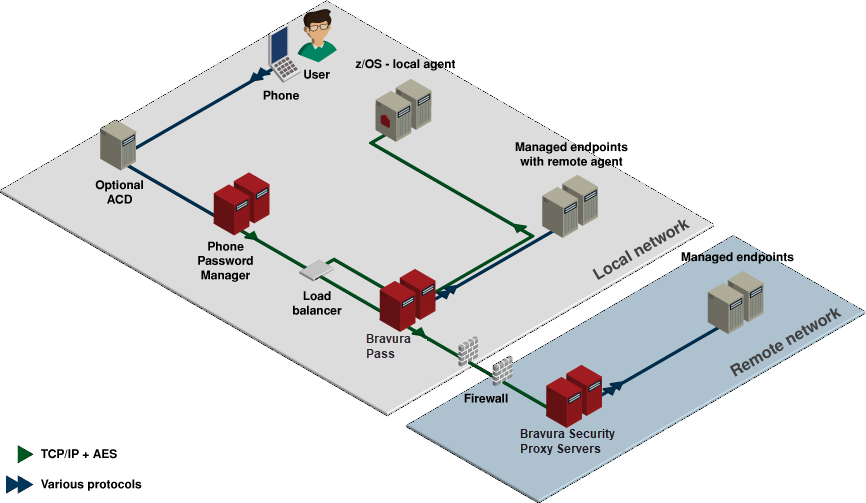
Bravura Pass server
Runs the API SOAP Service (
idapisoap) used by Phone Password Manager.Provides access to password reset, challenge-response, and account operations.
IVR server
Runs Phone Password Manager and the telephony integration (Asterisk® or Dialogic® PowerMedia HMP).
Handles incoming calls, voice menus, audio prompts, and DTMF tone detection.
Communicates with Bravura Pass via the pspushpass.dll library.
Recommended deployment
Bravura Pass and Phone Password Manager should be hosted on separate servers to isolate telephony workloads, simplify maintenance, and avoid system downtime during updates.
The diagram below shows a typical Phone Password Manager installation. The physical layout of the Phone Password Manager solution varies depending on your organization's needs.
Example process
Below is an example flow for resetting a user’s password using Bravura Pass's telephone-based challenge-response authentication:
User forgets password or triggers intruder lockout.
User calls the support number and is routed to the IVR.
Phone Password Manager prompts for the user’s numeric ID.
User keys in the ID.
Phone Password Manager server sends a request to the Bravura Pass server.
Bravura Pass looks up the user’s profile.
Bravura Pass returns a random subset of challenge-response questions to Phone Password Manager.
Phone Password Manager prompts the user to answer the selected questions.
User keys in (numeric) answers to the selected questions, or answers questions verbally, depending on configuration.
Phone Password Manager forwards answers to the Bravura Pass server.
Bravura Pass validates the credentials.
Phone Password Manager prompts the user to select reset password or unlock account.
User: navigates the audio menu, and requests a password reset.
User selects target systems.
Phone Password Manager invokes secure API/RPC to request a random password for this user.
Bravura Pass generates and applies the password on selected systems.
Phone Password Manager server enunciates the password, and prompts the user if to reset another password.
Optional: Bravura Pass writes a ticket to a call tracking system.
Optional Bravura Pass sends the user a confirmation email.
Integration options
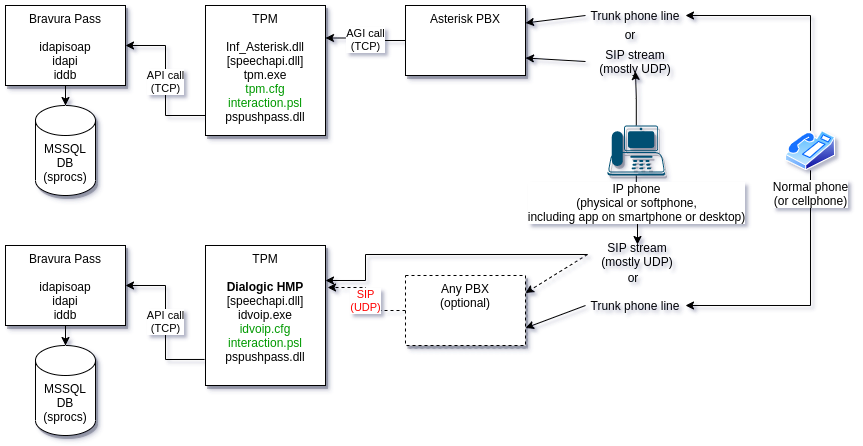
Phone Password Manager supports several telephony integration models
Integration design considerations
Minimize call-processing segments to reduce latency and audio errors.
Use SIP with QoS where possible.
Maintain Separation of Duties by allowing PBX administrators to manage telephony configurations.
Asterisk integration
There are free as well as paid versions for PBXs which support the AGI.
The Asterisk integration can be used both on its own, as well as (not recommended, but feasible) intermediary between an existing legacy PBX that doesn't support AGI or SIP, because FreePBX has modules for older protocols, and some paid modules for some of the more advanced and better UX and other features.
This is the simplest and most robust option:
Uses AGI (Asterisk Gateway Interface) over TCP.
Supports common PBX systems.
Handles pre-rendered IVR audio prompts.
Minimizes configuration complexity and reduces latency.
Besides the comparatively simple configuration, the use of TCP in the API calls from the PBX to the Phone Password Manager make this solution very robust, but limited to the implemented AGI functions. The main drawback of this integration is that the dll used to communicate with Asterisk has to change sometimes as the Asterisk API changes (rarely).
Asterisk as an Intermediary (Legacy PBX Bridge)
Used when integrating with proprietary PBXs (Avaya, Nortel, Cisco) that do not support SIP or AGI.
Adds latency and increases configuration burden.
Not recommended except when necessary for backwards compatibility.
Dialogic Host Media Processing software integration
Integrating with Dialogic Host Media Processing (HMP) software is harder to configure, maintain and much harder to troubleshoot.
The main issue is the SIP stream which is mostly UDP with the control sequences sent over TCP.
When delays occur in the software-processed stream at the PBX, in the networking to the Phone Password Manager server or on the Phone Password Manager server itself, even a few microseconds interruption in the stream can cause pressed digits to be "multiplied" (the user presses "1" and Phone Password Manager heard "1","1", or even 3 copies, on longer presses)
These issues are hard to replicate in a controlled environment with a few callers, but real-life systems have all kinds of load and noise issues.
This solution makes sense when your organization does not have an Asterisk PBX or does not have any internal telephone system, because Dialogic HMP software can make the SIP listening port available on the network, and from there (unsafely) on the Internet. There is a paid option with trial license available for testing.
This is the option to use when integrating with older proprietary PBX systems such as Nortel, Avaya, or Cisco, which don't support the AGI, but support SIP.
More configuration is needed:
Installing the Dialogic HMP software.
If a PBX is used, matching the HMP listening configuration to that of the PBX.
Configuring HMP's listening options, including routing over the internal or (ouch) external network, with its stringent latency and QoS requirements.
Configuring Phone Password Manager to match the complex frequency / tone options of the HMP and PBX.
Phone Password Manager with its Dialogic HMP becomes a PBX of its own, which can accept direct IP phone (SIP) calls.
Some customers prefer to pass the SIP stream through their existing on-prem PBX in order to simplify the security configuration on the outside of their private network. This is much more flexible to configure and doesn't depend on the limitations of the API calls. But that flexibility comes with much more telephony protocol knowledge necessary to troubleshoot any issues.
Phone Password Manager generates its own voice prompts (or uses pre-rendered voice "fonts" like the Asterisk integration)
Common integration
Regardless of telephony transport (Asterisk, SIP, Dialogic):
Phone Password Manager exposes compiled IVR functions via PSLang.
Scripts can interact with the SOAP API and audio/DTMF streams.
Sample PSLang scripts and libraries are provided for:
Authentication flows
Password reset
Account unlock
Token management
Scripts can be extended to support additional languages or authentication methods.