Configuring group-level resource operations
Define resource operations for groups to:
Determine whether Bravura Security Fabric connectors automatically fulfill requests or whether human agents will carry out tasks to fulfill the requests.
Add implementers to a group to define who fulfills requests based on the group if an Bravura Security Fabric connector is not used.
You can override resource operations at the target system and group level. If the operation is set at either of those levels to be carried out by an implementer, you must assign at least one implementer. If you do not do this, requests involving the group will be put on hold unless implementers are dynamically assigned by a plugin.
Inheriting resource operation configuration from the target system
You can configure target systems so that managed groups inherit the resource operation configuration settings of the target system. You can also override the configuration for a group, or add implementers.
Enable inheritance by selecting the Default authorization for child resources, including templates and managed groups, will be inherited from the target system option on the relevant Target system information page .
To override or add to the configuration for a managed group:
Navigate to the Managed group information page.
Set Override implementation configuration to:
Use only inherited configuration
Do not inherit configuration
Add to inherited configuration (default)
Click the Resource operations tab.
If you chose to not inherit configuration, then the page shows the resource operations explicitly setup for the managed group; no settings from the target system should display.
If you chose to add to inherited configuration, then the page displays settings that are both inherited and explicitly set for the group.
Proceed to configure resource operations as described in the rest of this section.
Determining override levels
To set resource operation override levels for a group:
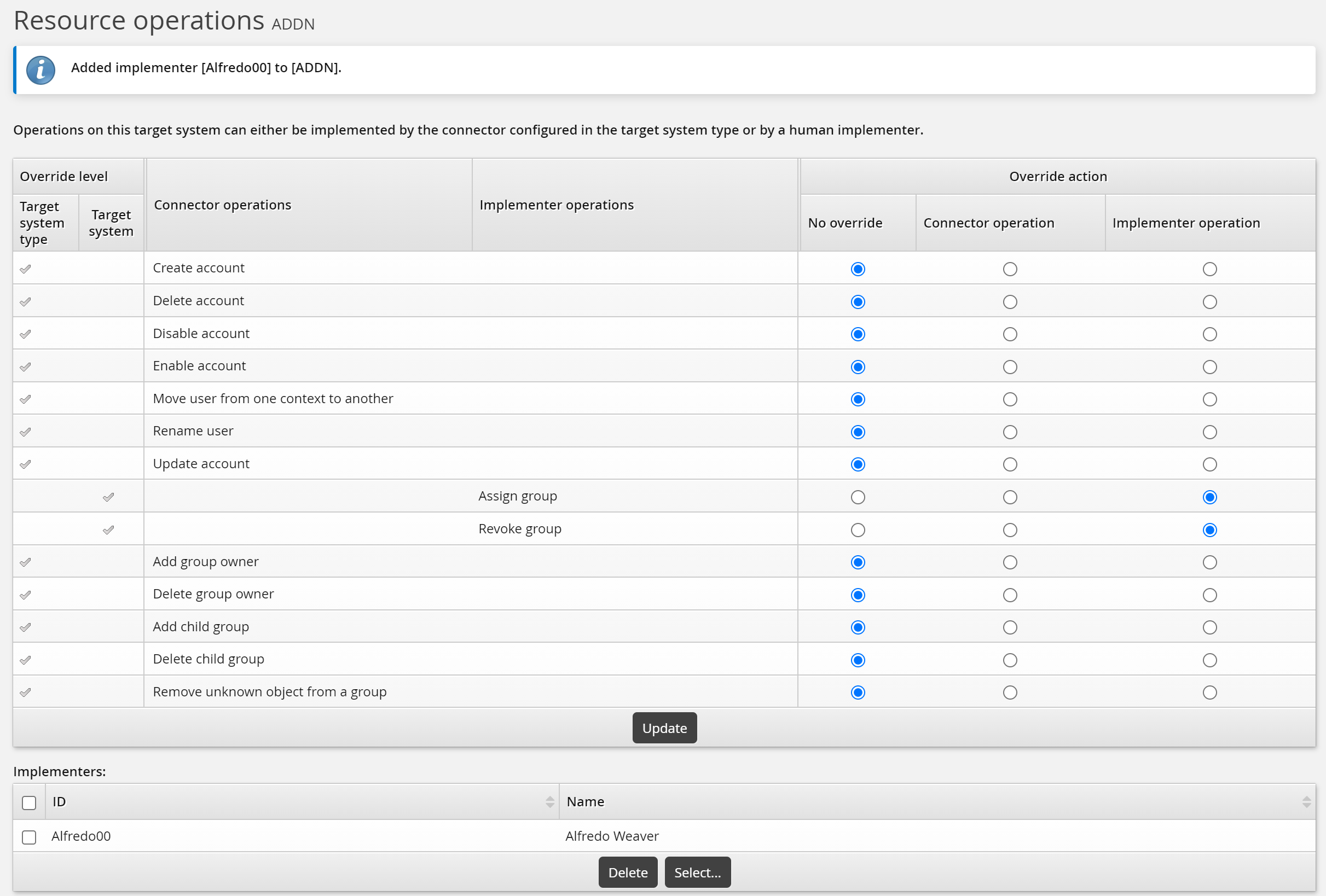
Navigate to the Resource operations page .
Select:
No override – the operation setting is inherited from the connector or target system.
Connector operation – the operation will be connector-enacted, regardless of the connector or target system setting.
Implementer operation – the operation will be implementer-enacted, regardless of the connector or target system setting.
Click Update.
Assigning static implementers
When the group-level operation is carried out by an implementer, whether by inheriting the setting from the target system, or being explicitly set, an Implementers table is included on the Implementer operation page. If implementers are assigned to the target system, they are inherited by the group. You can remove or keep the inherited implementer, or add new implementers for the group.
Note
If you chose to not inherit the configuration from the target system, you cannot assign the same implementer that is assigned at the target system level.
To assign static implementers to a group:
Navigate to the Resource operations page .
Click Select… at the bottom of the Implementers table.
Search for, or select the checkboxes next to the implementers that you want to assign to the resource.
Click Select at the bottom of the page.
To remove static implementers from a group, click Remove implementer in the same row as the user’s ID.
Click Update at the bottom of the page.
See also:
Assigning implementers by user class
To assign implementers to a group based on user class:
Navigate to the Resource operations page .
Click the User classes sub-tab.
To define membership criteria:
Select existing user classes: Click Select… and enable the checkboxes for the user classes you want to add, then click Select.
Create new user classes: Click
 Add new…. See Adding user classes for full details on how to create a new user class.
Configure Participant mapping for each user class that you add.
Select and create user classes until you have defined membership.
If your membership criteria includes multiple user classes, define whether users are required to match All of the user classes or Any of the user classes.
Removing users from membership
To remove users from membership, you can:
Edit user classes to change the participants.
Delete user classes from the membership criteria.
Navigate to the membership criteria page where user classes are listed.
Enable the checkbox next to the user classes you want to delete.
Click Delete.