Roles app
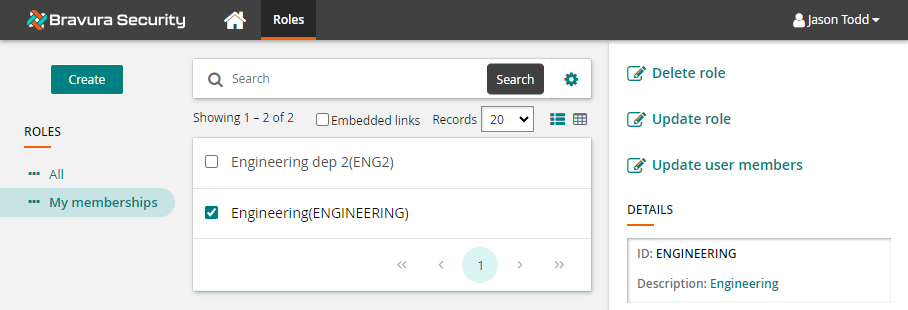
The Roles app allows users to request role membership and role configuration changes.
It is enabled and configured via the Scenario.im_role_wizard component , which is installed by default. The component includes:
Pre-defined requests
User classes
Additional entries into
extdbtableshid_idmconfig_wizard_attributes
im_policy_authorization
See also
See Roles in end-user documentation describes how end users view and request changes.
Roles app access
Access to the Roles app is enabled by default for all end users. The app allows end users to view their role memberships and request assignments and revocations for any roles they hold via the Roles app. Access to specific requests is controlled by user classes and pre-defined requests.
Roles must be both enabled and assignable in order for membership to be requested.
Pre-defined requests
Users can create, update, delete and/or authorize role membership and configurations based on which pre-defined requests they have access to:
Pre-defined request | Description |
|---|---|
ROLE_CREATE | Create role |
ROLE_DELETE | Delete role |
ROLE_UPDATE | Update role |
ROLE_UPDATE_ATTRS | Update attributes |
ROLE_UPDATE_ENTITLEMENTS | Update entitlements |
ROLE_UPDATE_USERS | Update user members |
USER_ADD_ROLES | Assign roles |
USER_DELETE_ROLES | Revoke roles |
_CERT_ROLE_REMEDIATION_ | Default remediation for roles |
_RESOLVE_ROLE_DEFICITS_ | Add missing role entitlements |
User classes
For using the Roles App, users can be added to the following default user classes appropriately to grant the pre-defined requests needed:
User class | Description |
|---|---|
ROLE_AUTHORIZERS | Role request authorizers |
ROLE_CREATE_USERS | Users who can create roles |
ROLE_DELETE_USERS | Users who can delete roles |
ROLE_UPDATE_USERS | Users who can update roles |
Configure role request wizard attributes
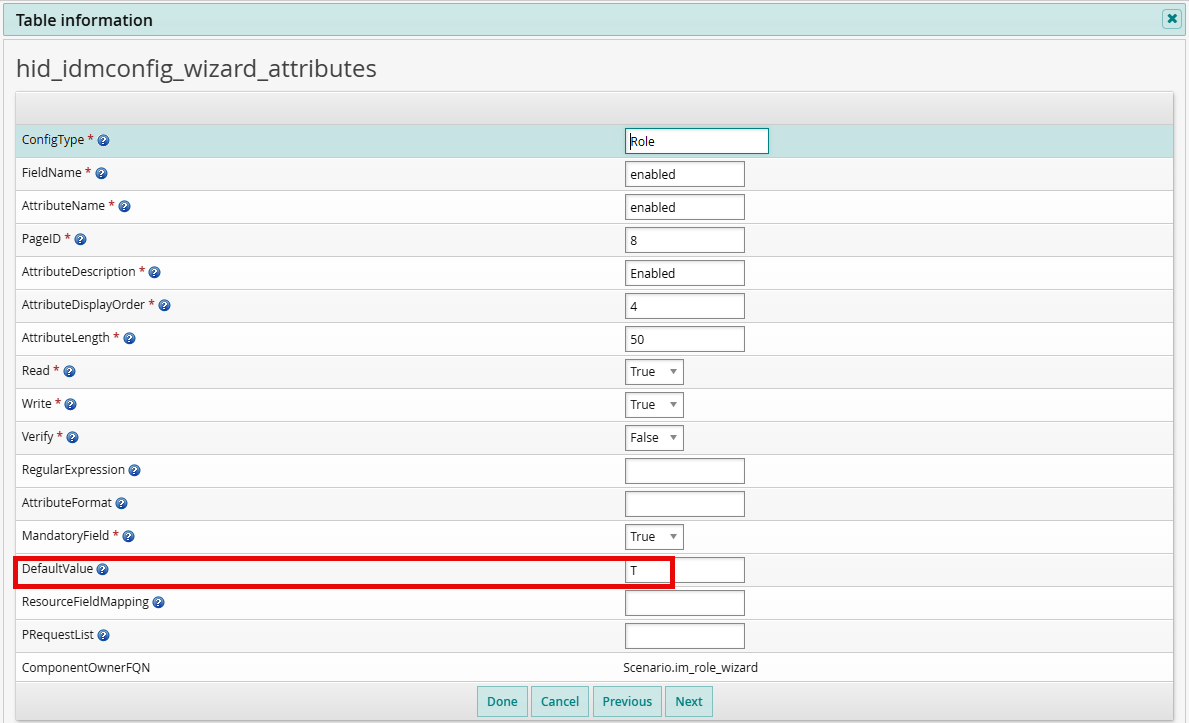
The hid_idmconfig_wizard_attributes extdb table controls which role attributes are exposed in the request wizard and what restrictions or default values apply. Each row in the table defines a rule for a specific role attribute within the context of one or more pre-defined requests.
When a rule is triggered for a request, it exposes the specified attribute in the wizard. If the attribute is not in scope for the request (based on PRequestList), it does not appear in the wizard and no changes are made to its value.
Table columns
The following columns define each rule:
Column | Description |
|---|---|
ConfigType | The type of configuration object (for example, Role). |
FieldName | The internal field name of the attribute (for example, enabled, assignable). |
AttributeName | The attribute identifier used in the wizard. |
AttributeDescription | The display label shown to the user in the wizard. |
AttributeDisplayOrder | The order in which the attribute appears in the wizard. |
AttributeLength | The maximum character length of the attribute value. |
Read | Whether the attribute is visible in the wizard (True or False). |
Write | Whether the attribute can be modified in the wizard (True or False). |
Verify | Whether the attribute requires verification (True or False). |
MandatoryField | Whether the attribute must have a value when submitting the request (True or False). |
DefaultValue | An optional default value to populate in the wizard. If left blank, the current value from the database is preserved. If set (for example, T for true), the wizard displays this value instead of the stored value. |
PRequestList | A comma-separated list of pre-defined requests this rule applies to. If left blank, the rule applies to all PDRs. |
How DefaultValue and PRequestList interact
The DefaultValue and PRequestList columns work together to control attribute behavior across different request types:
If PRequestList is blank, the rule applies to all role request PDRs. The attribute appears in the wizard for every role request type.
If PRequestList specifies one or more PDRs (for example, ROLE_CREATE), the attribute only appears in the wizard for those PDRs. For other PDRs, the attribute is not exposed and its value remains unchanged.
If DefaultValue is set (for example, T), the wizard displays that default value instead of the current database value. When the request is submitted, the default value is written back, which may overwrite the existing value.
If DefaultValue is blank, the wizard displays the current value from the database, preserving it unless the user changes it manually.
Important
If DefaultValue is set to T (true) for the enabled or assignable attributes and PRequestList is blank, every role request submission overwrites the stored value with the default. This can cause disabled or non-assignable roles to become enabled or assignable unintentionally. To prevent this, either clear the DefaultValue or restrict the rule to specific PDRs using PRequestList.
Example
The default configuration includes a rule for the enabled attribute with DefaultValue set to T and PRequestList left blank. This means that for any role request (ROLE_CREATE, ROLE_UPDATE, and so on), the enabled field appears in the wizard with a default value of T (true).
To prevent role update requests from overwriting the enabled status:
Set PRequestList to only the PDRs where the default should apply (for example, ROLE_CREATE), or
Clear the DefaultValue so the wizard displays the current stored value instead.