Determining language preference
Bravura Security Fabric determines each user’s preferred language in the following ways:
A value specified in the Bravura Security Fabric URL
The user’s browser preference
Using the language selector in Bravura Security Fabric
Including language preference in the URL
If the URL used to access Bravura Security Fabric includes the <lang>-<locale> code in its path after the instance name, then Bravura Security Fabric loads the skin for the specified language.
For example, for Spanish enter the URL:
https://idm-server/default/es-es
As the user navigates through the interfaces, the path is appended to the URL, for example:
https://idm-server/default/es-es/gerer-le-system/recursos
If the specified language is not installed, then Bravura Security Fabric displays an error.
Alternatively, if the URL used to access Bravura Security Fabric includes LANG=<lang>-<locale> in its query string, then Bravura Security Fabric loads the skin for the specified language.
For example, for Spanish enter the URL:
https://idm-server/default/?LANG=es-es
If the specified language is not installed, then Bravura Security Fabric falls back to American English (en-us).
If the URL includes both a locale in the path, and a LANG query parameter, then the locale specified in the path takes precedence; for example, Spanish will be loaded from the following URL:
https://idm-server/default/es-es/?LANG=tr-tr
Using browser preferences
If no language is specified in the URL, Bravura Security Fabric checks the browser for the user’s language preferences. If no exact match is found among the installed languages, Bravura Security Fabric uses the closest related language. For example, if the browser preferences are set to:
Polish (pl-pl)
French/Canada (fr-ca)
and Bravura Security Fabric has Italian/Italy (it-it) and French/France (fr-fr) language skins installed, Bravura Security Fabric will first check for Polish language packs, then French, settling on French/France (fr-fr). If a related language cannot be found, Bravura Security Fabric defaults to American English (en-us).
Using the language selector
If multiple languages have been installed, a language selector is available in the top right hand corner of the login page. Click the language selector icon to display the available languages, then select the language you want to use.
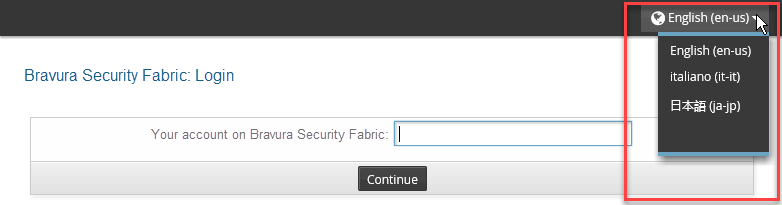
To access the language selector after you have logged in, click the user menu icon first, then scroll down to the language selector. The available languages will be displayed. You can then select the language you want to use.
