Transparent Password Synchronization
About transparent password synchronization
Bravura Pass can extend native password changes to selected system types with transparent password synchronization. When enabled on a trigger system:
Native password changes are evaluated against the Bravura Pass password policy and may be rejected if the new password does not comply.
Approved password changes trigger automatic synchronization to the user's other managed accounts.
Architecture
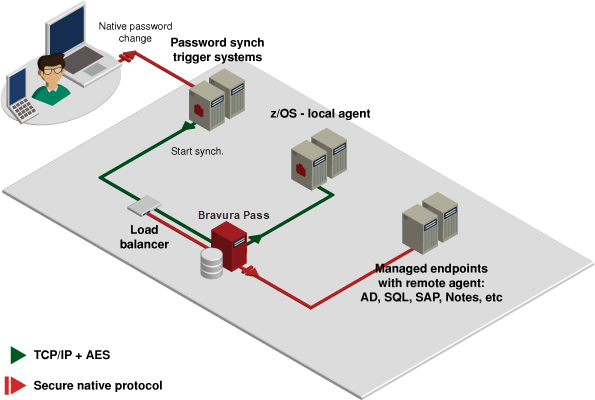
When a user changes a password natively on a monitored system (for example, through a Windows workstation connected to AD), the installed trigger contacts a Bravura Pass server—typically via the load balancer.
Two calls are made to Bravura Pass :
Password policy evaluation
The trigger sends the user ID and proposed password.
Bravura Pass checks the password against:
Assigned password policies
Full password history (unlimited)
Dictionaries and other rule sets
If the password fails policy requirements, Bravura Pass instructs the trigger to reject the change. No password is committed locally, and the user receives an error.
If Bravura Pass is unreachable, the trigger can be configured to accept passwords by default for fault tolerance.
Synchronization request
Once the local system commits the password, the trigger notifies Bravura Pass.
Bravura Pass looks up all systems where the user has accounts.
Bravura Pass looks up all systems where the user has accounts.
If a password change fails on any target system, Bravura Pass:
Leaves successful updates intact
Re-queues the failed updates for retry
Optionally notifies users or creates incident tickets via event actions
Transparent synchronization architecture
Process
Transparent password synchronization follows this sequence:
User initiates a password change (manually or due to expiration).
User enters login ID, current password, and new password.
Login server processes the password change request.
Trigger system validates password quality locally, then calls the Bravura Pass interceptor for additional validation.
Bravura Pass interceptor establishes an encrypted connection and requests a policy check.
Bravura Pass validates the password and returns a success or failure result. It may notify the user (email or Windows message) when a policy violation occurs.
Trigger system commits the password locally if validation succeeds and notifies the interceptor.
Bravura Pass interceptor establishes a second encrypted connection to initiate synchronization.
Bravura Pass queues the password for synchronization.
Bravura Pass expands the event to all accounts belonging to the user.
Bravura Pass: performs administrative password updates on each target system.
Bravura Pass retries failed updates and may notify the user or create incident tickets.
Transparent password synchronization triggers are provided with Bravura Pass for Active Directory, Windows servers, LDAP, Linux and Unix (various), iSeries and z/OS (optional component).
Integration details
Implementing transparent password synchronization requires installing trigger software on systems that perform native password changes. This software communicates with the Password Manager service on the Bravura Pass server, using an encrypted TCP socket connection.
Notes:
RSA Authentication Manager 7.1/8.2 cannot act as a trigger system. However, transparent synchronization can reset RSA PINs if alphanumeric PINs are permitted.
Trigger software locations:
Windows and OS/400: provided with Bravura Security Fabric (addon/transparent-synch)
Unix: provided with Connector Pack (location depends on global vs. instance installation)
OS/390: provided with Mainframe Connector.
The Password Synchronization Registration (PSR) module can optionally be enabled to educate users and enforce registration.
Transparent password synchronization involves the following software:
Integration sub-system | Purpose |
|---|---|
Password Manager service ( | Works in conjunction with trigger programs and libraries on various systems. Over a secure, encrypted TCP connection, the service validates new passwords and performs administrative password updates across systems. |
Password Change Notification Module ( | Intercepts native password changes on Microsoft Active Directory domain controllers and Windows servers, and triggers transparent password synchronization. |
Password replacement program ( | Intercepts native password changes on Unix servers and triggers transparent password synchronization. |
LDAP password filter plugin ( | Intercepts native password changes on LDAP Directory Service servers and triggers transparent password synchronization. |
OS/400 exit program | Intercepts password changes on IBM OS/400 and propagates them to the Bravura Security Fabric server for policy validation and to initiate transparent synchronization. |
Warning
If using load balancers, do not configure any SSL options for transparent synchronization traffic. Only enable SSL options on load balancers for WebUI traffic, not transparent synchronization. Transparent synchronization is encrypted using a proprietary encryption algorithm. Contact support@bravurasecurity.com for more details.
Example: Users change their password on a Windows workstation
Organizations often require periodic password changes in Active Directory. Transparent password synchronization allows these changes to propagate automatically to other systems.
Requirements
This demonstration assumes that:
Bravura Security Fabric and Connector Pack are installed.
An Active Directory target system is configured as a source of profiles.
A Linux target system is also configured as a source of profiles.
A user has an account on both target systems.
The user is working on a Windows workstation that has been added to the domain.
Method
For demonstration, a user named adam0000 with an AD account and a Linux account will be used on a workstation that is connected to the AD network. The IP of the Linux server is 10.0.23.77.
Log into the Windows workstation as adam0000.
Press Ctrl+Alt+Del and choose Change a password.
Enter the current password for adam0000.
Enter the new password and confirm it in the appropriate places.
Click the arrow to complete the process and confirm that the password change was successful.
Review logs on the Bravura Pass instance to verify that the password change was detected. Example log entries:
idpm.exe Info: Strength check success
idpm.exe Info: Request queued
agtssh.exe Info: Password for account [adam0000] has been changed.
agtssh.exe Info: [verifyreset] succeeded
Log in as adam0000 to the Linux server.
Enter the new password when prompted.
If the new password was accepted, the password change was successfully propagated, and adam0000 will now be logged in.
Interceptor compatibility
Review this compatibility matrix before upgrading Bravura Pass services (idpm or pushpass) or interceptors. Y denotes that the versions are compatible and N denotes that the versions are not compatible.
Service version→ | 10.0.x | 10.1.x | 11.0.x | 11.1.x | 12.0.x | 12.1.x | 12.2.x | 12.3.x | 12.4.x | 12.5.x | 12.6.x | 12.7.x | 12.8.x | 12.9.x | 12.10.x |
|---|---|---|---|---|---|---|---|---|---|---|---|---|---|---|---|
Interceptor version, on trigger system↓ | Service version, installed on Bravura Pass server | ||||||||||||||
6.4.9 | Y | Y | Y | Y | Y | Y | Y | Y | Y | Y | Y | Y | N | N | N |
7.3.1 | Y | Y | Y | Y | Y | Y | Y | Y | Y | Y | Y | Y | N | N | N |
8.2.8 | Y | Y | Y | Y | Y | Y | Y | Y | Y | Y | Y | Y | Y | Y | Y |
9.0.x | Y | Y | Y | Y | Y | Y | Y | Y | Y | Y | Y | Y | Y | Y | Y |
10.0.x | Y | Y | Y | Y | Y | Y | Y | Y | Y | Y | Y | Y | Y | Y | Y |
10.1.x | Y | Y | Y | Y | Y | Y | Y | Y | Y | Y | Y | Y | Y | Y | Y |
11.0.x | Y | Y | Y | Y | Y | Y | Y | Y | Y | Y | Y | Y | Y | Y | Y |
11.1.x | Y | Y | Y | Y | Y | Y | Y | Y | Y | Y | Y | Y | Y | Y | Y |
12.0.x | Y | Y | Y | Y | Y | Y | Y | Y | Y | Y | Y | Y | Y | Y | Y |
12.1.x | Y | Y | Y | Y | Y | Y | Y | Y | Y | Y | Y | Y | Y | Y | Y |
12.2.x | Y | Y | Y | Y | Y | Y | Y | Y | Y | Y | Y | Y | Y | Y | Y |
12.3.x | Y | Y | Y | Y | Y | Y | Y | Y | Y | Y | Y | Y | Y | Y | Y |
12.4.x | Y | Y | Y | Y | Y | Y | Y | Y | Y | Y | Y | Y | Y | Y | Y |
12.5.x | Y | Y | Y | Y | Y | Y | Y | Y | Y | Y | Y | Y | Y | Y | Y |
12.6.x | Y | Y | Y | Y | Y | Y | Y | Y | Y | Y | Y | Y | Y | Y | Y |
12.7.x | Y | Y | Y | Y | Y | Y | Y | Y | Y | Y | Y | Y | Y | Y | Y |
12.8.x | Y | Y | Y | Y | Y | Y | Y | Y | Y | Y | Y | Y | Y | Y | Y |
12.9.x | N | N | N | N | N | N | N | N | N | N | Y | Y | Y | Y | Y |
12.10.x | N | N | N | N | N | N | N | N | N | N | Y | Y | Y | Y | Y |
CP 3.0.x (unix) | Y | N | N | Y | Y | Y | Y | Y | Y | Y | Y | Y | Y | Y | Y |
CP 3.1.x (unix) | Y | N | N | Y | Y | Y | Y | Y | Y | Y | Y | Y | Y | Y | Y |
CP 3.2.x (unix) | Y | Y | Y | Y | Y | Y | Y | Y | Y | Y | Y | Y | Y | Y | Y |
CP 3.3.x (unix) | Y | Y | Y | Y | Y | Y | Y | Y | Y | Y | Y | Y | Y | Y | Y |
CP 4.0.x (unix) | Y | Y | Y | Y | Y | Y | Y | Y | Y | Y | Y | Y | Y | Y | Y |
CP 4.1.x (unix) | Y | Y | Y | Y | Y | Y | Y | Y | Y | Y | Y | Y | Y | Y | Y |
CP 4.2.x (unix) | Y | Y | Y | Y | Y | Y | Y | Y | Y | Y | Y | Y | Y | Y | Y |
CP 4.3.x (unix) | Y | Y | Y | Y | Y | Y | Y | Y | Y | Y | Y | Y | Y | Y | Y |
CP 4.4.x (unix) | Y | Y | Y | Y | Y | Y | Y | Y | Y | Y | Y | Y | Y | Y | Y |
CP 4.5.x (unix) | Y | Y | Y | Y | Y | Y | Y | Y | Y | Y | Y | Y | Y | Y | Y |
CP 4.6.x (unix) | Y | Y | Y | Y | Y | Y | Y | Y | Y | Y | Y | Y | Y | Y | Y |
CP 4.7.x (unix) | N | N | N | N | N | N | N | N | N | N | Y | Y | Y | Y | Y |
CP 4.8.x (unix) | N | N | N | N | N | N | N | N | N | N | Y | Y | Y | Y | Y |
CP 4.9.x (unix) | N | N | N | N | N | N | N | N | N | N | Y | Y | Y | Y | Y |
Also review the access control list for the Comma-delimited list of IP addresses with CIDR bitmask that are allowed to send socket requests setting for the Password Manager Service. Password synchronization interceptors that need to access idpm must be defined in this field.
Interceptor version | 2025 | 2022 | 2019 | 2016 | 2012 | 2008 R2 |
|---|---|---|---|---|---|---|
6.4.9 | N | N | N | N | N | Y |
7.3.1 | N | Y | Y | Y | Y | Y |
8.2.8 | N | Y | Y | Y | Y | Y |
9.0.x | N | Y | Y | Y | Y | Y |
10.0.x | N | Y | Y | Y | Y | Y |
10.1.x | N | Y | Y | Y | Y | Y |
11.0.x | N | Y | Y | Y | Y | Y |
11.1.x | N | Y | Y | Y | Y | Y |
12.0.x | N | Y | Y | Y | Y | N |
12.1.x | N | Y | Y | Y | Y | N |
12.2.x | N | Y | Y | Y | Y | N |
12.3.x | N | Y | Y | Y | Y | N |
12.4.x | N | Y | Y | Y | Y | N |
12.5.x | N | Y | Y | Y | Y | N |
12.6.x | N | Y | Y | Y | N | N |
12.7.x | N | Y | Y | Y | N | N |
12.8.x | N | Y | Y | Y | N | N |
12.9.x | Y | Y | Y | Y | N | N |
12.10.x | Y | Y | Y | Y | N | N |