Server requirements
The Bravura Security Fabric server and any replicated servers must be installed on a Windows Server operating system. For Bravura Security Fabric release 12.9 and later, Windows Server 2025 is recommended. Windows Server 2022, Windows Server 2019, and Windows Server 2016 are also supported.
Installing on Windows Server enables Bravura Security Fabric to leverage client software that is available only on the "Wintel” platform. In turn, this makes it possible for Bravura Security Fabric to manage passwords and accounts on target systems without installing a server-side agent.
Bravura Security Fabric stores all of its data in an external database. Microsoft SQL Server 2025 (recommended), Microsoft SQL Server 2022 , Microsoft SQL Server 2019 , Microsoft SQL Server 2017 , or Microsoft SQL Server 2016 SP2 must be installed and configured before the Bravura Security Fabric server software can be installed. See Installing and configuring Microsoft SQL Server for more information. Oracle database was supported on versions up to 9.0.x and is not supported on 10.0 or later releases.
If you are installing the Bravura Security Fabric on the same server as the database, ensure you consider the server requirements for the database software when calculating the requirements for the Bravura Security Fabric server.
Each Bravura Security Fabric application server must also be configured with a web server. The Bravura Security Fabric installer is aware of and can automatically configure IIS web servers for use with Bravura Security Fabric .
The Bravura Security Fabric server is a security server, and should be locked down accordingly. See Locking down a Bravura Security Fabric server for details. In short, most of the native Windows services can and should be removed, leaving a very small attack surface, with exactly one inbound TCP/IP port (443):
No ASP, JSP or PHP are used, so such code interpreters should be disabled.
Web-facing .NET is not used and should be disabled (some connectors require it, due to .NET API bindings).
No ODBC or DCOM are required inbound, so these services should be filtered or disabled at the web server. As with .NET, ODBC is sometimes needed to connect to target systems.
Inbound file sharing should be disabled.
Remote registry services should be disabled.
Inbound TCP/IP connections should be firewalled, allowing only port 443, remote desktop services (to configure the software) and a handful of ports between Bravura Security Fabric servers, mainly for data replication.
Bravura Security Fabric is compatible with 64-bit Windows Servers:
The core software is compiled as 64-bit binaries.
Programs that execute in the context of the core operating system, such as password synchronization triggers, event hooks, etc. are available in both 64- and 32-bit versions for compatibility.
Ensure that PowerShell execution is not blocked by server security policy or endpoint protection software.
Primary server requirements
Each Bravura Security Fabric server is configured as follows:
Bravura Security Fabric software requires the following hardware:
Intel Xeon or similar CPU. Multi-core CPUs are supported and leveraged. Dual core is a minimum.
At least 16GB RAM – 32GB or more is leveraged and is typical for a server.
At least 600GB of HD storage, preferably in an enterprise RAID configuration for reliability and preferably larger for retention of more historical and log data.
More space is always better, to increase log retention.
At least one Gigabit Ethernet NIC.
Ensure you take into consideration the hardware requirements of any other software that may share the Bravura Security Fabric server; for example, database storage requirements.
See also: Support for virtual machines.
Bravura Security Fabric requires one of the following operating systems:
Windows Server 2025.
Windows Server 2022.
Windows Server 2019.
Windows Server 2016.
It is recommended that the server is not a domain controller.
TCP/IP networking, with a static IP address and DNS name entry
Cryptographic certificate
Bravura Security Fabric requires:
A Microsoft SQL Server 2025 (recommended), Microsoft SQL Server 2022 , Microsoft SQL Server 2019 , Microsoft SQL Server 2017 , or Microsoft SQL Server 2016 SP2 instance is required to host the Bravura Security Fabric schema:
Normally one database instance per application server.
The SQL Server database software can be deployed on the same server as the Bravura Security Fabric application, as this reduces hardware cost and allows application administrators full DBA access for troubleshooting and performance tuning purposes.
See Best practice: Where to install the Bravura Security Fabric and database software for more information.
If the database software is deployed on a separate server, it is recommended that you install the client software that corresponds to the database backend.
See Installing Database and Database Client Software for details.
The Connector Pack contains connectors which integrate Bravura Security Fabric with target systems.
It is recommended, but not required, that you install the Connector Pack after the Bravura Security Fabric . This allows you to select instance-specific or global installation.
See Installing Connector Pack for details.
The following software must be installed before installing Bravura Security Fabric:
Bravura Security Fabric uses 64-bit binaries. If both 32-bit and 64-bit software is available, only install 64-bit unless mentioned otherwise in our documentation. Do not install Microsoft's SDK, only the items mentioned below.
Native clients for the systems that Bravura Security Fabric will interface with. Refer to the Connector Pack documentation for information specific to each type of target system.
Microsoft .NET Framework 3.5 and 4.5+
.NET 8.0 with the following:
ASP.NET Core Hosting Bundle 8.0.x (latest. Use 'Hosting Bundle', not x86 nor x64)
.NET Desktop Runtime 8.0.x
Download .NET 8.0 from https://dotnet.microsoft.com/en-us/download/dotnet/8.0.
Web Service Enhancements (WSE) 2.0 SP3 for Microsoft .NET or greater
Note
This requirement is only needed for the "SOAP Web Service (
agtsoap)" and "XML-RPC Web Service (agtxml)" connectors.Web server (IIS) with the following:
HTTP redirection
The IIS URL Rewrite module from:
CGI
Dynamic Compression
Static Compression
WebSocket Protocol
Latest Microsoft Visual C++ Redistributable (x64)
The latest Microsoft Visual C++ Redistributable is required for Bravura Security Fabric 10.0 and higher. It is required for certain Bravura Security Fabric run-time components that use Visual C++ libraries. This is automatically installed during setup , if prerequisites are met. Download it from the Latest supported Visual C++ Redistributable downloads page.
Note
The installer checks prerequisites for C++ runtime and universal CRT. Before these two can be installed, the system requires the KB2919355 update (this is a set of patches, which has to be installed in order by clearcompressionflag.exe, KB2932046, KB2959977, KB2937592, KB2938439, KB2934018). KB2938439 must be patched before KB2919355 can be patched. During the installation of patches, if a Windows dialog box displays the message: ”The update is not applicable to your computer” and you are sure that you installed the patch that matches your operating system, it is likely that there are other prerequisites that need to be installed before the current patch.
At least one web browser (such as Chrome)
A Git client (for revision control)
Caution
Anti-virus software may impact Bravura Security Fabric functionality and performance. It is strongly recommended to exclude Bravura Security Fabric Bravura Security Fabric and database directories from the anti-virus software.
Python 3.14.5+ must be installed before installing Bravura Security Fabric. It is required for certain components, including the Python IDMLib library used to help create plugin programs, the Health check monitor, and the Pattern components (reference builds).
Ensure that Python is installed for all users to allow the Bravura Security Fabric service user (psadmin) account appropriate access to the Python installation.
It is recommended to add Python to the system PATH. This may also be added by selecting the Add Python <version> to PATH option during the Python installation.
Python 3.14.5+ is optional for Connector Pack installations. It is, however, required for the agtpython and pxpython connectors.
For older versions of Bravura Security Fabric, there are alternate versions of the agtpython connector located in the agent\alt directory and alternate versions of the pxpython connector located in the interface\alt directory that are compatible with specific versions.
Review this compatibility matrix regarding Python version requirements before upgrading Bravura Security Fabric and Connector Pack.
Python is optional for Connector Pack 4.3.x+ installations, but is required for the agtpython and pxpython connectors. For older versions of Bravura Security Fabric, there are also alternate versions of the agtpython and pxpython connectors located in the agent\alt and interface\alt directories that are compatible for specific Python versions.
Y denotes that the versions are compatible and N denotes that the versions are not compatible. Y* indicates that there are alternate connectors for agtpython or pxpython that are shipped with the noted Connector Pack .
3.3.x | 3.4.1 | 3.4.3 | 3.5.3 | 3.7.x | 3.8.x-3.9.x | 3.10.x | 3.11.x | 3.14.x | |
|---|---|---|---|---|---|---|---|---|---|
Instance version ↓ | Python version | ||||||||
12.10.x / CP 4.9.x | N | N | N | N | N | N | N | Y* | Y |
12.9.x / CP 4.8.x | N | N | N | N | Y* | N | Y* | Y | N |
12.8.x / CP 4.7.x | N | N | N | N | Y* | N | Y* | Y | N |
12.7.x / CP 4.6.x | N | N | N | N | Y* | N | Y* | Y | N |
12.6.x / CP 4.5.x | N | N | N | N | Y* | N | Y* | Y | N |
12.5.x / 4.4.x | N | N | N | N | N | N | Y | N | N |
12.4.x / CP 4.3.x | N | N | N | N | Y* | N | Y | N | N |
12.0 - 12.3.x / CP 4.0.x - 4.2.x | N | N | N | N | Y | N | N | N | N |
10.0.4 - 11.1.3 / CP 3.1.4 - 3.3.2 | N | N | N | Y | N | N | N | N | N |
9.0.3 - 10.0.3 / CP 3.1.0 - 3.1.3 | N | N | Y | N | N | N | N | N | N |
9.0.0 - 9.0.2 / CP 3.0.0 - 3.0.2 | N | Y | N | N | N | N | N | N | N |
8.2.8 / CP 2.4.0 - 2.5.2 | Y | N | N | N | N | N | N | N | N |
See also
Install the 64-bit version of Python 3.14.5+, before installing Bravura Security Fabric or Connector Pack.
Ensure that Python is installed for all users to allow the Bravura Security Fabric service user (psadmin) account appropriate access to the Python installation.
To install Python 3.14.5+:
Download and run the 64-bit installer from python.org .
On the first screen, check the Add Python 3.14.5+ to PATH option.
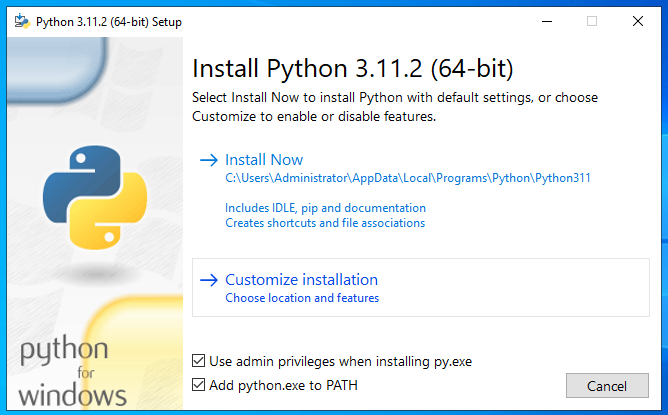
Click Customize installation.
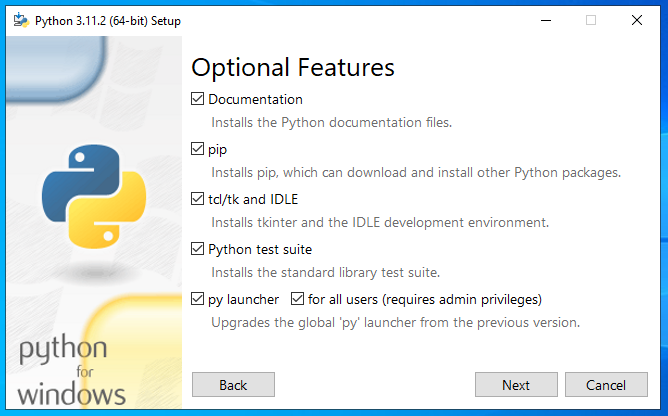
Use all Optional Features.
On the Advanced Options screen, select Install for all users, and ensure that the path is correct in the Custom install location.
Do not select Download debugging symbols or Download debug binaries.
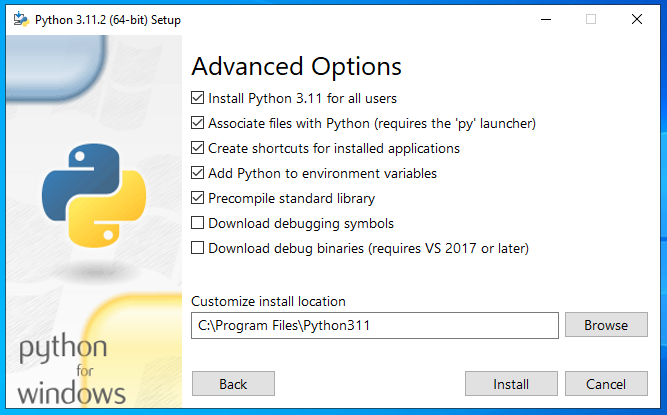
Click Install.
During the instance pre-installation check the installer checks if IIS module "Web Distributed Authoring and Versioning" (WebDAVModule) is installed. If so, the installer warns that this module may interfere with REST API usage and that it should be disabled. This can be done after the instance is installed.
To disable WebDAVModule for an already installed instance (named "myinstance" in this example), run the command:
%SYSTEMROOT%\system32\inetsrv\appcmd.exe delete module /module.name:"WebDAVModule" /app.name:"Default Web Site/myinstance"
Port requirements
Open ports are an exploitable means of system entry. Limiting the number of open ports effectively reduces the number of potential entry points into the server. A server can be port scanned to identify available services.
All TCP/IP port numbers used for communication between Bravura Security Fabric services and modules across the network are configurable. Following are default values. Note that not all of these services may be active depending on the deployed features.
Description | Program name | Default |
|---|---|---|
Database Service TCP port | iddb | 5555 |
File Replication Service TCP port | idfilerep | 2380 |
Workflow Manager Service TCP port | idwfm | 2240 |
Transaction Monitor Service TCP port | idtm | 2234 |
Password Manager Service TCP port | idpm | 3334 |
Session Monitoring Package Generation Service TCP port | sessmon modules | 2340 |
Discovery Service TCP port | iddiscover | 2540 |
Privileged Access Manager Service TCP port | idarch | 6190 |
Persistent Connector Service TCP port | agtsvc | 4567 |
The defaults are applied during installation unless modified or that port is already in use by another Bravura Security Fabric instance.
On Bravura Security Fabric proxy servers, the following ports are used:
Service | Program name | Default |
|---|---|---|
Proxy service |
| 3344 |
From a user’s web browser to the Bravura Security Fabric server, the following ports are used:
Service | Port (non-SSL) | Port (SSL) |
|---|---|---|
Web Service | 80 | 443 |
For ports that Bravura Security Fabric uses to connect to target systems see the respective sections in the Connector Pack documentation.
Support for virtual machines
Bravura Security Fabric is compatible with VMware, Xen Project, Microsoft Hyper-V and Oracle VirtualBox virtual machine platforms. It can also be deployed on IaaS, including AWS. It generally works well with other virtualization platforms, but Bravura Security primarily tests with these. Bravura Security officially supports running Bravura Security Fabric on these virtual servers and will make a best effort to support customers who run on other hypervisors.
So long as the database server that hosts the Bravura Security Fabric back-end has access to reasonably fast I/O (e.g., NAS or similar) and so long as connectivity between the Bravura Security Fabric application sever and the database is fast and low latency (e.g., 1Gbps/1ms) there should is no adverse performance impact when comparing Bravura Security Fabric installed on hardware vs. Bravura Security Fabric installed on a similarly-equipped virtual server.
The key point above is to ensure sufficient I/O capacity for the database (MSSQL). If the database server is virtualized, using network attached storage (NAS) is recommended, as virtualized I/O (files such as VMDK’s emulating an HDD image) is often substantially slower than physical I/O.
Even where customers choose to deploy the main Bravura Security Fabric servers on raw hardware, virtual machines are an excellent platform for proxy servers, test servers, development servers and model PCs.
A related question is often “how large can the deployment get before we have to move from a VM to hardware?” Unfortunately, there is no simple, universal answer:
Virtual servers vary in capabilities – they may have a 32-bit or a 64-bit CPU, may have 1, 2, 4 or 8 CPU cores allocated, may have different amounts of memory and may link to different types of storage infrastructure.
The load created by the application also varies – is there complex business logic? Do users access the application at random times or all at once? Are there just a few or thousands of integrations?
This variability means that the safest bet is to use benchmark results, using a configuration as similar as possible to the production setup, to gauge the performance of Bravura Security Fabric on representative physical and virtual servers.
As a general standard, the ratio of vCPU to CPU (core) is 3:1. Therefore the actual vCPU performance will be 33% of the actual CPU. If the Bravura Security Fabric is deployed in a virtualized environment, and the general ratio on the hypervisor is 3:1, then a virtualized setup would require 6vCPU to match the minimal 2 CPU physical CPU requirement.
Domain requirements
While Bravura Security Fabric servers are capable of operating as domain members, we suggest you take the following into consideration:
Security / limited accessibility:
If the Bravura Security Fabric server is part of the domain, then other administrative users from the domain (who may not be Bravura Security Fabric administrators) can gain administrative logon access to the server and can then access (encrypted) credentials for target systems other than the domain.
A policy of segregation of duties suggests that it is preferable to eliminate the ability of administrators of one system to access privileged accounts for another system and since Bravura Security Fabric houses such credentials, it makes sense to avoid domain membership.
Secure service account:
Bravura Security Fabric requires a service account which Bravura Security Fabric services will run as. It is recommended to restrict the service account’s abilities to interactively log on to networks when a domain account is used. This is a recognized industry best-practice and it can be configured by using group policy.
See Creating a secure service account for more details.
Windows credential conflicts:
To change/verify passwords on an Active Directory domain, Bravura Security Fabric uses ADSI, which may connect a named pipe to a share on a domain controller, such as the NETLOGON share.
If an administrative user logs in to the Bravura Security Fabric server console and makes a similar connection but using his personal credentials (not those encoded into Bravura Security Fabric ), then the Windows network provider may produce a credential conflict error. This can interrupt Bravura Security Fabric ’s ability to manage user objects on the domain, for the duration of the interactive login session.
If Bravura Security Fabric is not a domain member, then the set of administrators who are able to inadvertently cause this error condition is significantly reduced and so Bravura Security Fabric operation is more reliable (less prone to human-induced errors).
Password randomization:
Credential problems can also occur if the Bravura Privilege server is also a Domain Controller, and Bravura Privilege is used to manage the administrator account used to target the system. When the administrator account has its password randomized, the target system administrator credentials may not be updated.
Creating a secure service account
The following steps for creating a secure service account are demonstrated on Windows Server 2019:
Launch .
Create an OU.
In the OU, create an account as the service account and add it to the Administrators group. When you run the installer, the default account name is
psadmin.Give the new account the "Logon as a service" right under Local Security Policy settings.
Add a security group.
Add the service account as a member of the security group.
Launch Group Policy Management Console (GPMC).
Create a new group policy.
Right click on the group policy, then click on Edit... to launch Group Policy Management Editor, configure the group policy with following settings:
Navigate to Computer Configuration > Policies > Windows Settings > Security Settings > Local Policies > User Rights Assignments.
Select Deny log on locally and enter the security group created previously.
Select Deny log on through remote desktop services and enter the security group created previously.
Select Log on as a batch file and enter the security group created previously
Remove Administrators from the User Rights Assignment Deny log on as a batch job .
Exit from Group Policy Management Editor.
Back to Group Policy Management Console (GPMC), click the Scope tab to ensure the GPO is set to authenticated users.
Link the GPO to any OUs containing machines which you want to stop the service account from being able to log on to interactively, or the domain level for all machines.
If you have more than one domain, you can put groups from the trusted domain in the GPO. However, you might want to make a GPO like this on both sides (in case of two-way trusts).
Reboot or run command gpupdate.exe /force on the machines to apply the GPO.
Test to ensure the service account is not allowed to log on the machines where the GPO is applied.
Configure auto-memory-dumps for troubleshooting
When something goes wrong with a part of the application or the server, and an application or server process crashes, configure the operating system to collect a memory dump at the time the exception is registered, before the process is aborted. This will help with troubleshooting.
To do so, follow these Microsoft instructions .
If at all possible, the storage for the memory dumps should be made on a different drive than the Bravura Security Fabric instance is installed. That will prevent the possibly large memory dumps from taking up free space needed for the application to store its various queues.
Database server
Bravura Security Fabric requires Microsoft SQL Server 2025 (recommended), Microsoft SQL Server 2022 , Microsoft SQL Server 2019 , Microsoft SQL Server 2017 , or Microsoft SQL Server 2016 SP2 , typically with one database instance per application server. In most environments, the Microsoft SQL Server software is installed on the same hardware or VM as the Bravura Security Fabric software, on each Bravura Security Fabric server node. This reduces hardware cost, eliminates network latency and reduces the security surface of the combined solution.
Be sure to install the following services and tools that come with SQL Server:
Database Engine Services
Client Tools Connectivity
Management Tools - Basic
Management Tools - Complete
Database I/O performance on a virtualized file system (e.g., VMDK or equivalent) is slow. If the database server software runs on a VM, please use a fast, nearby NAS or SAN to store the actual data files.
Bravura Security Fabric can leverage an existing database server cluster, but Bravura Security recommends a dedicated database server instance, preferably one per Bravura Security Fabric application server, installed on the same OS image as the core application.
The data managed by Bravura Security Fabric is extremely sensitive, so it is desirable to minimize the number of DBAs who can access it, despite use of encryption.
SQL Server has limited features to isolate workloads between database instances on the same server. This means that a burst of activity from Bravura Security Fabric (as happens during auto-discovery) would cause slow responses in other applications. Conversely, other applications experiencing high DB load would slow down Bravura Security Fabric .
Bravura Security Fabric already includes real-time, fault-tolerant, WAN-friendly, encrypted database replication between application nodes, each with its own back-end database. Use of an expensive DB server cluster is neither required nor beneficial.
Deploying the database to localhost has performance advantages (minimal packet latency from the application to its storage).
Allowing Bravura Security Fabric administrators full control over the database simplifies performance and related diagnostics and troubleshooting, especially when we consider that database administrators in most organizations are few in number and very busy.
Eliminating reliance on shared database infrastructure also eliminates the need to coordinate events such as database version upgrades, which involve reboots. Some Bravura Security customers who leverage a shared database infrastructure have experienced application disruption due to unscheduled and un-communicated database outages and restarts.
See Installing Database and Database Client Software for details.
Replicated server requirements
Requirements for replicated servers are the same as for a primary server . Bravura Security strongly recommends that you install at least three replicated Bravura Security Fabric servers for fault tolerance and back up. Configuration of replicated servers is detailed in Replication and Recovery.
All replicated servers must be created with the same instance name. It is recommended that all replicated servers be created with the same Bravura Security Fabric license, and use the same type of Connector Pack . All server clocks must be synchronized.
Proxy servers
In some cases, the connection to a target system may be slow, insecure or blocked. This may be because the connection spans multiple data centers or uses an insecure network protocol.
To address such connectivity problems, Bravura Security Fabric includes a connector proxy server. When a proxy server is deployed, the main Bravura Security Fabric server ceases to make direct connections to some target systems and instead forwards all communication to those systems through one or more connector proxies, which are co-located with the target systems in question.
Communication from the main Bravura Security Fabric server to the connector proxy is encrypted and works well even when there is low bandwidth or high packet latency. It uses a single, arbitrarily-numbered TCP port number. Connections are established from the main Bravura Security Fabric application server to the proxy server. A single TCP port supports an arbitrarily large number of target systems at the connector proxy’s location.
It is simple for firewall administrators to open a single TCP port per proxy server. Since connections are efficient and encrypted, there are usually no objections to doing so.
Communication between the proxy server and target systems continues to use whatever protocol each system supports natively. This communication is confined to a physically secure data center with a high-bandwidth, low-latency local network.
See Proxy servers for more information.
TLS/SSL requirements
On Windows servers, Bravura Security binaries use the MS-TLS/SSL version installed, with its specific protocols and ciphers . Any security updates to that are part of operating system patching.
Configuration on allowed versions must overlap with that of all integrated systems which use encryption, including the database servers (both target systems and Bravura Security Fabric backend), TPM servers, REST, SOAP or other HTTP-accessible targets.
If openssl is to be used for any integrations on Linux servers, for remote tools like psunix , mobproxy , or pamutil, and the locally installed version is 3.0 or higher, install the most recent openssl 1.1.1 package;it can work side-by-side with the higher version libraries.
Cryptographic certificates
Bravura Security strongly recommends that users access Bravura Security Fabric using SSL (HTTPS). To do this:
Assign a fixed IP address to each Bravura Security Fabric server.
Assign a single DNS host name to all Bravura Security Fabric servers.
Install the web server (IIS).
Create a certificate signing request (CSR) file.
Submit the CSR file to a certificate authority such as Verisign.
Receive and install a signed certificate.
The SSL/TLS, is all configured and managed by IIS. For detailed information for using IIS, consult Microsoft's documentation.
Once you have configured IIS the following settings should be updated so that the product communicates via the new, https URL.
Click Manage the system > Workflow.
Update BASE IDSYNCH URL with the FQDN of the instance server; for example, https://idm1.bravura1.corp.
Click Update.
Update the various end points to the HTTPS URL that you may have previous configured; for example, if you are using the API SOAP service, edit the
idapisoapservices endpoints. See API SOAP Service (idapisoap) .
Browser support
The following browsers are supported:
Edge Chromium.
Safari.
Edge (legacy).
Latest version of Google Chrome.
Font downloads must be enabled in the browser to allow Bravura Security Fabric to use Font Awesome.
HTTPS settings
Bravura Security Fabric adds the ”Strict-Transport-Security” header to IIS for all resources. What this means is that if you have configured your site to use SSL and if you have accessed your site using HTTPS protocol, the browser will cache that the site supports HTTPS and prevents the browser from using HTTP. This keeps your site secure but occasionally in testing there will be a need to downgrade the browser security to allow accessing your site via HTTP. In order to do this you must clear the HSTS settings in the browsers.
These links show how to clear the HSTS settings in the browsers: