Modes of failure
The following scenarios illustrate ways to recover from possible failures in a replicated environment. These scenarios are based on the figure below, which illustrates a basic Bravura Security Fabric configuration, including:
Three replicated and load balanced Bravura Security Fabric servers.
Access to target systems routed via Bravura Security Fabric proxy servers, which are firewalled and load-balanced.
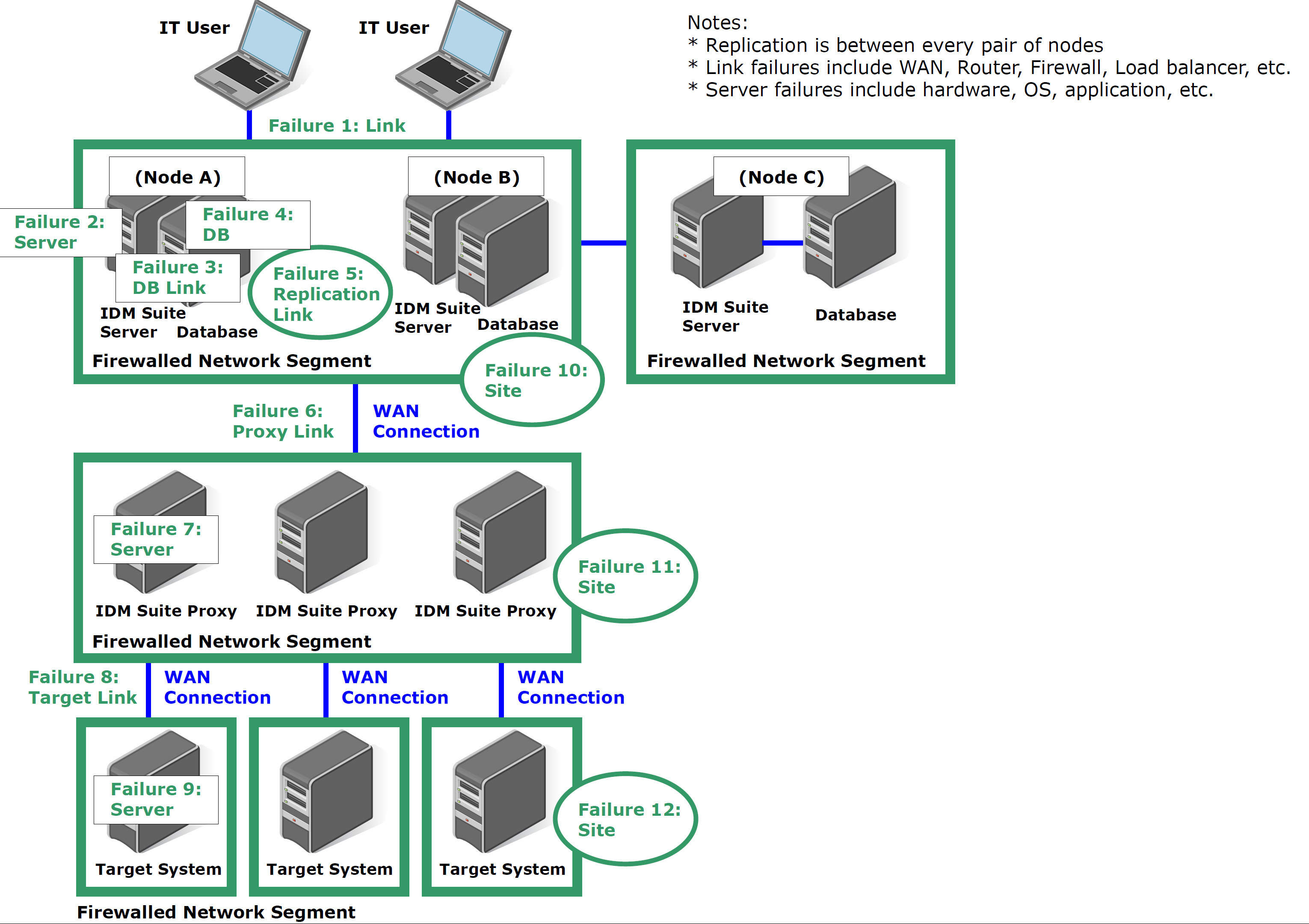
The figure illustrates the major modes of failure which can take place.
User loses connectivity
Users complain that they cannot connect to Bravura Security Fabric .
What stops working | What continues to work | Possible causes | Data loss | Resolution |
|---|---|---|---|---|
The user is unable to manage users or resources that are controlled by Bravura Security Fabric . This is probably an inconsequential loss, since the user probably cannot connect to the resources either – that is, loss of connectivity to Bravura Security Fabric is likely accompanied by loss of connectivity to the resources which the user needs to manage. | Bravura Security Fabric continues to manage passwords on target systems and no data is lost. It is the ability of certain users to do work using Bravura Security Fabric which is impaired. | The user loses connectivity which is required to access Bravura Security Fabric . This may be for a variety of reasons, including:
| None | Resolve the connectivity problem. This is not a problem with Bravura Security Fabric itself. |
Single Bravura Security Fabric server fails
Users may complain that they cannot log in to this server at all (no login page) and that other servers display the following error message:
Changes to this instance are temporarily disallowed. Please contact the Bravura Security Fabric administrator. Due to a problem in the replication environment all pages except Database replication and System logs are temporarily disabled.
The DB COMMIT SUSPEND event (Manage the system > Maintenance > Options) is configured by default to send an email as soon as the Bravura Security Fabric server has entered this state.
What stops working | What continues to work | Possible causes | Data loss | Resolution |
|---|---|---|---|---|
| Other servers continue to function normally, unless their replication queues reach their limit. In the event that the queue is full on other servers, they switch to DB COMMIT SUSPEND mode. In that case, removing the non-functional server from replication is the only possible action. | A problem occurs on a single Bravura Security Fabric server. This may be for a variety of reasons, including:
| No data loss or — due to an unavoidable race condition — minimal data loss if updates on target systems were not yet committed to the database when the damaged server went offline. | Fix the failed server if it can be done in time. See Time available to fix problems . Other servers will continue to function in the meanwhile. See Troubleshooting Bravura Security Fabric server failures for fixes to some possible failures. If the server cannot be fixed quickly or is permanently damaged, remove it from the replication configuration on other servers promptly, as described in Removing a node from replication . If the failed server can be recovered (for example, by installing new hardware), synchronize the node with the already-running replicated nodes, using the process described in Synchronizing a new node with an existing set of Bravura Security Fabric replicas . If the failing server was acting as the primary, then it may be necessary to promote one of the secondary nodes to allow it to initiate resynchronization. Update the list of scheduled jobs so the most up-to-date replica is acting as the primary, then resynchronize the new replacement node. Once the replacement has been confirmed as functional, it can be promoted to the primary node similarly. For the full procedure, see Promoting a secondary node to primary. |
Link between single Bravura Security Fabric server and its database goes offline
Users may be given warning messages that refer to the module not being licensed when users attempt to start a new login session or their existing session is terminated. This error is generated because the database service is unable to authenticate, log, or confirm requests. The most likely errors that users will see are:
invalid session key! please re-log in
or
This module is not enabled for use! Please call your help desk.
The logs may include messages such as the following:
iddb.exe [948,2296] Error: Failed to initialize the SQL Server OLE DB provider, ensure
it is installed [0x80004005]
iddb.exe [948,2296] Error: Got error [0x80004005], [2], [0x0], [0x4005]
iddb.exe [948,2296] Error: Provider error [HRESULT: 0X80004005
SQLSTATE: HYT00
Native Error: 0
Source: Microsoft SQL Native Client
Error message: Login timeout expired
HRESULT: 0X80004005
SQLSTATE: 08001
Native Error: 10061
Source: Microsoft SQL Native Client
Error message: An error has occurred while establishing a connection to the server.
When connecting to SQL Server 2005, this failure may be caused by the fact that under
the default settings SQL Server does not allow remote connections.
HRESULT: 0X80004005
SQLSTATE: 08001
Native Error: 10061
Error state: 1
Severity: 16
Source: Microsoft SQL Native Client
Error message: TCP Provider: No connection could be made because the target machine
actively
Any monitoring system that is tracking the health of the database should also raise an alarm at this point.
What stops working | What continues to work | Possible causes | Data loss | Resolution |
|---|---|---|---|---|
| Other servers continue to function normally, unless their replication queues reach their limit. In the event that the queue is full on other servers, they switch to DB COMMIT SUSPEND mode. In that case the only possible action is to remove the non-functional server from replication. | A problem occurs on the network connecting a single Bravura Security Fabric server to its database server; this presumes that the two are not on shared hardware. This may be caused by DNS problems, router, switch or cabling problems, a failed NIC, or something else. | No data loss or — due to an unavoidable race condition — minimal data loss if updates on target systems were not yet committed to the database when the damaged server went offline. | Network links and DNS problems should be diagnosed and repaired quickly. See Time available to fix problems . If the server/database link cannot be fixed quickly, the affected Bravura Security Fabric server should be removed from the replication configuration on other Bravura Security Fabric servers promptly. Instructions for this are in Removing a node from replication. At a later date, the server should be returned to the replicating set using instructions from Synchronizing a new node with an existing set of Bravura Security Fabric replicas . |
Single Bravura Security Fabric database goes offline
From the point of view of the Bravura Security Fabric server, this is indistinguishable from a failed link to the database. It is possible that system monitoring logs will discern whether the problem is connectivity to the database or the database itself.
What stops working | What continues to work | Possible causes | Data loss | Resolution |
|---|---|---|---|---|
| Other servers continue to function normally, unless their replication queues reach their limit. In the event that the queue is full on other servers, they switch to DB COMMIT SUSPEND mode. In that case the only possible action is to remove the non-functional server from replication. | A problem occurs on the database server used as a back end for a single Bravura Security Fabric server. This takes the database offline and incapacitates the Bravura Security Fabric server in question. | No data loss, or minimal data loss if updates on target systems were not yet committed to the database when the damaged server went offline. | Database problems may be due to hardware or OS on the database server (assuming that it is separate from the Bravura Security Fabric server). They may be as simple as a full file system or may be more complex. Diagnostics of database problems are outside the scope of this document. Repair the database if possible (see Time available to fix problems ). If the database link cannot be fixed in time, remove the affected Bravura Security Fabric server from the replication configuration on other Bravura Security Fabric servers promptly. Instructions for this are in Removing a node from replication . At a later date, the server should be returned to the replicating set using instructions from Synchronizing a new node with an existing set of Bravura Security Fabric replicas . |
Link between two Bravura Security Fabric servers goes offline
Users logged into the individual Bravura Security Fabric servers may not notice this problem at all. You can send a warning email to administrators in the event of a short-lived replication problem, by configuring the DB REPLICATION CONN FAILURE event action (Manage the system > Maintenance > Options).
What stops working | What continues to work | Possible causes | Data loss | Resolution |
|---|---|---|---|---|
Attempted replication events, including sending a record of user logins from one server to another, will cause the sending server to detect the outage automatically. Other (still functioning) servers will start displaying a warning about replication problems and queuing updates until the unavailable server comes back online. If the queue fills on replicated servers, these servers enter a DB COMMIT SUSPEND mode. At that time, the only available option is to remove the failed server from the functional servers’ replication configuration. | Each server continues to function, and queues updates to its peers until the link comes back up. Functionality is suspended if a configured retry-value has been reached, or if the queue fills. | The link between two Bravura Security Fabric servers becomes non-functional. This may be due to a bad NIC, network cable, network switch, router, WAN link, or something else. The result is that the two servers cannot communicate and consequently cannot replicate updates. | No data loss or — due to an unavoidable race condition — minimal data loss if updates on target systems were not yet committed to the database when the damaged server went offline. | Restore connectivity quickly if possible. See Time available to fix problems . Depending on when the failure occurs while the replicating data is being sent to the other servers, there may be some discrepancies between the nodes. If possible, check that the database backend is still up, and consolidate the databases. If the network link cannot be fixed quickly, the affected Bravura Security Fabric server should be removed from the replication configuration on other Bravura Security Fabric servers promptly. Instructions for this are in Removing a node from replication . At a later date, the server should be returned to the replicating set using instructions from Synchronizing a new node with an existing set of Bravura Security Fabric replicas . |
Link between Bravura Security Fabric servers and proxy servers goes offline
The effect is the same as a target server being disconnected. Users may see that requested operations, such as password changes, have not happened yet. You can run system operation reports; for example, to see which passwords have been expired and not changed recently. You can also review logs to detect failed password reset attempts in the form of connector errors.
A recommended way to detect this condition and related problems is to configure events to trigger email or update tickets in the event of a failed operation.
What stops working | What continues to work | Possible causes | Data loss | Resolution |
|---|---|---|---|---|
The Bravura Security Fabric server in question will be unable to scramble passwords on devices supported by that proxy server. | Passwords can still be checked out by users. Check-ins will obviously not trigger a successful password change until the problem is resolved. | The link between at least one Bravura Security Fabric server and at least one proxy server becomes nonfunctional. This may be due to a bad NIC, network cable, network switch, router, WAN link, or something else. | None, unless an extremely unlikely race condition takes place:
| Repair connectivity as soon as possible. |
A single proxy server fails
The effect is the same as a target server being disconnected. Users may see that requested operations, such as password changes, have not happened yet. You can run system operation reports; for example, to see which passwords have been expired and not changed recently. You can also review logs to detect failed password reset attempts in the form of connector errors.
A recommended way to detect this condition and related problems is to configure events to trigger email or update tickets in the event of a failed operation.
What stops working | What continues to work | Possible causes | Data loss | Resolution |
|---|---|---|---|---|
The main Bravura Security Fabric servers will be unable to scramble passwords on devices supported by that proxy server. The Bravura Security Fabric server is unable to connect to any device that requires that proxy server. Bravura Security Fabric will be unable to carry out operations involving a target system, including listing information, or updating data such as passwords on a machine. | Users can still log in to Bravura Security Fabric , assuming they are not authenticating against a target through the damaged proxy. They can access their profiles and carry out tasks that do not require a connection to affected target systems. | A problem occurs on a single Bravura Security Fabric proxy server. This may be for a variety of reasons, including:
| None, unless an extremely unlikely race condition takes place:
| Repair or replace the failed proxy server as soon as possible. Bravura Security Fabric proxy servers are essentially stateless, so a fresh installation on a new physical server or virtual machine is all that is required. |
A link to a site where there are target systems fails
Users may see that requested operations, such as password changes, have not happened yet. You can run system operation reports; for example, to see which passwords have been expired and not changed recently. You can also review logs to detect failed password reset attempts in the form of connector errors.
A server monitoring system may be able to localize the connectivity problem.
A recommended way to detect this condition and related problems is to configure events to trigger email or update tickets in the event of a failed operation.
What stops working | What continues to work | Possible causes | Data loss | Resolution |
|---|---|---|---|---|
The main Bravura Security Fabric servers will be unable to carry out operations on devices at that site. | Users can still log in to Bravura Security Fabric , assuming they are not authenticating against a target on the offline site. They can access their profiles and carry out tasks that do not require a connection to affected target systems. Moreover, it is likely that users who access the site via Bravura Security Fabric cannot connect to that site themselves, but this is beyond the scope of Bravura Security Fabric ’s functionality or responsibility. | A site where there are target systems becomes inaccessible to either the main Bravura Security Fabric server or a proxy server which would normally be responsible for making updates to systems at that site. This may be caused by DNS problems, router, switch or cabling problems, a failed NIC, or something else. | None, unless an extremely unlikely race condition takes place:
| Repair the failed network link as soon as possible. |
A single target system goes offline
Users may see that requested operations, such as password changes, have not happened yet. You can run system operation reports; for example, to see which passwords have been expired and not changed recently. You can also review logs to detect failed password reset attempts in the form of connector errors.
A server monitoring system may be able to localize the problem and identify a failed server as opposed to a failed network link.
A recommended way to detect this condition and related problems is to configure events to trigger email or update tickets in the event of a failed operation.
What stops working | What continues to work | Possible causes | Data loss | Resolution |
|---|---|---|---|---|
The main Bravura Security Fabric servers will be unable to scramble passwords on the device which is offline. | Users can still log in to Bravura Security Fabric , assuming they are not authenticating against the offline target. They can access their profiles and carry out tasks that do not require a connection to affected target systems. Moreover, users who access the system via Bravura Security Fabric will be unable to connect to the system itself, or at least not over the network. It is possible that a checked out password will be used to assist in system recovery at the failed device’s console, however. | A system where Bravura Security Fabric performs operations goes offline. This may be for a variety of reasons, including:
| None, unless an extremely unlikely race condition takes place:
| Repair the failed device as soon as possible. |
A site where one or more Bravura Security Fabric servers is installed is offline
A destroyed or offline site should be immediately detected by network monitoring systems in general. Detecting disasters is not a function of Bravura Security Fabric , although symptoms will be evident.
What stops working | What continues to work | Possible causes | Data loss | Resolution |
|---|---|---|---|---|
If the site is destroyed, assuming that there are Bravura Security Fabric servers running in at least one other physical site, this is equivalent to the failure in Single Bravura Security Fabric server fails . If the site is just knocked offline (for example, all connectivity temporarily lost), this is equivalent to a combination of User loses connectivity, Link between two Bravura Security Fabric servers goes offline, or Link between Bravura Security Fabric servers and proxy servers goes offline. | Users at other sites can still access data from Bravura Security Fabric servers at other sites, as described in DB COMMIT SUSPEND mode . Operations on some target systems will continue, from servers at other sites to target systems for which those servers are responsible. Users at an offline site can still access local systems at their local site. They can even access data for systems at other sites, but obviously cannot connect to those other sites. | A complete data center goes offline. This may be due to power outage, fire, flood, earthquake, hurricane, tornado, or something else. The site may be permanently damaged or simply taken offline for a while; for example, digging equipment cuts all network links to the site. | None, unless an extremely unlikely race condition takes place:
| If the problem is site-wide connectivity that can be resolved quickly, wait for the site to come back online. See Time available to fix problems . If the site was physically destroyed, see Removing a node from replication for instructions on removing affected servers from replication and ultimately building and initializing replacement servers. |
A site where one or more Bravura Security Fabric proxy servers is installed is offline
A site is either destroyed or taken offline. The site houses at least one Bravura Security Fabric proxy server. Site disasters should be detected via other means, before Bravura Security Fabric is involved.
The symptoms and recovery steps in Bravura Security Fabric are identical to the situation described in A single proxy server fails.
A site where one or more target systems is installed is offline
This scenario is identical to the situation described in A link to a site where there are target systems fails .