About replication
This section describes replication between multiple physical or virtual servers hosting a single instance of any Bravura Security Fabric product. It is intended to help architects, network engineers, and database administrators to understand, plan for, and operate Bravura Security Fabric in a fault-tolerant and scalable fashion.
In a replicated Bravura Security Fabric environment, multiple data sets have to be kept consistent on all nodes, from two points of view:
Data use (application data and application configuration).
Storage mechanism (files/registry and backend database) configuration data; files and the backend database contain configuration and application data.
There are two types of replication in Bravura Security Fabric:
Database Replication — Changes from each node are sent to all other nodes. Proxies are not involved.
File Synchronization — Changes are always copied from the primary node to secondaries and proxies.
Terminology
Latency The time it takes for a data packet to be transmitted from one physical server to another over the network.
Bandwidth The maximum number of bits per second that can be transmitted from one physical server to another over the network.
Local area network A set of connections between servers where the worst-case latency is low (for example, less than 10 ms) and the worst-case bandwidth is high (for example, over 100 Mbps).
Wide area network A set of connections between servers where the best-case latency is high (for example, more than 50 ms) and the best-case bandwidth is low (for example, under 10 Mbps).
Application This is a reference to the Bravura Security Fabric application being deployed, being one of:
Bravura Identity
Bravura Privilege
Bravura Pass
Instance A single running copy of the Bravura Security Fabric application, or all copies of the application running under the same instance name and linked through replication (a replicated instance).
Server A physical or virtual server running the Windows 2012 or 2016 operating system on which at least one application instance and/or an MSSQL database server is installed.
Application node A single physical or virtual server housing at least one instance of the Bravura Security Fabric application.
Backend database A single instance of Microsoft SQL Server housing the internal data used by a single instance; this is recommended to be replicated between database nodes using data replication.
External database Two SQLite databases residing in the db\ directory of each application node and housing configuration data for the component framework; this can be changed only on the primary node and is replicated using file replication.
Logical schema A set of database objects (the description of tables, views, indexes, procedures, and so on, but without their data) used as the back-end for one or more application nodes. It is specific to each version of Bravura Security Fabric . External databases also have their own, version-specific logical schemas. The same logical schema must be used for all replicated database nodes and for all instances used for developing and testing it.
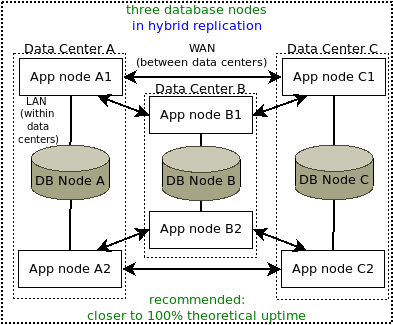
Database node One or more application nodes using the same backend database, all hosted in the same data center, as close as possible to each other on the network (to reduce latency).
A single application instance may be distributed over multiple nodes, where the database nodes may be very far apart and have relatively low network bandwidth / high latency between them compared to connectivity between servers in the same database node.
Why is replication required?
An enterprise application like Bravura Security Fabric requires scalability for several reasons.
Two or more replicated nodes
If there is a lot of interaction expected from users, the web-based interface processing requires attention: limits on OS processes, IIS processing, and other OS resources can be reached.
In that case, adding nodes in shared schema would be the solution; that is, two or more nodes connecting to the same database.
At least two replicated full nodes (application and database) are required if:
Geographical distribution and disaster failure have to be considered (one node per internet-routing geographical area, at a minimum).
Resource-consuming functionality can be segregated on separate dedicated nodes:
psupdateand other discovery processes.User interaction so
psupdateand other automated processes do not slow it down.Disaster recovery (one database node in a different data center).
For Bravura Privilege , different managed-system-policy processing can be assigned to different nodes.
Storage-intensive session monitoring can be limited to one (hybrid architecture) database node that does not do anything else.
For Bravura Identity , any resource-intensive automation can be processed on a (hybrid) node that does not do anything else, if it does not depend on the most recent data processed on other nodes.
Hybrid architecture replication
After adding a certain number of database nodes, the transactional overhead between linked iddb services reduces the additional resource benefits.
After five or six nodes in direct (1:1) replication, the added benefits are negligible.
The upper number of nodes that allow for scaling up of the instance depends on the characteristics of the available network between the nodes (latency and in some cases, bandwidth; see the sections on those topics).
For that reason, hybrid architecture replication can be added; x sets of (y nodes connected to the same database) can perform better than x*y nodes in direct replication.
Hybrid architecture combines the benefits of direct data replication with those of shared schema, to provide resources for critical instances, or instances serving many users (in the hundreds of thousands or more), or with very complicated, resource-intensive solutions.
One database node, no replication
On small, low use, low automation instances, resources can be saved by placing the database server on the application server (Database node A, primary-only, with its own database, no replication):
This removes network latency from App-DB communication, speeding up the instance.
It also makes Bravura Security Fabric easier to maintain (including backups).
Even if there is not much activity (for instances serving under 5000 profiles with few targets), the data on a single node with the database running on the same server will increase to the point where the database engine and the application will start competing for resources. At that point a separate database server will be required — still no replication is involved.
However, this one-node topology presents a single point of failure, and is not recommended for mission-critical solutions.
Not all configuration changes are replicated between nodes
When working in a replicated environment, making a configuration change on the primary node will usually replicate the change to the other application nodes and proxies.
Most system variables and other backend database changes are replicated instantly. External database and component changes are sent every five minutes by default. This interval can be configured in Windows Task Scheduler > Library > Bravura Security external database replication.
Changes to instance files and registry, including some system variables, are sent once a day, or whenever PSUPDATE in Manage the system > Maintenance > Scheduled jobs is configured to run:
These are sent to secondary nodes from the
updinstutility on the primary node, sending to theidfilerepservice on each secondary node.To proxies with the
updproxyutility on the primary node, sending to thepsproxyservice on each proxy.
Some changes are not replicated at all:
Most files from the instance directory are replicated. The <Program Files>\Common Files\Bravura Security\ files are not, so Connector Packs have to be installed on each secondary node and each proxy node separately.
To see the blacklist(s) for file/registry replication, open a command prompt in the instance’s util\ directory and run updinst -showconfig.
The blacklist for
updproxyis built into the binary. There is no config file. Contact support@bravurasecurity.com with the Bravura Security Fabric version installed on your instance if you want to know that blacklist.
Keep this in mind and document your configuration for the Bravura Security maintenance team to be aware of which specific configuration changes will be replicated to other nodes, and when.