Database replication architecture
When an instance is distributed on more than one database node, even within the same data center, its data and configuration should be kept very closely synchronized, so that the user experience is the same no matter which application node they are currently using.
This section explains why Bravura Security developed data replication at the application level, and then details the possible topologies briefly introduced in the previous section.
Fault tolerance: geographic distribution
It is strongly recommended that at least two application nodes be installed and — if possible — that they be located in different data centers. This is especially true of Bravura Privilege , where the geographical distance between application nodes should be maximized, so as to minimize the probability that a regional disaster (hurricane, earthquake, tsunami, etc.) causes privileged passwords for systems in other regions to be lost.
The built-in replication, both of file/registry contents (during psupdate) and of database contents (near real time and nightly) supports multiple servers, distributed over a wide area network. It is reasonably tolerant of low bandwidth (under 10 Mbps), high latency (up to 150 ms), and is encrypted to protect against man-in-the-middle attacks.
Application level versus database-native
Some applications require a high performance backend database but not near-100% uptime. In these cases, it makes sense to construct a high-availability, high-capacity database cluster and share this cluster between many applications; this is also known as backend/database-native replication.
It is recommended to deploy an application in a geographically distributed architecture without having to configure multiple (expensive) database clusters — one per region; however, there are pros and cons with each type of replication.
The drawbacks of using a natively-replicated database or a cluster are:
If the cluster is damaged or becomes unreachable, then all of the applications that use it go offline.
A cluster or any other form of database-level replication sends all data changes to its replicas.
Backups are critically important in a database cluster, since failures impact many applications.
Modern database server software from Microsoft and other vendors has poor isolation between logical instances. An overloaded or badly written application using one logical schema can consume too much session space, disk I/O and CPU, impacting the performance and availability of other applications that use the same cluster.
Application-level replication, on the other hand:
Eliminates any single point of failure, so is more fault tolerant.
Can be configured to provide total isolation between applications. A badly behaving database node with its own, private database server cannot adversely impact the data on other database nodes.
Can reduce network traffic and increase performance by only replicating the data that is important to exist on all replicas.
The main drawbacks of application-level replication are:
As a result of replication failures, the database nodes can fall out of sync; in application-level replication, the sync status has to be verified as part of regular database maintenance.
Applications have to be written with replication in mind. In particular, the process used to assign unique identifiers to new records has to be replication-aware.
More physical databases are deployed.
As mentioned above, more maintenance is needed to verify data synchronization, and decisions on what data to keep and what data can be left out of sync have to be made. This is actually a trade-off; in database-level replication data is lost on all nodes, and in application-level replication data is lost only on the database node where the error occurs.
Best practice
Since high availability is such an important design parameter for the Bravura Security Fabric in general and of Bravura Privilege in particular, Bravura Security strongly recommends that customers deploy a replicated architecture, rather than overburden an existing database cluster.
The need for application-level replication
Database products from Microsoft and other vendors include native support for database replication. This raises the question of whether another replication layer is required. Following are reasons to use the application-level replication provided by Bravura Security Fabric :
Native replication is very complex to configure in order to make its performance optimal for each application. The set of available configuration options depends heavily on the runtime behavior of the application using that database; this may even differ from table to table:
Should logical or physical replication be used? Physical replication operates at the level of disk blocks while logical operates at the level of some database objects (details below).
If logical replication is chosen, at what level of granularity should replication be configured? Options include record-level, column-level, table-level or transactional.
Should replication be synchronous (potentially making each instance of the application slower) or asynchronous (where there are short time intervals during which each instance has different, possibly inconsistent data)?
Should failed updates be queued up or discarded?
How can unique keys generated by the database itself be guaranteed to be consistent across replicas?
What should the topology connecting nodes be?
Can communication between replicated database nodes be encrypted, to protect against data snooping and injection by a man-in-the-middle attack?
Without a deep understanding of application behavior, database administrators cannot make appropriate decisions about these parameters and may configure a non-performant or unreliable database back end for an application.
In contrast to the above complexity, the database replication built into all Bravura Security products:
Is included at no extra cost.
Provides for encrypted communication between nodes out of the box.
Performs reasonably well on wide area networks (not just high-bandwidth, low-latency local area networks).
Can be very simple to configure, with a few settings on the product configuration web based interface. This is the case for both direct and shared schema replication. Even though the hybrid topology is not very simple to understand and configure, and requires complex maintenance steps, it still uses fewer network resources and is more adapted to the way Bravura Security Fabric works than native-database replication.
Is fault-tolerant, queuing up updates made during failed network communication or other node’s unavailability due to maintenance, until a peer application node becomes available again.
Is asynchronous by default, and replicates only business/application-relevant data, offering the best possible performance for any given network conditions.
Best practice
Since replication is so valuable to Bravura Security Fabric deployments in general and to Bravura Privilege in particular, Bravura Security strongly recommends that customers use the built-in replication capability and always deploy at least two database nodes (or when 100% uptime is required, at least three database nodes).
In the case of Bravura Privilege , Bravura Security further recommends that the database nodes be installed as far apart as possible — preferably in different data centers, located in different cities that are not likely to be affected by the same natural disaster at the same time.
If the arguments above are not enough to sway the database administration team, or if the customer company has a hard requirement to use existing database-native replication or clustering:
Setting up the replicated nodes at the different data centers using native database replica nodes will have to be done as if all nodes are in shared schema (since all application nodes will see the distributed database as the same one).
Some functionality may break (because native database replication places locks on various parts of the schema as the data is replicated).
Some product operations will be much slower (since stored procedures will have to wait for data to replicate as they run, and since ALL data changes will be replicated instead of only relevant data).
Replicated network topology alternatives
In this section we review stand-alone instances (one database node, not recommended), and the three supported and recommended instance topologies for the following ratios of database:application node replication:
1:1 — direct replication
1:N — shared schema replication
M:N — hybrid replication
Replication architecture and the choice of replicated instance topology is up to the solution architect and managers who decide what amount of application usage and disaster mitigation they want to dedicate IT resources for.
Direct database node replication
1:1 data and application nodes
Given that multiple application nodes will each have their own database node, there are several architectural possibilities.
It is important, no matter what topology is selected for a given Bravura Security Fabric instance, to keep an up-to-date "topology document" that contains:
The relationship diagram using simple names as topology designations (like DB-A for database node A; A-A1, A-A2 for application nodes 1 and 2 connected to DB-A; and so on.)
This diagram should also contain any networking devices used, like switches, WANs, VPNs, load balancers, and so on, which could affect system communication and functionality.
All the nodes (application and database), in a list containing:
Their topology designation
Fully qualified domain name
Geographical/data-center location
Any specific jobs and tasks assigned specifically to each node
Best practice
Bravura Security recommends either two or three database nodes, at different locations.
In this scenario each database node replicates to all other nodes
This does not mean linear replication. All application nodes are required to be DNS-resolvable and network-reachable from all other application nodes. All database replication ports (by default 5555 for data replication) to all application nodes must be reachable, not blocked by firewalls or other network appliances or rules. The file replication port (by default 2380) has to be reachable from the primary application node to all other application nodes. The file replication port must also be reachable from all other application nodes to the primary node.
See all Port requirements.
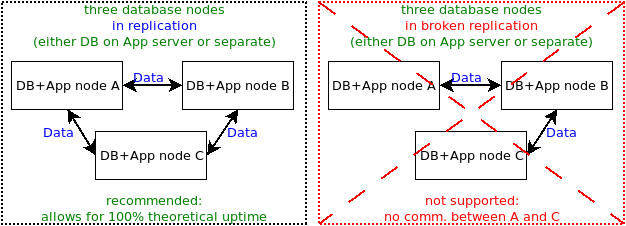
In this scenario, two database nodes replicate to each other. This cannot provide even theoretically 100% uptime, because attempting to resynchronize the two databases when they fall out of sync will take both nodes down.
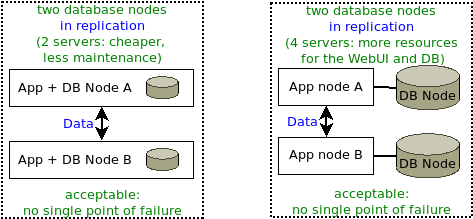
In this scenario, there is one database node, with the database running on the same server as the application node, or on a separate server.
Though possible for demonstration and development purposes, Bravura Security does not recommend using a single database node for production purposes, as it becomes a single point of failure.
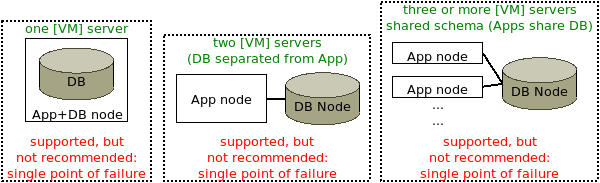
Shared schema environment
Replication can be configured with multiple application nodes using the same backend database. This is not recommended for a production instance with a single database node, because that would not be fault tolerant. See Fault tolerance: geographic distribution .
When an application node is added to an existing database node, all nodes that share the schema will be listed on the page; for example:
A Bravura Security Fabric instance, MYPASS, is installed on two different servers: A and B.
MYPASS (A) and MYPASS (B) are sharing the same data schema; that is, they store their data on the same database, or same database-native replicated database or cluster.
If either MYPASS (A) or MYPASS (B) is added as a replication node, both will be listed in the same database node row in the page, as illustrated below.
In database migration cases, when product administrators expect to find the node normally in direct replication, but forget to change the value from the schemaID table in the backend database, the product sees the node(s) with the same schemaID in shared schema instead.

In a shared-schema environment, re-synchronization must be disabled when you add a node to replication. On the Database Replication page, the option to Propagate and reload replication configuration on all servers (without resynchronizing nodes) is available for this purpose.
To learn how to install a node in a shared-schema environment, see Installing with a shared schema.
Combining database-native with application-level replication
The third available node topology is a hybrid (combination) of the direct application-level replication, and shared schema topologies introduced above. Each application node from a shared schema database node has to replicate with exactly one application node from all other database nodes; for example, in a hybrid replication topology with three application nodes providing web-based interface resources to each database node:
DB/Schema A | Replication | DB/Schema B |
Node A1 | <– –> | Node B1 |
Node A2 | <– –> | Node B2 |
Node A3 | <– –> | Node B3 |
Crucially, it is impossible to eliminate one application node and configure another application to replicate to two other application nodes serving the other database. For example, it is impossible to eliminate node A3 and then configure node A2 to replicate with both nodes B2 and B3; doing so would violate the constraint that node A2 must replicate into schema B exactly once. If node A3 is removed and not replaced, node B3 must also be removed.
The most complex configuration for replication is one where a database cluster with shared schema is combined with multiple application nodes. This is illustrated below in an example of a hybrid topology configuration using two shared schema database clusters.
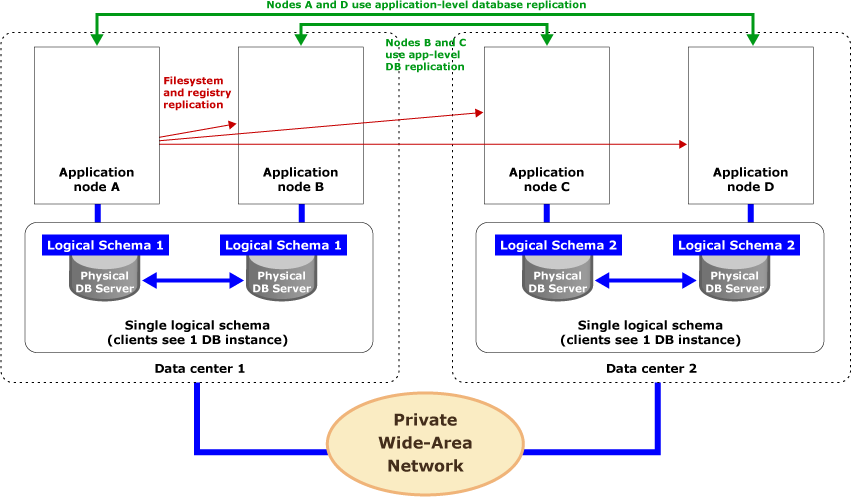
In this scenario, database-native replication creates fault-tolerant database clusters at each site. Each cluster appears as a single, local database instance to every application node in the same data center. Application-level replication involves replicating changes between corresponding application nodes at different sites.
Operationally, when application node A processes an update using stored procedure P1 in data center 1, native database replication between the two physical database servers in the cluster at data center 1 forwards the call to this stored procedure from one database server to another. In other words, application node B will see the results of P1, regardless of which physical database it calls, as a consequence of database-native replication. At the same time, P1 is forwarded from application node A to application node D at another data center, to be written into the database cluster there. Both application nodes will see the update results at the second data center because of physically local native replication in that database cluster.
File system and registry replication takes place independently of all this. In the above figure, application node A is the primary node. It pushes changes to its files/registry to all other application nodes and application proxies as a part of its nightly processing.
For more on file/registry replication, see File Synchronization .