Unix Configuration Scripts
The Unix Listener requires a configuration file to define interaction between Bravura Security Fabric components and your system. A default configuration file (/etc/psunix.cfg) is created for you during the Unix Listener installation. It may be necessary to edit this file, or to create your own configuration file which matches your specific system’s behavior.
The psunix installation package
Installing the psunix installation package
The psunix archive package contains the Unix Listener and other tools and files used to perform Bravura Security Fabric operations on Unix systems. There are versions for each type of supported Unix system. The packages are installed in the unix directory when you choose a complete Connector Pack installation, or select them as part of a custom installation.
To install the package on a Unix system:
If you did not select the Unix Installation Packages when you installed Connector Pack, run
setupfrom the main software installation to modify your instance.The
setupprogram displays the page.Click Connector Pack 64-Bit.
Click Modify.
Choose Change.
Ensure that the select

 icon is selected for Unix Installation Packages , and the appropriate packages, on the component selection page.
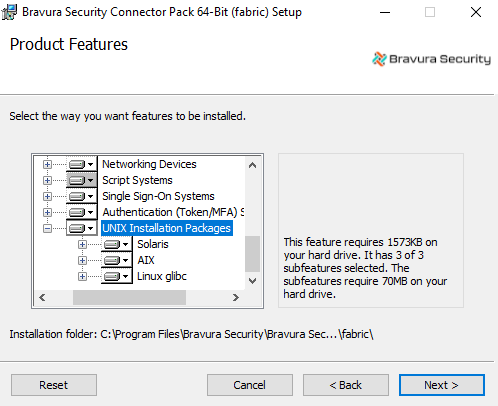
Click Change, then complete the installation procedure.
Copy the
psunix-<os>.<cpu>.tar.gzfile from the unix directory to a scratch directory, such as /tmp/, on the Unix server.Log into the Unix server with administrative privileges, and extract the files from the
psunixarchive. For example, type:cd /tmp tar -zxvf psunix-linux-glibc-2.28.x64.tar.gz
Running the install.sh script
sh install.sh [-c <n>] [-ni] [-inf <path>/idmsetup.inf] [-inst <instancename>] [-rf <responsefile>] [-bd <dir>]
Option | Description |
|---|---|
-h | Displays usage statement. |
-v | Displays version. |
-bd <dir> | Specifies a base directory (default /usr/local/psunix) |
-c <comp> | Specifies the component to install. Required in non-interactive mode. Optional in interactive mode. |
-inf | Specifies the path to the |
-inst | Specifies the instance name for location of the psunix files. If omitted, files are copied to the /usr/local/psunix/default instance. See Determining the psunix instance for more information about the instance location. |
-ni | Installs in non-interactive mode. |
-rf | Specifies the response file for non-interactive mode. If not specified the default is psunix-responsefile.cfg . |
For the -c argument, the component is identified numerically where:
Unix Listener
Bravura Pass passwd transparent synchronization trigger
Bravura Pass LDAP trasparent synchronization trigger
Bravura Privilege local service (not supported in Bravura Security Fabric 8.2.x)
Installing interactively takes less preparation and allows you to specify settings during installation. Installing non-interactively allows you to install components unattended on many systems. You must edit the response file (psunix-responsefile.cfg) and the applicable configuration files before installing non-interactively.
Examples
To start installation in interactive mode:
sh install.sh
To pre-select the Listener and use the
idmsetup.inffrom the Bravura Security Fabric installation to supply the communication key (or Master Key):sh install.sh -c 1 -inf ./idmsetup.inf
To install the Listener in non-interactive mode:
sh install.sh -c 1 -ni
To install the Listener in non-interactive mode, using a response file named alt-response.cfg:
sh install.sh -c 1 -ni -rf alt-response.cfg
See also
Specific requirements and instructions for installing Unix components see:
Unix Server to learn how to install the Listener on a Unix target system.
Transparent Password Synchronization in the Bravura Security Fabric documentation to learn how to set up transparent synchronization on a Unix server.
Mobile Access in the Bravura Security Fabric documentation for more information about how to install and configure the Bravura One proxy server on a Unix server for use with the Bravura One app.
Unix Listener configuration file
The Unix Listener configuration file is written using Key-Value Group (KVGroup) syntax.
The default /etc/psunix.cfg file contains a KVGroup for each configuration option that you can edit.
In general, account operations (verify, create, list) are built-into the Unix Listener. You can add additional KVGroups with a PSLang script. Do this, for example, if you are managing application accounts.
In the configuration file, lines that begin with # are comments. These lines and blank lines are ignored.
Configuration options
You can set the following options in the configuration file:
facility By default the logger directs any logging to syslog through the LOG_USER facility. Use this setting to direct the logging to another syslog facility. See Logging for more information.
Example:
facility = "LOG_USER";
level The log level option allows the logger to filter content of a specified level and higher out of syslog. Higher logging levels result in more verbose entries in syslog.
Valid logging levels:
nolog=0
error=1
warning=2
notice=3
info=4
debug=5
See Logging for more information.
Example:
level = "5";
include -dir Describes the location of the psunix.d configuration directory. See The psunix configuration directory for more information.
Example:
include-dir = "/etc/psunix.d";
commkey Defines the private key used for encryption. This key must match the one set during installation on the Bravura Security Fabric server.
Example:
commkey = "<encrypted commkey value>";
passwd-path Defines an alternate path to the password database file where all user information is stored. If it is not specified (default behavior), the location is /etc/passwd.
Example:
passwd-path = "/var/yp/passwd";
shadow-path Defines an alternate path to the shadow database file where all user password information is stored. If it is not specified (default behavior), the location is /etc/shadow.
Example:
shadow-path = "/var/yp/shadow";
group Defines an alternate path to the group database file where all group information is stored. If it is not specified (default behavior), the location is /etc/group.
Example:
group-path = "/var/yp/group";
gshadow-path Defines an alternate path to the group shadow database file where all group password information is stored. If is is not specified (default behavior), the location is /etc/gshadow. If this configuration option is not applicable then leave it unconfigured.
Example:
gshadow-path = "/var/yp/gshadow";
restricted-user-list Restrict these users from psunix and Bravura Security Fabric operations, (except the list operation). The accounts are listed in a colon-separated list.
Example:
restricted-user-list = "root:psadmin:joesomebody" ;
pslang-override-path Specifies a script file that allows users to script PSLang code that either overrides the built-in psunix operation, or adds pre/post operations that augment the built-in operations.
Example:
pslang-override-path = "/usr/local/psunix/<instance>/pslang-override.psl";
archive-homedir-path Specifies the directory to place the archived home directories in when users are removed from the system. This value must point to an existing directory. If it is not specified (default behavior), or points to an invalid directory, the users home directory will not be removed/archived when they are deleted.
Example:
archive-homedir-path = "/homedir_archive/";
tcb-retire Specifies if users should be retired when Bravura Security Fabric performs a delete request. This configuration option only applies to systems that have Trusted Computing Base (TCB) installed. C2 Security compliance requires that userid’s are never removed or reused, as such the default behavior for ’Trusted’ systems is to retire users. This can be overridden by setting this configuration option to false.
Example:
tcb-retire = "true" ;
Logging
All Bravura Security Fabric Unix-based applications use syslog to store information. See the Unix man page for more details on syslog.
You can configure psunix facility and level options in psunix.cfg to control logging behavior.
By default the logger directs any logging to syslog through the LOG_USER facility. Use the facility setting to direct the logging to another syslog facility. Valid values are:
LOG_AUTH
LOG_AUTHPRIV
LOG_CRON
LOG_DAEMON
LOG_FTP
LOG_KERN
LOG_LOCAL0
LOG_LOCAL1
LOG_LOCAL2
LOG_LOCAL3
LOG_LOCAL4
LOG_LOCAL5
LOG_LOCAL6
LOG_LOCAL7
LOG_LPR
LOG_MAIL
LOG_NEWS
LOG_SYS
LOG
LOG_USER
LOG_UUCP
Example:
facility = "LOG_USER";
The log level option allows the logger to filter content of a specified level and higher out of syslog. Higher logging levels result in more verbose entries in syslog. This is not to be confused with the syslog log level configuration option, which directs tagged messages to the appropriate logging queues.
By default, the logging level is set to 5 (debug level), effectively causing most of psunix logging to be directed to syslog. This does not mean that syslog logs all that we send. Rather, syslog uses syslog.conf (see the syslog.conf man page) to filter and direct logging as it sees fit.
Valid logging levels:
nolog=0
error=1
warning=2
notice=3
info=4
debug=5
Example:
level = "5";
The [facility].[actualseverity from each message] will be tagged to each message sent to syslog. You can use syslog.conf (or its equivalent, if using other system loggers such as syslog-ng) to direct the messages accordingly. For example, use one of the local facilities, such as local0/LOG_LOCAL0, and redirect all psunix output to a separate file to facilitate troubleshooting.
Note that if your system has any "catch-all" rules in syslog.conf, these will be triggered in addition to logging as configured by the psunix.cfg facility option. For example:
   # Some ‘catch-all' logfiles.
   #
   *.=debug;\
           auth,authpriv.none;\
           news.none;mail.none     -/var/log/debug
   *.=info;*.=notice;*.=warn;\
           auth,authpriv.none;\
           cron,daemon.none;\
           mail,news.none          -/var/log/messages
makes psunix debug output go into /var/log/debug in addition to the /var/log/local0 file as configured by the facility option. To only keep Bravura Security Fabric logs in one file, you would need to add lines such as:
local0.none;
to all the catch-all *.level entries in syslog.conf.
The psunix configuration directory
The psunix.d configuration directory contains several configuration files that contain the settings for the various psunix components:
The configuration files are written using Key-Value (KVGroup) syntax.
File | Description |
|---|---|
idarchive | Settings for Bravura Privilege Client Service. |
listener | Settings for Unix Listener Service. See Unix Listener configuration |
pam | Settings for password authentication module (PAM). See PAM and password policy configuration |
psldap | Settings for password policies. See passwd utility configuration |
idapi | Connection settings used for transparent synchronization with |
pushpass | Settings for transparent synchronization with PAM. See Transparent synchronization configuration (PAM) |
Bravura Privilege Client Service configuration
The idarchive file is used to configure the options for the Bravura Privilege Client Service if installed.
The options are as follows:
cgipath Path used by the Bravura Privilege Client Service when connecting to an Bravura Privilege server via HTTP.
Example:
cgipath = "instance/psw.exe";
defaultgroup The name of the managed system policy that the Bravura Privilege Client Service automatically adds to Bravura Privilege on the initial connection. This is typically the same managed system policy that produced the installation key.
Example:
defaultgroup = "PULL_SVC_GRP";
serverlist A comma separated list of Bravura Privilege servers used by the Bravura Privilege Client Service to obtain user information.
Example:
serverlist = "10.0.0.1, 192.168.1.1";
port Port number used by the Bravura Privilege Client Service when connecting to a Bravura Privilege server via HTTP.
Example:
port = "80";
polltime Interval (in seconds) between update requests to the Bravura Privilege servers. A small value is not recommended since an update request can be a CPU and time intensive process. The default value is set to 3600 seconds.
Example:
polltime = "3600";
HttpTimeout Timeout (in seconds) that should be used when communicating with the Bravura Privilege HTTP service. The default value is set to 300 seconds.
Example:
HttpTimeout = "300";
waittime Wait time (in seconds) to wait after establishing connection to Bravura Privilege Client Service. The default value is set to 60 seconds.
Example:
waittime = "60";
Unix Listener service configuration
The listener file is used for Unix Listener service configuration. The options are as follows:
admin-user Administrative user, used for authentication in Bravura Security Fabric operations.
Example:
admin-user = "administrator";
timeout The timeout (in seconds) that should be used when communicating with the Unix Listener. The default value is set to 10 seconds.
Example:
timeout = "10";
PAM and password policy configuration
The pam file is used for configuring the password authentication module. The psldap file is used for configuring password policies. Both files currently have the same options. The options are as follows:
strength-check-only If this option is set to true, the password reset operation will not occur. The default value is set to true.
Example:
strength-check-only = "true";
passwd utility configuration
The pspasswd file specifies the passwd utility used to perform an operation on a non- Bravura Security Fabric users password. Usually, this option specifies operating system’s passwd command. The native password operation is executed if the user is contained in the [restricted-user-list] option, or is contained in the ignore list on the Bravura Security Fabric server. The options are as follows:
passwd-cmd-reset A reset operation is less strict than a change operation since it does not validate the users old password first. Most native passwd commands do both change and reset operations depending on who is running the command and the arguments passed on the command line. Generally, running the passwd command as superuser is considered a password reset operation.
This option accepts psunix textual replacement strings, notably the "%u" keyword indicating the username.
Example:
passwd-cmd-reset = "/bin/passwd.bin %u";
passwd-cmd-change A change operation is more strict than a reset operation since it validates the user's old password first. Most native passwd commands do both change and reset operations depending on who is running the command and the arguments passed on the command line. Generally, running the passwd command as a non-privileged user is considered a password change operation.
This option accepts psunix textual replacement strings, notably the "%u" keyword indicating the username.
Example:
passwd-cmd-change = "/usr/bin/yppasswd %u";
Exit status codes
The following table outlines the pspasswd exit status codes:
Error code | Description |
|---|---|
0 | Success. |
1 | Syntax error in PSLang override script. |
2 | Failed to acquire password policy from remote |
3 | Failed to reset password using native command line tool. |
4 | Failed to reset password. |
Transparent synchronization configuration (passwd)
The idapi file is used to configure the connection to API SOAP Service (idapisoap). The options are as follows:
targetid If you are using aliasing, this option is used to specify the ID of the target.
Example:
targetid = "UNIXSERVER";
url The url that API SOAP Service (idapisoap) is listening on.
Example:
url = "http://hipmserver/default/idapi";
user The product administrator used to connect to the API SOAP Service.
Example:
user = "_API_USER";
psw The product administrator password used to connect to the API SOAP Service. idaptool can be used to provide an encyrpted form of the password.
Example:
psw = "{AES}xdWShI2f+fM7Bd0SRhIi9kHvdhM9Y0fVxvKjpIbHfp4T47X2IAjLakoNitoSfu4Z" ;libcurl In order to communicate to the API SOAP Service over SSL, the libcurl is required. If the full path is specified, then the library can be loaded when connecting over SSL. If no libcurl is avalable and plain HTTP is used, the value can be set to ’0’. If empty, the system default is used.
Example:
libcurl = "0";
capath When communicating to the API SOAP Service over SSL, a certificate check will be made unless ignore is set to "1". If the CA certificate is not installed on the system default paths, a path can be specified.
Example:
capath = "/etc/certs";
cert When communicating to the API SOAP Service over SSL, a client-side certificate can be provided. If there is a passphrase as part of the certificate it needs to be specified as well.
Example:
cert = "/etc/certs/hipmcert.pem:apassphrase";
ignore When communicating to the API SOAP Service over SSL, the certificate check can be ignored. If 0, the check is not ignored. If 1, the check is ignored.
Example:
ignore = "1";
language The language set in this value will be used when fetching the password rules. By default is it is en-us. The language packs must be installed in order to retrieve rules in other languages.
Example:
language = "fr-fr";
fail-if-unavailable Specifies the action to take if the password operation fails and the Password Manager service (idpm ) cannot be contacted. The default behavior is to fail the operation if the Password Manager service is unavailable.
Example:
fail-if-unavailable = "true";
Transparent synchronization configuration (PAM)
The pushpass file is used to configure the Password Manager service (idpm). The options are as follows:
targetid If you are using aliasing, this option is used to specify the ID of the target.
Example:
targetid = "UNIXSERVER";
hostname The hostname option is used to specify the location of the Password Manager service service to be used by pspasswd . This can either be an IP address or a hostname.
Example:
hostname = "UNIXSERVER";
port The port option is used to specify the port that the Password Manager service is running on. The default value for the Password Manager service is 3333.
Example:
port = "3333";
timeout Specifies the timeout (in seconds) that should be used when communicating with Password Manager service. The default value is set to 10 seconds.
Example:
timeout = "10" ;
fail-if-unavailable Specifies the action to take if the password operation fails and the Password Manager service cannot be contacted. The default behavior is to fail the operation if the Password Manager service is unavailable.
Example:
fail-if-unavailable = "true";
Overriding operations
You can add additional KVGroups to your Unix Listener configuration file to override account operations. They can be written using PSLang script syntax.
Complete documentation on how to write the override functions using PSLang is detailed in the pslang-override-sample.psl file that is included with the psunix installation in the psunix/conf/ directory. This file also provides a sample framework for configuring overrides for the built-in operations.
When using PSLang, you can also add pre/post operations that augment the built-in operations. For each <operation> in the sample script file, there is a corresponding pre_<operation> and post_<operation>. These provide entry points into an operation before and after the operation is executed. For example, the pre_<operation> is often useful when validating data or policies before the server performs the operation.
Refer to the pslang-override-sample.psl file for more detail and examples.
Caution
Any sample script should be modified to fit your environment and prevent security exploits.
Operation elements
Each operation is implemented using a PSLang function with the same name. Most of the functions (create, enable, etc.) take one parameter, an associative array. Each element is a string unless otherwise indicated. The following listing defines the elements that may be required:
Element | Description |
|---|---|
userid | The profile ID of the user. |
fullname | The full name of the user. |
acctid | The ID for the account that the user has on this system. |
newpw | The new password (for password reset/create operations). |
oldpw | The old password (for verify operations). |
modeluid | The model (template) ID for create. |
groupid | The group ID for the group operations. |
groupname | The group description for group operations. |
attributes | A KVGroup containing information about attributes to set during create and update operations. |
Utility functions
Utility functions are used by one or all operations to pass back information specific to the operation.
agentError Return an error message to the agent.
agentWarning Return a warning message to the agent.
agentInfo Return an info message to the agent.
agentListAttribute Return user attributes from a list operation.
agentListGroup Return group information, excluding the group SID, from a listgroups operation.
agentListGroupSID Return group information, including the group SID, from a listgroups operation.
agentIsEnabled Return enabled status from an isenabled operation.
agentIsLocked Return locked status from an islocked operation.
agentIsPassExpired Return password expired status from an ispwexpired operation.
agentIsAcctExpired Return account expired status from an isacctexpired operation. Although this function point is implemented, the isacctexpired operation is not yet supported.
agentLongId Return longid from a create operation.
agentShortId Return shortid from a create operation.
agentGroups Return a list of groups for which user belongs from a userattribute/checktpl operation.
Operation functions
The operation overrides that may be specified in the configuration file are as follows:
checktpl List the attribute information for a given acctid.
list List the accounts for the target.
listgroups List the groups for the target.
isenabled Checks if the account is enabled.
islocked Checks if the account is locked.
ispwexpired Checks if the account password is expired.
disable Disables an account.
enable Enables an account.
lock Locks an account.
unlock Unlocks an account.
expirepw Expires an account password.
unexpirepw Unexpires an account password.
create Creates an account.
delete Deletes an account.
verify Verify an account password and increment the failed password attempts on verification failure.
admin_verify Verify an account password.
verifyreset Verify an account password and on failed password verification, reset the password.
reset Reset an account password.
change Verify an account password and on successful password verification, reset the password.
resetexpirepw Reset an account password and expire the account password.
groupuseradd Add an account to a given group.
groupuserdelete Remove an account from a given group.
groupcreate Create a group.
groupdelete Delete a group.
update Updates an account.
Warning
Functions which reset or verify passwords in scripts used by Bravura Privilege for password randomization must always report the result of the reset or verification accurately. Inaccurate status information may result in checked out passwords not working; additionally, if the credential used to manage the target system is being randomized, Bravura Privilege may invalidate its own managed system credential when an erroneous status is returned. Do not assume scripted password changes are always successful; always check return codes.
Troubleshooting integrations that use psunix files
When the correct permissions on *nix systems are not granted to the psunix files copied from the Connector Pack (from the instance's unix\ directory), the integration will fail.
For example, when integrating with an LDAP, syslog may show the following:
May 28 09:16:22 rhds2-idp-master-1-work-es-1 psldap[5486]: [Line: 38, Pos: 1]: Parse error: expected ';' in kvgroup option file [/usr/local/psunix/default/psunix.d/idapi].


May 28 09:16:22 rhds2-idp-master-1-work-es-1 ns-slapd: [28/May/2020:09:16:22.810271756
      +0000] - ERR - plugin_setup - Init function "prepasswd_init" for "Psynch Check Password"
      plugin in library "/usr/local/psunix/default/64/psldap-sunldap.so" failed


May 28 09:16:22 rhds2-idp-master-1-work-es-1 psldap[5486]: Failed to load configuration information
Solution
Grant permissions on the psunix files to the account that has to run them or access them:
For
mobproxy, the account in question is the one that runs the Apache serverFor
agtunix:If the listener is installed, grant access to the account that runs the internet daemon that
psunixruns under (e.g. inetd, xinetd, etc)If the integration is with a directory server (e.g. LDAP or NIS), grant access to the account that runs that service
chown -R <user>:<usersgroup> </full/path/to/psunix/*>