Mobile Access
Overview of Bravura One
Organizations typically deploy Bravura Identity , Bravura Pass , or Bravura Privilege on their private corporate network. Using their work PCs, users can access the web portal of any of these products either through the physical corporate network (Ethernet or WiFi) or using a VPN.
Users may wish to access these same Bravura Security products, which are generally not reachable from the public Internet, using a personal device such as a smart phone or tablet. Phones and tablets are often not connected to the corporate network, instead using a home or public WiFi hot spot or a cell phone data plan. Accordingly, without a corporate VPN client deployed to the phone or tablet, the personal device cannot access the Bravura Security product’s web user interface.
The Bravura One app enables personal mobile devices to access the Bravura Security system deployed on the corporate private network from outside that network, over the Internet, in a secure manner.
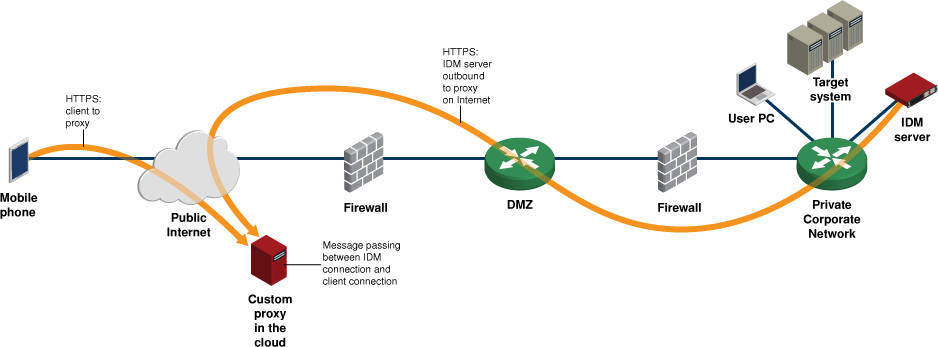
Connectivity between the phone or tablet, attached to the public Internet, and the on-premise Bravura Security software is mediated by a secured reverse proxy server, deployed in the cloud.
The Bravura One app requires activation. It is only useful to users whose organization has deployed both a Bravura Security software product, with a version number of 9.0 or later, and where a cloud reverse proxy has been activated to enable mobile access to the on-premise IAM system.
Architecture
The Bravura One mobile proxy server communicates with the Mobile Worker Service and allows the Bravura One app on mobile devices using a home or public WiFi hot spot or a cell phone data plan to access Bravura Security Fabric servers on a corporate and private network.
At minimum, a typical Bravura One deployment consists of the following:
A Bravura Security Fabric server running the Mobile Worker Service (
mobworker).This service works in conjunction with the Bravura One mobile proxy server to allow the Bravura One app on mobile devices to access Bravura Security Fabric servers.
A separate Bravura One mobile proxy server running the Mobile Proxy Service (
mobproxy).The Bravura One mobile proxy server communicates with the Mobile Worker Service (
mobworker) and allows the Bravura One app on mobile devices using a home or public WiFi hot spot or a cell phone data plan to access Bravura Security Fabric servers on a corporate and private network.Optional: A separate Bravura One mobile proxy server running the Mobile Proxy Service (
mobproxy) may be configured to send push notifications to mobile devices for users that have the Bravura One app registered on their devices.Contact support@bravurasecurity.com for assistance with the configuration and access of the Bravura One mobile proxy push notification server.
The architecture diagram below shows one of the solutions for a Bravura One deployment.
The requirements and layout of the Bravura One solution will vary depending on the needs of your organization and network.
The mobile proxy, used to mediate connections between Bravura One on smartphones and Bravura Security Fabric servers which do not have a public URL, is configured with Linux and Apache and the following hardware capacity:
Small instance, minimum setup (for example, supporting up to 5,000 users): Single core CPU, 1 GB RAM, 10GB HDD.
Large instance (for example, supporting 10,000 or more users): Quad-core CPU, 4 GB RAM, 40GB HDD.
At least two mobile proxies should be deployed and load-balanced in all cases for high availability. Adding proxies also has the desirable side effect of increasing capacity.